
kilclhheeidneiiiaeggbadgommkdhbc

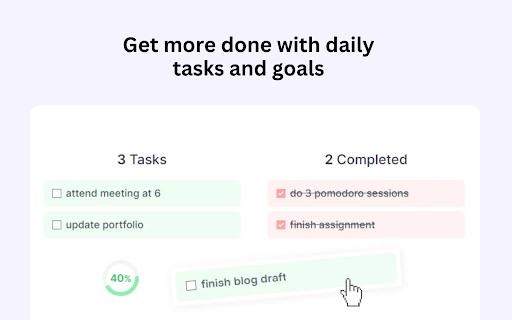


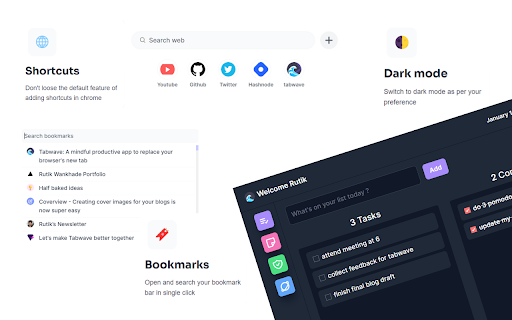
A mindful productive app to replace your browser's new tab. Tasks, notes, pomodoro, bookmarks, and site blocking, all in one place. Tabwave is an all in one mindful productive app to replace your browser's new tab . Get more done with todo lists, add sticky notes, block distractions, and boost your productivity with a pomodoro clock. Customize your new tab with a beautiful productivity app. - 🎯 Get more done with daily tasks and goals. Your daily to-do list right in your browser's new tab. - 📑 Brainstorm ideas on Sticky notes. Write down your quick ideas, short notes and things to remember - ⏳ Increase your productivity with a Pomodoro clock. Do focused work sessions with frequent short breaks - 🚫 Block distracting websites. Be mindful about your time to be more productive. - 🏷️Open and search your bookmark in single click. Add shortcuts to your favourite sites. - 🌓 Dark mode and many more exciting features. This tool is really great! It really has all the things that I wanted for productivity. - Sai Karthik I love this so much! Its a 4-in-1 extension with good graphics and a playful design. It also has a Pomodoro timer that plays a cute sound when the timer runs out. - Lu Valour

PurposeTab
New tab dashboard with goals, habits, calendar, and daily focus. PurposeTab is a minimalist extension that helps you stay centered on your priorities. Every time you open a new tab in Chrome, you see exactly what you need to focus on. On the left side, you can see your daily intention, habits, priorities, and the day's schedule (from your Google Calendar). On the right side, you can upload images of the goals you're working towards. Other exciting features include the ability to submit a journal entry reflection for the day (and you can review all saved journal entries) and to export a graphic of your daily updates to post to social media. It’s built for focus and privacy. All your data stays on your computer, it works offline, and there is no need to create an account. If you connect your Google account, PurposeTab cannot read or edit any of your data (more on that at the bottom). • Daily focus and mantras: Set an intention that resets at midnight to keep you present. • Habit tracking: Add your daily habits with optional links to the tools you use. • Priority list: A simple to-do list for your most important tasks. • Vision board: Upload personal images that inspire you and add custom titles or dates. • Journaling: Use the built-in prompts for daily reflection and look back at your entries later. • Social sharing: Generate custom graphics of your progress to share on Instagram. • Scratchpad: Quick notepads for whenever you have a random idea or need to jot something down. • Google Calendar: Connect your account to see your schedule directly on the sidebar. • Customization: Toggle sections on or off, use dark mode, or use privacy mode when you’re sharing your screen in a meeting. • Data sync: Your settings and data sync automatically across any computer where you’re logged into Chrome. Getting started is easy. Just install the extension and open a new tab. If you want to see how it works first, you can watch the guide here: https://www.jaredgold.com/purposetab If PurposeTab helps you stay on track, please leave us a 5-star review. It really helps others find the tool. For help or questions, you can reach us at: purposetabhelp@gmail.com Privacy is a top priority, and PurposeTab is built with minimal permission requests, and I don't use any servers of my own to read or edit any of your data. Connecting your Google account is fully optional. In addition to enabling data backup to your Google Drive, it allows PurposeTab to show your Google Calendar events and Tasks for the day. It cannot make any changes to your calendar, and it cannot touch anything else in your Google account. When you connect, Google will show a standard message about accessing data on "googleapis.com" and "jgold242.github.io." Every app that connects to Google shows this same message. Your information goes directly from Google to your PurposeTab and nowhere else. Nobody, including me, can see, store, or access your personal data. It securely streams right into your PurposeTab.

nuTab
Capture your thoughts and save favorite pages in a new tab nuTab is the place for your notes, drafts and todos where you won't ever forget them. 🔒 Privacy Your notes and favorite pages are saved only on your machine 📦 Export Download a markdown export of your notes anytime 💚 Favorite links Save sites you visit frequently or just don't want to forget 🌗 Dark and light mode Switch between two beautiful themes 🚀 Blazing fast Because you don't have time to wait for the new tab to load

Kaizen Flow - Pomodoro Timer (new tab)
Replace your new tab page with a dashboard for getting deep work done. Featuring a Pomodoro timer, lo-fi music and a todo list for… Replace your new tab page with a dashboard for getting deep work done. Featuring a Pomodoro timer, lo-fi music and a todo list for organising tasks. About: A lot of people work with two tabs open. One for music & one with a timer. Why? to utilise the Pomodoro technique whilst enjoying distraction-free music. Kaizenflow combines a Pomodoro timer with lo-fi beats to create an environment for distraction free deep-work. It's the ultimate app for getting into a flow state and getting deep work done. How it works: 1 Pick a task you need to accomplish. 2. Start a session 3. Get in to your flow state 3. When the Pomodoro timer rings, take a 5 minute break. Key Features: + Pomodoro timer + Hand picked lo-fi beats and research-backed music for focus + Daily community leaderboard + Beautiful aesthetic background animations

NewTabTodo
Manage your day to day tasks by simply adding cards inside your browser's new tab New Tab Todo Task management in your browser's new tab Replace your browser's "new tab" with a simple and beautiful to-do app! New Tab Todo is a simple browser extension that lets you add and manage your day-to-day tasks whenever you open your browser's new tab! * FREE * Add Boards & Cards to make your todo! * Keep track of your time & tasks in a clean interface * Dark Mode Key Features: - No signup/registration required - Drag and Drop cards and boards - Copy Cards - Dark and Light theme - Add due date/time in cards - Add labels - Prioritize your cards - Hide completed cards - Search on Google, Bing, YouTube & DuckDuckGo - Bookmark your favorite websites - Import and Export your data - Focus Clock - Browser Sync* and many more... * Browser synchronization across all Chrome browsers that you're logged into Try it & you'll love it...
