
eihjgbfgjkbgdhaldhppomcodpefgecd
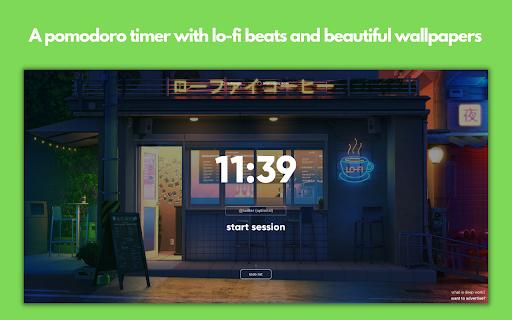

Replace your new tab page with a dashboard for getting deep work done. Featuring a Pomodoro timer, lo-fi music and a todo list for… Replace your new tab page with a dashboard for getting deep work done. Featuring a Pomodoro timer, lo-fi music and a todo list for organising tasks. About: A lot of people work with two tabs open. One for music & one with a timer. Why? to utilise the Pomodoro technique whilst enjoying distraction-free music. Kaizenflow combines a Pomodoro timer with lo-fi beats to create an environment for distraction free deep-work. It's the ultimate app for getting into a flow state and getting deep work done. How it works: 1 Pick a task you need to accomplish. 2. Start a session 3. Get in to your flow state 3. When the Pomodoro timer rings, take a 5 minute break. Key Features: + Pomodoro timer + Hand picked lo-fi beats and research-backed music for focus + Daily community leaderboard + Beautiful aesthetic background animations

Focus To-Do: Pomodoro Timer & To Do List
Focus To-Do combines Pomodoro Timer with Task Management, it is a science-based app that will motivate you to stay focused and get things done. It brings Pomodoro Technique and To Do List into one place, you can capture and organize tasks into your todo lists, start focus timer and focus on work & study, set reminders for important tasks and errands, check the time spent at work. It's the ultimate app for managing Tasks, Reminders, Lists, Calendar events, Grocery lists, checklist, helping you focus on work & study and tracking your working hours. Focus To-Do syncs between your phone and computer, so you can access your lists from anywhere. How it works: 1. Pick a task you need to accomplish. 2. Set a timer for 25 minutes, keep focused and start working. 3. When the pomodoro timer rings, take a 5 minute break. Key Features: - ⏱ Pomodoro Timer:Stay focused and get more things done. Pause and resume Pomodoro Customizable pomodoro/breaks lengths Notification before the end of a Pomodoro Support for short and long breaks Skip a break after the end of a Pomodoro Continuous Mode - ✅ Tasks Management: Task Organizer, Schedule Planner, Reminder, Habit Tracker, Time Tracker Tasks and projects: Organise your day with Focus To-Do and complete your to do, study, work, homework or housework you need to get done. Recurring tasks: Build lasting habits with powerful recurring due dates like "Every Monday". Reminders: Setting a Reminder ensures you never forget important things ever again, you can set up recurring due dates to remind you each and every time. Sub-tasks: Break down your task into smaller, actionable items or add a checklist . Task Priority: Highlight your day’s most important To-Do with color-coded priority levels. Estimated Pomodoro Number: Estimate the workload or set a goal. Note: Record more detailed about the task. - 📊 Report: Detailed statistics of your time distribution, tasks completed. Support the calculation of the total time of Focus Time. Gantt Chart of the Focus Time. Statistics on completed To Do. Statistics on time distribution of project. Trend chart of the completed To Do and the focus time. - 🖥📲 All-Platform synchronization: View and manage your goals wherever you are for better goal achieving. Support seamless synchronization within iPhone、Mac、Android、Windows、iPad、Apple Watch. - 🎵 Various Reminding: Focus Timer finished alarm, vibration reminding. Various white noise to help you focus on work & study. Contact Us: focustodo@163.com, reply within 24 hours. Website: http://www.focustodo.cn Pomodoro ™ and Pomodoro Technique ® are registered trademarks of Francesco Cirillo. This app is not affiliated with Francesco Cirillo. Users have been focused on our app for 200 million hours, join us and we help you to be focused and increase your productivity, reduce procrastination and anxiety.

Habitica Pomodoro SiteKeeper
Pomodoro Timer and Site Blocker that Plugs into Habitica and turns your time-wasting navigation tendencies into rewards. This extension has two main features: 1."Pay to Pass" Website Blocker: Website Blocker that plugs into Habitica and limits you from visiting websites that you decide. You can decide to visit these sites by spending Habitica currency, which you'll earn by developing good habits and doing chores. 2.Pomodoro Timer: Including a Pomodoro Timer. You can read about the pomodoro technique here: https://habitica.fandom.com/wiki/Pomodoro During Pomodoro mode, all websites in the list are blocked, websites with cost 0 are blocked only during pomodoro. A Pomodoro habit is created automatically for the user in Habitica, with an option in the extension settings to automatically score [+] or [-] of the habit when a Pomodoro is done successfully or fails accordingly. How to use: After installing the extension, click on the icon at the top right to open the menu. In here, you must set your API Credentials. You can then block a site by navigating to it and clicking block site. It will ask you to enter a cost. From this point on, when you visit this site, the extension will ask you if you'd like to spend GP to access it. To start a pomodoro timer simply click on the Tomato character. Click again to stop the timer. In the settings you will find a lot of option that allow you tweak and change the pomodoro behavior to fit best for you. For more information, recommended settings and version update log: https://habitica.fandom.com/wiki/Habitica_Pomodoro_SiteKeeper

Yellow Tomato — Pomodoro Timer & Site Blocker
A simple timer for the Pomodoro technique that allows you to block distracting sites while running. Yellow Tomato is a simple Pomodoro timer that helps you stay focused, avoid distractions, and get more done. Work in short, focused intervals followed by quick breaks — a proven method used by students, developers, writers, and remote workers to stay productive without burning out. 1. Configure your work and break intervals 2. Start the timer and focus on one task until it ends 3. Take a break and get notified when it’s time to get back to work 4. Repeat and build momentum throughout the day • Custom Pomodoro timer – set your preferred work interval • Break timer – automatic tracking of break time • Session counter – see how many Pomodoro sessions you’ve completed • Distraction blocker – block websites that interrupt your focus • Custom extension icon display – choose to show: • completed sessions • remaining minutes • nothing • End-of-cycle notification – get alerted when a session finishes • Optional sound alert – hear when it’s time for a break • Open a new tab after each cycle (optional) • Statistics • Tasks Many timers are cluttered or complicated. Yellow Tomato stays simple so you can focus on what matters: your work.

Lofidoro
A Pomodoro Technique Timer with Lofi Music. Lofidoro is a Pomodoro timer assistant for Chrome with built-in study music from YouTube. When you open the extension, it launches a dedicated popup window with your timer and an embedded music stream so you can start focusing immediately. Pause and resume both timer and music. Set custom work and break durations. Choose from multiple study music streams. Toggle desktop notifications and alarm sounds for interval changes. Track completed Pomodoros (1 Pomodoro = one full work + break cycle), with session reset support. Use Dark Mode and Zen Mode for different focus environments. The extension displays: A live timer for the current interval. A Pomodoro completed counter. A progress bar showing elapsed time vs remaining time. The embedded YouTube stream. Lofidoro is built for low-friction focus: click the extension icon, start your music, and begin your Pomodoro session right away. Source code: https://github.com/jpolina/lofi-pomodoro-chrome-extension
