
khglpdagpjepfkjnnjcpiciekjoailhf

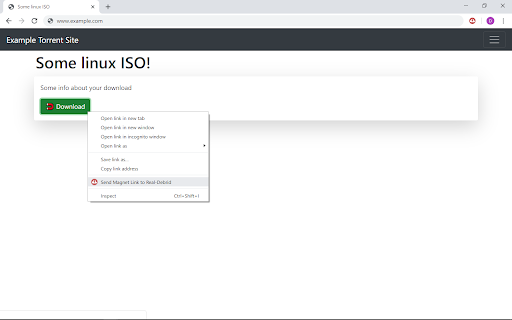


A Chrome Extension to simplify downloading of torrents through Real Debrid Easily send your magnet links to Real Debrid from any website, without needing to go to the Real Debrid website. Just right click any magnet links and choose "Send Magnet Link to Real-Debrid”. The extension will automatically select all files in the torrent and start it. Once complete you can download the contained files using chrome, or you can copy the completed links from the popup window for use with external software. By default, the torrents are removed on completion but this can be changed via settings. If using chrome to download each torrent will have its own folder in your "downloads ddm". I look forward to any feedback and hope people find this extension useful. Updates: 14/03/2025 - Fixed existing extension to work with manifest v3. This is temporary until I have completed my revised version with added features. Since this is my last change to this version I did brief tests as I want to devote more time to the next version. I tested auth, adding links via magnet, deleting links, auto download multi files, multi delete. If you run into auth issues you can try re-installing the extension. 07/03/2025 - Updated privacy page In progress: - Updating current extension to use Manifest V3 so that it won't stop working. - Working on a new version with added features and fixes to issues. 05/06/2020 - Removed unused permissions (for planned features which weren't implemented) to comply with Googles policies.

Free Download Manager
Free Download Manager integration with browser It's an official Google Chrome extension by Free Download Manager developers. The sole purpose of this extension is integration with Free Download Manager. FDM is a fast and reliable download manager and accelerator that improves your experience with downloads and helps you organize them in an easy manner. If you want to help us make Free Download Manager (or this Chrome extension) better - you are always welcome on our forum where you can post bug reports, feature suggestions, and ideas, as well as get support for any issues you stumbled upon with FDM: https://www.freedownloadmanager.org/board/ Note: Windows, Mac and Linux! Requires FDM to be installed to work properly.

Easy Extension Manager
Effortlessly Manage Your Chrome Extensions Easy Extension Manager is your all-in-one tool for optimizing and organizing Chrome extensions. Easily search, sort, snapshot, export, and import your extension setups in JSON format—all with a user-friendly interface. ☆ Complete List: View all your installed extensions from a single popup. ☆ Snapshot: Save and load your extension setups with a single click. ☆ Export & Import: Backup or restore your extension configurations in JSON format ☆ Toggle Extensions: Easily enable or disable extensions to improve performance. ☆ Sort Options: Sort extensions alphabetically or by enabled/disabled status for quick access. ☆ Quick Search: Find specific extensions quickly and easily. ☆ Dark Mode: Switch between dark and light themes for better viewing. ☆ Context Menu: Right-click for powerful options ☆ Disable All Extensions to temporarily boost performance. ☆ Enable All Extensions with one click. Effortlessly back up and restore your extension snapshots in JSON format. Export & Import Highlights: ☆ Backup Snapshots: Export your extension setups as JSON files for safekeeping. ☆ Restore Setups: Import your saved configurations and apply them instantly. ☆ Auto Save Snapshots: Automatically back up your latest extension setup, ensuring it's always up to date. ============================== Why Choose Easy Extension Manager? Easy Extension Manager simplifies managing Chrome extensions. Stay organized, perform backups and restores easily, and streamline your workflow. With powerful search and sorting with features like Snapshots, Export & Import, and Auto Save, managing extensions has never been simpler. Take control of your extensions today with Easy Extension Manager—the smarter way to manage Chrome.

ProxyWing Proxy Manager
Simple proxy manager for Chrome ProxyWing Proxy Manager gives you full control over your proxies directly from your browser, with no complicated system settings or manual reconfiguration. This free Chrome extension lets you add, configure, and switch proxy servers inside Google Chrome through a simple dashboard. Use and switch residential, ISP, or datacenter IP addresses in seconds without changing OS-level settings. Key features: - Add and configure proxy servers directly inside Chrome - Instantly switch between different IP addresses - Save and favorite IPs for one-click access - Search and filter your proxy list for faster management - Manage multiple profiles with ease ProxyWing Proxy Manager extension is your one-stop solution for all your proxy management needs, or geo-targeted browsing. Control your connection, manage sessions, bypass geo-restrictions, and access region-locked content directly from Chrome. Handle your browser proxy setup quickly and securely from one place.

Chrono Download Manager
Chrono Download Manager is the first and only full-featured download manager for Google Chrome™. Manage all your downloads inside Chrome™ and there is no need to install any separate downloader application. Chrono is tightly integrated with Chrome™ by context menus, toolbar buttons and key shortcuts. Besides download management, Chrono is also your best video download helper and bulk image downloader. The Chrono Sniffer detects all links, images, audios and videos on a webpage, and you can filter URLs by their file types or by Regular Expression. Start downloading with Chrono today! Have fun playing with it, and don't forget to share! * Totally override the Chrome™'s default download manager, and get rid of the bottom downloads toolbar. * Access your downloads in a popup window with a single click on the toolbar icon. * Organize your downloads with a fresh and clean table view or list view, and apply custom filters to group your downloads into different categories. * Notifications for downloads. * Preview your docs, images, audios, videos and zip files right after your download completes. * Highly customizable task filters let you group downloads by type, date, url etc. * Batch descriptors help you download a range of URLs with pattern painlessly. * Naming Mask allows you to name a downloaded file by link text, page title, URL components, date/time and many more. * Rule System uses programmable rules to automatically rename your downloads, and to route your files to different folders. * Chrono currently uses Chrome™'s built-in Downloads API, so it does not offer multi-threaded downloading capability and has limited support for pausing and resuming a large download. * The extension may not work properly in incognito mode. * The extension is not for downloading youtube videos.
