
khfjmphfblpcbnmlamiclchbdndleabd
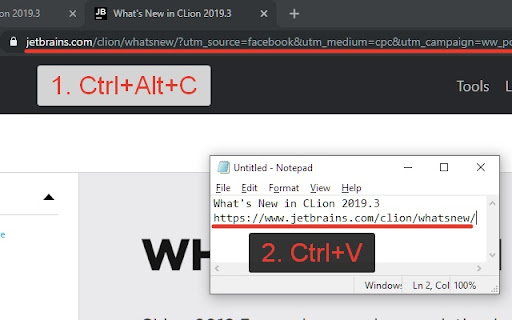
Copy current page URL and description to clipboard by hotkey (Ctrl+Alt+C) Simple extension which copied to clipboard title and URL current page. For Atlassian JIRA issue number, description and link. Just press Ctrl-Alt-C / Control-Command-C for Mac Add some defaults for YouTube and Trello.

Rich URL
Copy, save and share information in a convenient format. Rich URL is an extension, which will help you to copy, share or save information from viewed pages in one or two clicks. Why use the extension for copying if there is a standard shortcut of Ctrl+C/Cmd+C for this purpose, ask you? With the extension, it will be a little faster and more comfortable. Find out more on the website https://richurl.madewithlove.in.ua/en/ Available options: ● Copying (formatted and plain) ▸ The current tab ▸ All tabs of the current window ▸ Tabs of all open windows ● Sending by e-mail ● Share on social media ● Making service API requests for, for example ▸ turning the URL of the current page into a QR code ▸ search in various services For coping and sharing such elements are available: ● Page URL ▸ convert Unicode characters ▸ clearing marketing and other service marks ▸ add to URL your own parameters (affiliate programs) ▸ URL shortening (bit.ly, is.gd, cutt.ly, t.ly) ● Page title ● Selected text on the page ● All page text

Copylink
Click to copy the url of the current page to your clipboard Simply click the button to copy the address of the current website. * Use copylink to quickly send, share, or save the url to a website. * The address is also displayed in a little textbox. Don't forget to rate and share! Enjoy! :)

Copy Link
Copy links and page urls with text from context menu This extension provides an ability to edit Context Menu for links. Context Menu is edited in the extension Options window. In Options you can: - create new Context Menu item by specifying its Title and Macros - edit Context Menu item Title and Macros - delete Item Menu Item Macros can contain {u} and {t} macros, which will be replaced by link URL and link Text respectively. var 5.3.0 --------- + open options page in new tab var 5.2.0 --------- + drag and drop sorting of context menu items

Smart Copy Link
Copy tabs and web page links. Support analysis text link, open links, add to bookmark, and export in various formats This is a hyperlink processing tool that aggregates multiple functions. Its powerful functions will definitely make you love it Extended main functions: Copy Tab link It can copy the links of all the tab pages you have opened. Copy web link When you want to extract all the links in a certain webpage, use it to copy quickly. Copy area link Use the shortcut key and the mouse to drag the selection around the link and release the mouse, complete the copy. Copy the specified link You don’t need to right-click to copy the link address, just hover the link and press Ctrl-C / Cmd-C to complete the copy. .Open link Support open links in new tab and new window. .Save link Support export links in TEXT, HTML, JOSON formats, you can also customize the format according to your own preferences. .Filter link Provide multiple conditions to filter links, you can filter duplicate links, filter by domain name, etc. .Resolve link It will automatically resolve links based on the content you paste.
