
bkjdcppkdgccnhjibfhlhmeiafnjfamk

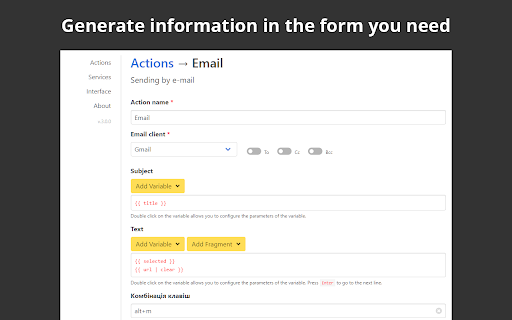

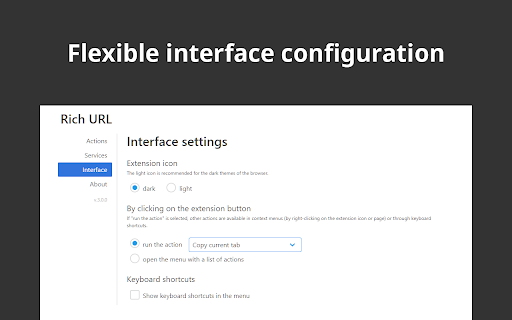

Copy, save and share information in a convenient format. Rich URL is an extension, which will help you to copy, share or save information from viewed pages in one or two clicks. Why use the extension for copying if there is a standard shortcut of Ctrl+C/Cmd+C for this purpose, ask you? With the extension, it will be a little faster and more comfortable. Find out more on the website https://richurl.madewithlove.in.ua/en/ Available options: ● Copying (formatted and plain) ▸ The current tab ▸ All tabs of the current window ▸ Tabs of all open windows ● Sending by e-mail ● Share on social media ● Making service API requests for, for example ▸ turning the URL of the current page into a QR code ▸ search in various services For coping and sharing such elements are available: ● Page URL ▸ convert Unicode characters ▸ clearing marketing and other service marks ▸ add to URL your own parameters (affiliate programs) ▸ URL shortening (bit.ly, is.gd, cutt.ly, t.ly) ● Page title ● Selected text on the page ● All page text

Tab Copy
Quickly copy tabs to the clipboard in a variety of formats ● Copy the current tab, tabs in the current window, or all tabs. Optionally group tabs by window. ● Select from a wide variety of formats like Link, URL, Title & URL, Markdown, CSV, JSON, HTML, and more ● Create your own formats with powerful format templates ● Choose between using a popup or copying tabs with one click ● Define keyboard shortcuts for your most commonly used ranges and formats ● Add copy actions to web page context menus ● Set up filtering for tabs you want to omit ● Fine-tune your experience with a robust set of options See the docs for more: https://tabcopy.com/docs

BlogLinkClipper
This extension copies to clipboard URL, and Title for various formats. For link shareling with title or writing documentation. Awesome Copy Extension(Google Chrome) that copies TITLE/URL combination to clipboard with various formats in current tab. It's useful to share URL with Title or writing documentation, and more. - Copy TITLE/URL combination to clipboard in various format. - Get short url with Firebase - Cleanup Amazon Product URL(ASIN) - Simple format: between title and url, be inserted line feeds - HTML link tag format: `title`. (`_target="blank"` supported.) - Markdown: `[title](url)` - Redmine: `"title":url` - JIRA: `[title|url]` - reSTructuredTest: ``title `_` - MediaWiki: `[url title]` - PukiWiki: `[[title:url]]` - DokuWiki: `[[url|title]]` - Hatena notation (Japanese hacker popular): `[url:title=]`

Copy Link
Copy links and page urls with text from context menu This extension provides an ability to edit Context Menu for links. Context Menu is edited in the extension Options window. In Options you can: - create new Context Menu item by specifying its Title and Macros - edit Context Menu item Title and Macros - delete Item Menu Item Macros can contain {u} and {t} macros, which will be replaced by link URL and link Text respectively. var 5.3.0 --------- + open options page in new tab var 5.2.0 --------- + drag and drop sorting of context menu items

TabMate
TabMate helps you manage the tab clutter. Easily switch between tabs, save & restore set of tabs or windows, and more. TabMate helps you manage tab clutter and be more productive. Stash a set of tab/windows that you want to save for later and easily restore them when needed. Use quick switcher to search among open tabs and stashes and switch to them. Drag and drop the tabs to rearrange them with in windows or stashes. Name stashes so you can easily remember the purpose for each set of tabs. Easily send tabs to named stashes through right click context menu. Common usages: - Quickly search and switch between all the open tabs and stashes - Save the pages you've visited during your research session and restore all of them later. - Logically group all the pages you visit often and load each group when needed. - Easily manage existing open tabs by saving unnecessary tabs as a session.
