
aekjcglbehfoooglfoafbgglhhpjgemf

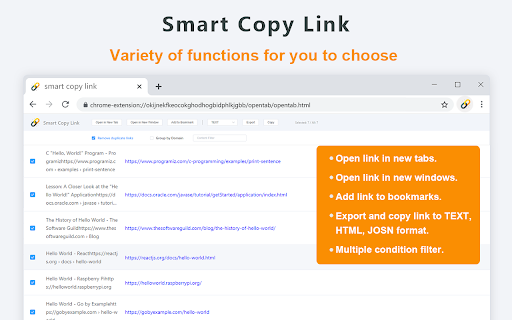
Copy tabs and web page links. Support analysis text link, open links, add to bookmark, and export in various formats This is a hyperlink processing tool that aggregates multiple functions. Its powerful functions will definitely make you love it Extended main functions: Copy Tab link It can copy the links of all the tab pages you have opened. Copy web link When you want to extract all the links in a certain webpage, use it to copy quickly. Copy area link Use the shortcut key and the mouse to drag the selection around the link and release the mouse, complete the copy. Copy the specified link You don’t need to right-click to copy the link address, just hover the link and press Ctrl-C / Cmd-C to complete the copy. .Open link Support open links in new tab and new window. .Save link Support export links in TEXT, HTML, JOSON formats, you can also customize the format according to your own preferences. .Filter link Provide multiple conditions to filter links, you can filter duplicate links, filter by domain name, etc. .Resolve link It will automatically resolve links based on the content you paste.

Copy URLs
Copy all open pages (title and/or address) to clipboard. Select what to export (all tabs or just the web-pages; all windows or current window only) and how to export it (choose between several formats -- simple url list, HTML, CSV etc.) You can define your own (custom) format to generate specific url list (for example -- JavaScript array or XLS table ready to be copy/pasted in Excel)

Copy URL with Title (plain text/markdown)
Copy the title and URL in plain text/markdown format by keyboard shortcuts: Ctrl+C/Cmd+C for plain text, Alt+C/Opt+C for markdown. Ver 1.1.1.0: ADD: Duration settings for notification Ver 1.1.0.6: FIX: Workaround for non-https pages Ver 1.1.0.5: FIX: Correction of the phenomenon that text is not copied to the clipboard ADD: Option menu ADD: New customizable toast UI -------------------------------------------------------------------------------- FEATURES -------------------------------------------------------------------------------- 1. Copy title and URL in text format Control+C(Win/Linux) / Command+C(Mac) 4.Settings Right click the extension icon -> Options --------------------------------------------------------------------------------

Copy link text
Adds a context menu to copy the clicked link's text Without this extension, copying a link's text is sometimes a bit of an art form. You have to highlight the link to copy the text, which usually involves copying the text around it. This extension allows you to simply right-click on the link and copy the link text. It even supports links in Jira.

Copy Link Name
Copies the name of a link (anchor text) to the clipboard. Developed exclusively for Chrome. This extension is not guaranteed to work with other Chromium-based browsers like Edge, Brave, Opera, etc... Please don't report issues or down-vote this extension in the Chrome Web Store if you're using a non-Chrome browser. Makes it very easy to copy the visible text of a link (also called link name or anchor text). Just right click on a link & choose "Copy Link Name". Note: Like all Content Script extensions, this extension is automatically disabled in the Chrome Extensions site. So please test it on a normal web page.
