
kgncmlkaopailaafofodciacppkjcenl


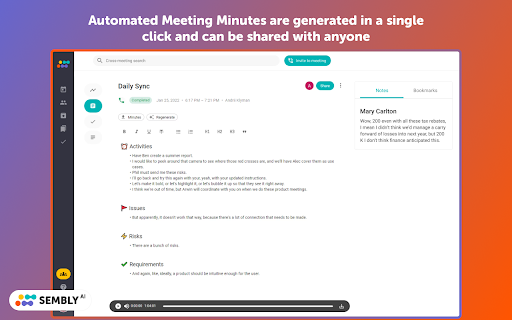
Sembly records, transcribes and generates AI meeting summaries & notes with meeting minutes. For Zoom, Google Meet, MS Teams. You can easily review & share meeting takeaways, meeting records and transcriptions from your Sembly account ⭐ ℹ️ HOW TO USE SEMBLY FOR GOOGLE MEET | ZOOM | MS TEAMS MEETINGS • Add Sembly extension to your Chrome browser • Pin the extension to the Chrome toolbar • Click on the Sembly icon in your toolbar to open the extension, sign up or log in • Start meeting in your browser or copy the meeting link from your calendar • Open extension and paste the meeting invite URL address • Push the “Invite” button and Sembly Agent will join your meeting automatically • Pause and stop the recording right from the extension • Review your meeting results • Automated Meeting Minutes are generated in a single click and can be edited, exported or shared with anyone ℹ️ HOW TO USE SEMBLY WITH GOOGLE & OUTLOOK CALENDAR: • Connect your Calendar in the settings of Sembly web application • Set the agent to join all your meetings, only the meetings you created, or manually join the meetings • You're all set! 🔥 Sembly AI features that save you tons of time: • Calendar integration and quick invite by link or email • VoiceID & Speaker identification • In-meetings voice commands • Cross- and in-meeting search • Sentiment analysis • AI-generated meeting summary Glance View • Key Items detection (Risks, Issues, Events, Actions, Requirements & Due Dates) • Automatic Meeting Minutes • Automated note-taking • Workspaces for your team • Export transcripts, meeting summaries, and key items to the PDF or easily copy tasks and tickets to the cloud collaboration tools like Trello, HubSpot, Slack, Notion, Jira, etc. 🚀 Suits for any type of meetings: • Internal or clients meetings • Customer interviews, feedback or demos • Product & user research • Hiring and recruiting calls • Online webinars & events • Online classes & lectures • Marketing surveys & market research • Meeting follow ups • Presentations & masterclasses • Scrum & Agile meetings • Transcribing video calls into Google Docs 🔒 SECURITY & PRIVACY: Privacy and security are our top priorities. Our technology and processes undergo rigorous audits to ensure compliance with all applicable regulatory requirements. • Sembly is GDPR compliant • SOC2 certified

Fireflies: AI meeting notes
Record & Transcribe meetings & calls directly from the browser with free unlimited transcriptions AI note taker, meeting transcription, and automatic meeting notes. Fireflies captures conversations, generates transcripts, summaries, and action items, and connects seamlessly with your favorite apps. Stop worrying about missed details—your ultimate AI teammate is here. Automatic Meeting Notes: Get instant, accurate transcripts, highlights, and key takeaways. AI Apps: Generate emails, write reports, analyze conversations, create scorecards instantly after every meeting Cross-App Productivity: 100+ apps. Enterprise-Grade Security: Built for trust from day one. Your conversations remain private and secure. 100+ Languages Supported. Global teams capture every detail, without barriers. Key Benefits of the Fireflies AI Notetaker Save hours each week with fully automated notes and follow-ups. Stay focused on the meeting and let Fireflies handle the documentation. Never miss a task with tracked action items and reminders. One source of truth for your team. Search across all past conversations. Multiply productivity with AI teammates that learn and adapt to your workflow. Who is Fireflies AI Perfect For? Sales – Fill your CRM automatically, train sales teams, and close deals faster. Recruiting – Capture interview notes, improve candidate screening, and enable smooth collaboration. Marketing – Analyze sentiment, track competitors, and execute campaigns with confidence. Product & User Research – Automate notes for user interviews, usability tests, and research debriefs. Collaboration – Share meeting notes instantly and keep everyone aligned. Engineering – Document technical discussions, decisions, and follow-up actions without extra effort. Finance – Automate client notes, simplify portfolio reviews, and ensure compliance. Healthcare – Securely capture clinical notes and patient insights while meeting HIPAA/GDPR standards. Podcasting & Media – Generate transcripts and subtitles for podcasts, audio, and video content. Real Estate – Record client meetings, capture property discussions, and follow up effortlessly. Venture Capital: Automate meeting notes for deal sourcing, due diligence, and partner updates. Install the Fireflies AI Chrome extension. Connect your calendar & video platforms. Fireflies automatically joins your meetings to take notes. Get transcripts, summaries, soundbites, and tasks instantly. Fireflies AI is Trusted Worldwide Used by 20M+ people in 500,000+ organizations. Trusted by 75% of the Fortune 500. Ranked a Top 10 AI Productivity Platform. Install Fireflies AI today—your team’s AI teammate. Want a guided demo? Contact our AI specialists: https://fireflies.ai/ Check out the Fireflies AI to supercharge your productivity: https://fireflies.ai/apps Contact support: support@fireflies.ai

Record & Summarize your Meetings - Inkdrop
Maximize Meeting Efficiency with Inkdrop - Record, Transcribe & Summarize - Compatible with Google Meet Unleash the full potential of your meetings with Inkdrop. No more handwritten notes or lost information. Our AI-powered platform streamlines collaboration and saves you time. Features: 🖊️ Automatic meeting minutes and next steps 🔎 Searchable meeting records for your team 💾 Free unlimited audio and transcript download ✌️ Effortless meeting transcription and recording without bot 🔜 Share automatically with slack channels and participants Inkdrop's cutting-edge AI technology transcribes your meetings in real-time, providing you with accurate and thorough notes without lifting a finger. Save time and reduce stress by never missing important information again. Our platform makes it easy to search past meetings and find the information you need. Inkdrop revolutionizes the way you work and free you up to focus on what truly matters. About Inkdrop: Inkdrop is a remote, Techstars-backed AI startup that transforms the way people collaborate. Our goal is to save 100 million hours daily by 2030 and make meetings more efficient, productive, and stress-free for everyone. Privacy: Your privacy is a top priority. All data is securely stored and encrypted, and you have full control over who has access to your meeting transcripts. Transform your collaboration with Inkdrop. Download now and experience the future of meetings.

Acta.ai Google Meet Teams and Zoom helper
Acta Agent is AI note-taker designed to streamline meeting conversations, placeholder for all your meeting discussions and… Acta Agent is AI note-taker designed to streamline meeting conversations, placeholder for all your meeting discussions and structured way of following up on Action points. It's simple and easy to use. Taking notes during meetings is hard—especially when you’re also trying to stay engaged. Let Acta handle the notes for you. It listens quietly in the background, captures everything that’s said, and gives you: -Full transcripts -Clear summaries -Highlighted decisions and next steps You don’t need to remember it all—Acta does that for you. *Role-Based AI Agents for Every Team One of the things that makes Acta special is its custom agents built for different job roles. That means the assistant shows you exactly what you need, whether you’re in sales, product, engineering, HR, or support. -Sales: Creates deal summaries and follow-ups automatically -Product Managers: Builds helpful PRDs and feature breakdowns from your conversations -Recruiters / HR: Summarizes candidate interviews and evaluations -Engineers: Tracks technical decisions and action items -Support teams: Fills in tickets, updates, and escalations -Finance: Flags risks and organizes meeting takeaways for investors or internal reviews No fluff — just what matters for your role. Works Where You Work Acta fits right into the tools you already use. It works with: Zoom, Google Meet, Microsoft Teams, Integrated with Google Calendar / Outlook (auto-joins your scheduled meetings) Jira, Salesforce, Slack, Asana, Confluence (sends meeting output directly where your team works) Download Chrome Extension (for ad hoc or unscheduled calls) You don’t have to change how you work — just plug in Acta, and it starts helping right away. *Why Teams Love Using Acta.ai -Saves Time: Cuts your admin work by 40% -Boosts Productivity: Helps your team focus on doing, not documenting -Increases Clarity: Everyone knows what to do after the meeting -Secure & Flexible: Enterprise-ready, with on-prem or cloud options And it’s as simple as signing up with Google or Microsoft Teams. That’s it. Acta will start joining your meetings and taking care of the rest. A Smarter Way to Meet Acta. isn’t just about transcription — it’s about making meetings count. Whether you’re closing deals, building products, hiring the right people, or tracking project progress, Acta helps you move faster with less effort. Start using Acta today, and spend more time on meaningful work — not on scribbling notes or chasing follow-ups.

Fellow: AI Meeting Notes, Agendas, and Action items
Get AI Meeting Notes, Transcripts, AI Action Items and Summaries in Google Meet and Google Calendar Get AI to take meeting notes for you and so much more. Access Fellow AI agendas directly in Google Meet and get the most accurate AI meeting notes, action items and summaries. Get full AI Meeting Notes with Fellow’s FREE Chrome extension including a full transcript, meeting summary, AI action items, highlights, the discussion organized by topics - all available in 36 languages. Fellow’s free Chrome extension takes AI meeting notes so you can stay focused on your meeting. Improve your team’s productivity without leaving Google Meet and Google Calendar. Fellow is trusted by leaders at Fortune 500 and Unicorn companies such as Warner Media, Fanatics, Shopify and Aledade, to run productive meetings. KEY FEATURES Get started with Fellow for FREE and you’ll have access to: - ✨AI meeting notes, transcriptions and summaries - 💼Pre-meeting AI briefs so you’re always prepared for your next meeting - 💬“Ask Copilot” answers questions about any meeting with AI - 🗄️AI Meeting call and clips library to organize your AI meeting calls - 🖊️Collaborate on meeting agendas directly in Google Meet - ✅Build accountability with assigned action items - 🗓️Keep track of due dates directly in your Google Calendar - 📬Easily share the agenda with your meeting attendees - 👨🏫Apply expert-approved meeting templates - 📷Insert images, gifs, Google Drive files and more directly into your meeting notes - 🏃♀️Run effective 1-on-1s with a clear purpose, agenda, and outcome 👩💻 GOOGLE MEET INTEGRATION - Get AI Meeting Notes automatically - Ask the AI Copilot questions during the meeting - Have your shared meeting agendas open automatically when you join your video call - Collaboratively view and add additional meeting minutes and action items in real-time - See your meeting attendees and notes, side-by-side with our intuitive overlay - End the call with clear takeaways and action items to build accountability 🗓️ GOOGLE CALENDAR INTEGRATION - Access AI meeting notes, AI clips, AI recaps and transcriptions directly from Google Calendar - Quickly open your notes by clicking on the button in your calendar event description - Easily add discussion topics to your upcoming meetings and 1-on-1s by using the side panel - Encourage your meeting attendees to collaborate on the agenda by including the link in the calendar invite - See what tasks need to be completed with due date indicators on your calendar - Make the notes easy to find by including a direct link to your meeting agenda in the calendar description. 🔐 SECURITY & PRIVACY Fellow employs security and industry best practices to ensure our product and systems stay secure. Highlights include SOC 2 Compliance, ongoing Vulnerability Scans, and Firewalls + Encryption on our Server Infrastructure. Read more here: https://help.fellow.app/en/articles/4302231-security-compliance Learn more about Fellow and our other integrations at https://fellow.app
