
mclnbcicnofcigjhhilajljjpgepbijp

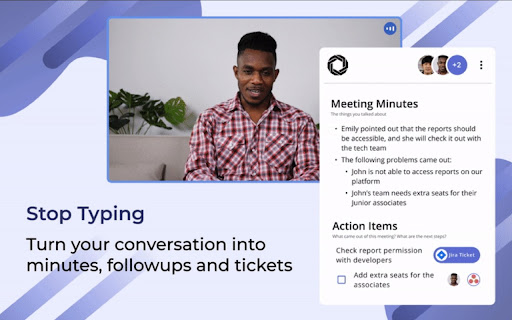
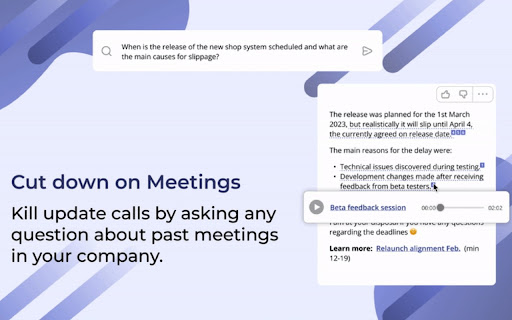
Maximize Meeting Efficiency with Inkdrop - Record, Transcribe & Summarize - Compatible with Google Meet Unleash the full potential of your meetings with Inkdrop. No more handwritten notes or lost information. Our AI-powered platform streamlines collaboration and saves you time. Features: 🖊️ Automatic meeting minutes and next steps 🔎 Searchable meeting records for your team 💾 Free unlimited audio and transcript download ✌️ Effortless meeting transcription and recording without bot 🔜 Share automatically with slack channels and participants Inkdrop's cutting-edge AI technology transcribes your meetings in real-time, providing you with accurate and thorough notes without lifting a finger. Save time and reduce stress by never missing important information again. Our platform makes it easy to search past meetings and find the information you need. Inkdrop revolutionizes the way you work and free you up to focus on what truly matters. About Inkdrop: Inkdrop is a remote, Techstars-backed AI startup that transforms the way people collaborate. Our goal is to save 100 million hours daily by 2030 and make meetings more efficient, productive, and stress-free for everyone. Privacy: Your privacy is a top priority. All data is securely stored and encrypted, and you have full control over who has access to your meeting transcripts. Transform your collaboration with Inkdrop. Download now and experience the future of meetings.

Inkdrop Web Clipper
It lets you save any web page off the internet to your Inkdrop database in Markdown so you can read or edit it later. **For Inkdrop users only** This is a browser extension for **Inkdrop**, a Markdown note-taking app, offering the following features: ## Clip web pages as Markdown Easily save the main content of a web page—or selected portions—as an Inkdrop Markdown note. ## Import Kindle highlights Import your reading highlights from Kindle directly into Inkdrop. The extension does **not** store your Amazon credentials; it simply uses your active login session to extract data from Amazon.

Beesy: Record Google Meets
Record & Transcribe Google Meets locally to your computer ⚠️ Disclaimer: A Beesy user should inform and get consent of other Google Meet members when recording is enabled on their system according to their local laws. Be a sound user and respect others' privacy :) Beesy is FREE for local use, no signup and no cloud dependency at all! Just install the extension and start recording. Features: 🎥 Record without signing up ✍️ Meetings are transcribed automatically using Google captions 🦺 You won't lose your recordings, even if your computer crashes! ⚡ Use shortcuts to start/stop recording. Configure them as per your need 🔊 Option to start video+audio or audio only recordings 🔇 Supports muting audio in recording by muting Google Meet, which is not possible with screen recorders 🎤 Automatically detect active mic when (dis)connecting headphones ⌛ Show time since recording started in extension icon 📥 Recording is downloaded automatically when you leave a meeting 🔀 Show recording in progress and an easy way to switch to the active Meet tab 🎦 Auto-disable Google Meet media controls before joining a session 🔔 Notify you to start recording when joining a meet This extension does NOT track or share user data. However, we use error collection service to improve Beesy and its user's experience.

Google Meet Captions Capture
Capture Google Meet captions and save them to a file. This plugin works with Google Meet captions. It grabs all the subtitles during a google meeting and allows you to download them. This way, you can summarize them using ChatGPT, BARD, or any other LLM chat tool. For getting this app working you MUST OPEN GOOGLE MEET AND ENABLE CAPTIONS AT FIRST

Briefly: AI meeting summary & email follow up
Capture meeting notes, transcribe, summarize and gather insights without distraction. Capture meeting notes, transcribe, summarize and gather insights without distraction. Let Briefly take your meeting notes, organize your thoughts, and be more focused during meetings, all within your browser. Briefly makes it easy to be more productive after meetings by generating summaries, action items, and composing thoughtful follow-up emails. It simplifies your post-meeting workflow by transforming your conversations into a variety of polished project documents like product requirements, marketing briefs, sentiment reports, investment memos, and more. Briefly works where you do. Update your CRM directly from Slack after receiving and reviewing meeting summaries and insights from your latest call. ✅ Never miss a thing Briefly transcribes all your meetings and categorizes them based on the topics and content covered. Capture important points with our voice-activated notes feature. Get your summaries delivered to your inbox after every call to make it easier to organize your meeting notes for a later time. 💡Objective summaries and takeaways Briefly uses AI to generate comprehensive summaries from transcriptions, identify key insights grouped by topic and personalized action items, so you don't have to comb through transcripts to synthesize notes. ✍️ Personalized follow-ups Timely correspondence and accurate action items can lead to higher close rates and follow-up meetings booked. Briefly automatically crafts compelling customized follow-up messages from the contents of your meeting. Send them out right after your meeting is over so you can save time when you’re in back-to-back meetings. 💼 Sync your CRM Keep all customer interactions in sync. Automatically sync meeting notes with customer contacts in either Salesforce or Hubspot using Slack. 📝 Craft your project docs Input your custom prompt and let Briefly convert your transcript into the requested document. Browse our popular templates, and tailor them until your results are perfect. Make the most out of the knowledge shared in conversation by using different prompts to draft multiple docs per call. 🥷 Unintrusive Briefly does not add a “ghost” note-taker into your meeting, and does not require you to record the meeting, allowing you to stay focused and not be distracted. 📑 No matter what platform you take your calls on, import your meeting transcripts from Zoom, Microsoft Teams, or any other platform directly to Briefly. Upload reports, articles, and any other text files and turn them into summaries and project documents via your dashboard. 🪄Briefly is great for: Product and Engineering Sales Marketing Customer Success Venture Capital 📌 How to Get Started: 1. Install Chrome Extension and pin the icon to your toolbar. 2. Sign in with Google. 3. Start your Google Meet and under Current Call, click “Start transcribing this meeting”. 4. After the call, open the Briefly extension and click the “Past Call” tab to view the transcripts and AI summaries for all your calls. 5. Click the AI follow-up tab to view the follow-up email and edit it from your Gmail inbox. 6. Check your spam if you’re not receiving your recaps shortly after the call. Your recaps are only sent to you. 7. To access your dashboard, go to the Past Calls tab by clicking "Create on web" or visit: https://app.brieflyai.com ** Important Note: Your transcripts, conversations, and summaries are NOT stored or collected by Briefly. Briefly is powered by OpenAI’s GPTchat.
