
eabicnldgjknbifdgmnieblkbnggfnde


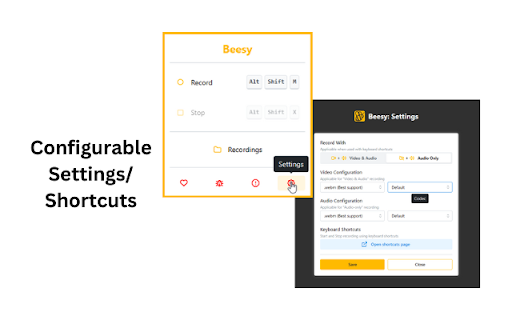
Record & Transcribe Google Meets locally to your computer ⚠️ Disclaimer: A Beesy user should inform and get consent of other Google Meet members when recording is enabled on their system according to their local laws. Be a sound user and respect others' privacy :) Beesy is FREE for local use, no signup and no cloud dependency at all! Just install the extension and start recording. Features: 🎥 Record without signing up ✍️ Meetings are transcribed automatically using Google captions 🦺 You won't lose your recordings, even if your computer crashes! ⚡ Use shortcuts to start/stop recording. Configure them as per your need 🔊 Option to start video+audio or audio only recordings 🔇 Supports muting audio in recording by muting Google Meet, which is not possible with screen recorders 🎤 Automatically detect active mic when (dis)connecting headphones ⌛ Show time since recording started in extension icon 📥 Recording is downloaded automatically when you leave a meeting 🔀 Show recording in progress and an easy way to switch to the active Meet tab 🎦 Auto-disable Google Meet media controls before joining a session 🔔 Notify you to start recording when joining a meet This extension does NOT track or share user data. However, we use error collection service to improve Beesy and its user's experience.

OneClick Google Meet Recorder
Professional meeting recorder for Google Meet with advanced features Record Google Meets locally to your computer OneClick Meeting Recorder is FREE for local use, no signup and no cloud dependency at all! Just install the extension and start recording. Features: 🎥 Record without signing up with auto start recording feature 🎥 auto start recording feature so you do not need to manually start every recording 🦺 You won't lose your recordings, even if your computer crashes! ⚡ Use shortcuts to start/stop recording. Configure them as per your need 📥 Recording is downloaded automatically when you leave a meeting This extension does NOT track or share user data.

Record Meetings on Zoom, Microsoft Teams, Google Meet & more
👀 Looking for the easiest way to record your meetings, calls, and webinars on Zoom, Google Meet, Microsoft Teams, and more? You’re in the right place — this extension does exactly that. Record any online meeting, class, webinar, or call right from Chrome Browser. One click to start. High-quality video and clear audio. Files are saved locally for maximum privacy—no account, no uploads. ✨ Key features - One-click recording — no account, login, or setup required. - Works on popular platforms — Zoom (web), Google Meet, Microsoft Teams (web) and most browser-based meeting tools. - High-quality video — captures at the tab’s original resolution for crisp results. - Crystal-clear sound — built-in AI noise suppression reduces keyboard, fan, and background noise. - Local & private — recordings are saved to your computer, not to the cloud. - Crash-safe — auto-recovery helps restore recordings even after a browser or system crash. - Easy downloads — WebM output with sensible filenames. - Flexible audio — capture tab audio/video, microphone, or both; - Pause/Resume — keep only the parts you need. - Lightweight — minimal CPU usage with smart defaults. ┃ Privacy first: All processing happens on your device. We do not collect or transmit your audio/video. 💡 How to record online meetings - Open your meeting in Chrome (Zoom in browser, Google Meet, Teams on the web, etc.). - Click the Meeting Recorder extension icon. - Choose what to capture (tab video, microphone). - Hit Start Recording. A timer will appear. - When finished, click Stop and Save. Your file is downloaded locally. ┃ Tip: For Zoom/Teams, click “Join from your browser” to use the web version. ❓ Why choose our Meeting Recorder? - Simplicity: designed for everyone—from students to IT pros. - Reliability: auto-recovery and careful handling of long recordings. - Quality: original resolution video + AI-cleaned audio. - Security: local files and clear permissions; no hidden data collection. - Compatibility: optimized for Chrome on Windows, macOS, Linux, and Chromebooks. 👍 Who will love it? - Students & teachers recording classes and webinars - Teams & managers saving training sessions, sprint reviews, and client calls - Sales & support capturing demos and troubleshooting sessions - Creators & marketers collecting interviews, webinars, and event streams - Anyone who needs a simple, private way to record meetings in the browser 📁 Output & formats - Video: WebM (VP8/opus) the default (MP4 depending on system/hardware) - Quality: original tab resolution when available; 🔐 Privacy & permissions - All recordings are stored locally on your device. - No server processing, no ads. 🛠 Troubleshooting - No audio recorded? Ensure “Share tab audio” is enabled and your meeting is in a Chrome tab. - Black bars or wrong size? Set your meeting tab to 100% zoom and avoid resizing during recording. - Choppy video? Close heavy tabs/apps. - Zoom/Teams desktop apps: use their web version in Chrome for best results. - Long recordings: make sure you have enough disk space; we auto-save chunks for better reliability. ⚖️ Important legal note - Recording calls may require consent from all participants depending on your jurisdiction and platform policies. Always notify and obtain permission before recording.

Meet Assistant
Only way for you to record your precious meetings on google meet. Meet Assistant is the only free screen recording tool on google meet, providing you with the option of capturing unlimited videos and saving them on your system and drive side by side. Available for Mac, Windows and Linux.

Leexi - Google Meet recording
Never forget to record your Google Meet video conferences again and find them in the Leexi app in one click. Automatically record and summarize all your meetings on Google Meet with this extension. Also available for Microsoft Teams and Zoom, you can capture the informations you need and enhance your productivity. - Contextualized summary - Follow-up emails - AI note-taking - Complete transcription with 10+ speakers identification - Transcribe all the transcription in 100+ languages - Time-stamped notes during calls - Automatically load your CRM (Salesforce, Hubspot, Pipedrive,...) with call information - Share call shorts - Upload video and audio files - Dictaphone for physical meetings - And much more... Leexi allows you to effortlessly transcribe, analyze, and summarize calls and video conferences. Start now and enjoy the summary of your next meetings !
