
meimoidfecamngeoanhnpdjjdcefoldn


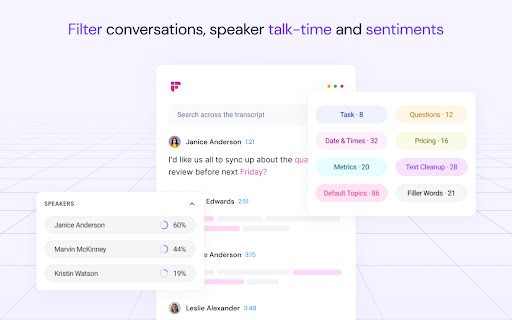
Record & Transcribe meetings & calls directly from the browser with free unlimited transcriptions AI note taker, meeting transcription, and automatic meeting notes. Fireflies captures conversations, generates transcripts, summaries, and action items, and connects seamlessly with your favorite apps. Stop worrying about missed details—your ultimate AI teammate is here. Automatic Meeting Notes: Get instant, accurate transcripts, highlights, and key takeaways. AI Apps: Generate emails, write reports, analyze conversations, create scorecards instantly after every meeting Cross-App Productivity: 100+ apps. Enterprise-Grade Security: Built for trust from day one. Your conversations remain private and secure. 100+ Languages Supported. Global teams capture every detail, without barriers. Key Benefits of the Fireflies AI Notetaker Save hours each week with fully automated notes and follow-ups. Stay focused on the meeting and let Fireflies handle the documentation. Never miss a task with tracked action items and reminders. One source of truth for your team. Search across all past conversations. Multiply productivity with AI teammates that learn and adapt to your workflow. Who is Fireflies AI Perfect For? Sales – Fill your CRM automatically, train sales teams, and close deals faster. Recruiting – Capture interview notes, improve candidate screening, and enable smooth collaboration. Marketing – Analyze sentiment, track competitors, and execute campaigns with confidence. Product & User Research – Automate notes for user interviews, usability tests, and research debriefs. Collaboration – Share meeting notes instantly and keep everyone aligned. Engineering – Document technical discussions, decisions, and follow-up actions without extra effort. Finance – Automate client notes, simplify portfolio reviews, and ensure compliance. Healthcare – Securely capture clinical notes and patient insights while meeting HIPAA/GDPR standards. Podcasting & Media – Generate transcripts and subtitles for podcasts, audio, and video content. Real Estate – Record client meetings, capture property discussions, and follow up effortlessly. Venture Capital: Automate meeting notes for deal sourcing, due diligence, and partner updates. Install the Fireflies AI Chrome extension. Connect your calendar & video platforms. Fireflies automatically joins your meetings to take notes. Get transcripts, summaries, soundbites, and tasks instantly. Fireflies AI is Trusted Worldwide Used by 20M+ people in 500,000+ organizations. Trusted by 75% of the Fortune 500. Ranked a Top 10 AI Productivity Platform. Install Fireflies AI today—your team’s AI teammate. Want a guided demo? Contact our AI specialists: https://fireflies.ai/ Check out the Fireflies AI to supercharge your productivity: https://fireflies.ai/apps Contact support: support@fireflies.ai

Calendly: Meeting Scheduling Software
Schedule meetings without the hassle. Never get double booked. Calendly works with your calendar to automate appointment scheduling. With any Calendly account (free or paid plans), you can use Calendly’s extension for Chrome to: - Access Calendly in one click from anywhere on the web - Find and share your scheduling links - View and manage your meetings - Keep track of your contacts and meeting history - Book meetings in real time, including follow-ups and handoffs - Add available time slots directly into your emails - Create one-off meetings, single-use links, and group meeting polls - Integrate with Gmail, LinkedIn, Google Calendar, and more ABOUT CALENDLY Calendly simplifies personal and professional scheduling for more than 20 million users worldwide. Calendly delivers a robust and intuitive scheduling platform that helps our customers close deals, land candidates, build relationships, and grow their business—faster.

Otter.ai: Record & Transcribe Meetings - Google Meet & Web Audio
Live transcription, summary, AI chat for meetings or website audio — Zoom, YouTube, online lectures, and more. No bot in Google Meet Otter.ai Chrome Extension offers real-time transcription, AI-powered summaries, and ChatGPT-style Chat to online meetings and any tab with audio—all inside Chrome. Compatible with Zoom, Microsoft Teams, and Google Meet. No-bot in Teams or Google Meet. Also compatible with YouTube, Coursera, online lectures, podcasts, and any website on Chrome browser. KEY FEATURES - Live transcription & captions – High accuracy so you never miss a word - Smart meeting summaries – bullet points, action items, and insights after the call. - AI chat with your meeting – Ask “What’s the deadline?” or “Summarize next steps” and get instant answers. - No-bot in Google Meet – no extra participant joins your call. - YouTube captions – Great for high-quality transcripts and language learning. - Works everywhere – from webinars and online classes to Twitter/X Spaces and LinkedIn Live - Search & share – locate any sentence later; export to Google Docs, Slack, CRM HOW TO PIN THE EXTENSION AND LOG IN: - After downloading, tap the extension icon, then tap the pin icon to add it to your browser bar. - You need to log in to use Otter. Tap the pinned Otter logo in your browser bar to log in to or sign up for an Otter account. HOW TO USE WITH GOOGLE MEET: - Remain logged in to use Otter. - After you join a Google Meet meeting, an Otter extension pop-up will open and ask if you want to - Record the meeting on your device, with no bot in the meeting. - Send AI Notetaker to the meeting as a normal participant. - You can see live transcript in the meeting. HOW TO USE WITH ZOOM: - Open a Zoom URL in your Chrome browser. - An Otter extension pop-up will open and ask if you want to send AI Notetaker the meeting to get an automatic meeting summary - However, if AI Noteteker is already scheduled to attend the meeting, you will not receive this pop-up. - You need to sync your calendar to enable Otter AI Notetaker to automatically join and record future meetings on your calendar. HOW TO TRANSCRIBE AUDIO ON THE BROWSER: - Open the website you want to transcribe the audio of, such as YouTube, online lectures, etc. - On this website, open the Otter Chrome Extension, and click “Record”. - If you mute or pause the audio or video you want to record and transcribe, the audio will not be recorded. - An overlay with live transcript will appear on the website that is being recorded. You can minimize the overlay.

Read AI
Boost productivity with Read AI's extension—bring the benefits of connected work AI directly to your meetings and calendar. Read AI is the fastest-growing independent work AI platform designed to help everyone work smarter and get more done. With features including world-class meeting notes and coaching, connected enterprise search, and helpful recommendations, our AI Copilot makes it easier to keep track of the details and move faster towards success. Trusted by millions worldwide, Read AI transforms daily work into insights and actions that propel you forward, faster. KEY EXTENSION FEATURES: 🎤 Automatic Meeting Detection Read AI detects upcoming Zoom, Teams and Google Meet meetings and prompts you to add Read, capturing conversations seamlessly. 🗓️ Smart Meeting Scheduling Effortlessly find the best time to meet, get real-time meeting summaries, and see the cost of meetings directly in your Google Calendar. 🔗 Meeting Scheduling Link Share a single link to let others find a time to meet without the back-and-forth. 📝 Live Meeting Summaries Catch up instantly if you’re late to a meeting, with real-time live notes of ongoing discussions. At Read, we take your privacy seriously, and we want you to feel confident about how we handle your information. Your trust means everything to us, which is why we don't sell your data to anyone - period. So why do we ask for all of those browser permissions? We request permissions like “”, “activeTab”, “notifications”, “contextMenus”, “notifications” and “scripting” so Read AI can work seamlessly across all your productivity platforms, not just a limited set. These permissions allow us to deliver powerful features now and enable future updates that bring even more context and value to your workflows. By using the Read AI’s browser extension, you agree to Read's terms and conditions and privacy policy:

Attio
Bring relationship insights into Attio from Twitter, Google Meets, and more. Attio’s browser extension does all the heavy-lifting for you, wherever you are on the web. With a click, you can add a lead from Gmail, Twitter, or even your Google Meets call, straight into your workspace, all enriched with valuable data. You can do so much more with Attio’s browser extension: • Run automations to speed up your workflow • Edit custom attributes • Edit data from associated lists and companies • And everything’s synced in real-time
