
kgfcmiijchdkbknmjnojfngnapkibkdh
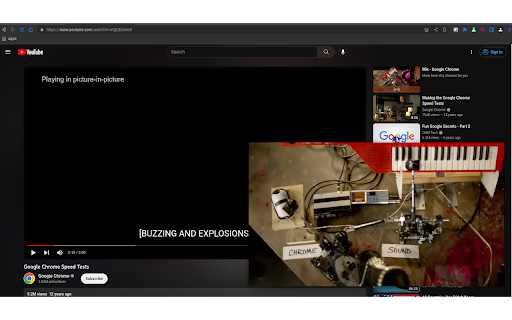
Watch video using the Picture-in-Picture API. A simple Chromium Extension to enable the Picture-in-Picture Web API in Chromium. It is a fork of https://chrome.google.com/webstore/detail/picture-in-picture-extens/hkgfoiooedgoejojocmhlaklaeopbecg with some fixes, and removed Google Analytics tracking.

Picture-in-Picture Extension (by Google)
Picture-in-Picture (PiP) allows you to watch videos in a floating window (always on top of other windows) so you can keep an eye on what you’re watching while interacting with other sites, or applications. Source code: https://github.com/GoogleChromeLabs/picture-in-picture-chrome-extension By installing this item, you agree to the Google Terms of Service and Privacy Policy at https://www.google.com/intl/en/policies/.

Tab Shortcut Tools
Duplicate Tab, Pop out Tab, and New Tab to the Right - Configurable Shortcuts Chromium Extension to Duplicate Tab, Pop out current Tab, and add New Tab to the Right. You can configure the shortcuts at chrome://extensions/shortcuts - Alex313031

Chromium Vector Icon Painter
Draws vector .icon files in the Chromium repository as SVG images. Extension which can draw .icon files locally, as well as in the Chromium repository at https://chromium.googlesource.com/chromium/src.git

Picture-in-Picture Shortcut
Switch videos to Picture-in-Picture mode with a keyboard shortcut or toolbar button. Picture-in-Picture Shortcut adds a keyboard shortcut and toolbar button for switching video players to the Picture-in-Picture mode in web browsers. The default keyboard shortcut is Ctrl+Period (Command+Period on Mac), but it can be changed from the browser settings. The Picture-in-Picture Shortcut extension button in the browser's toolbar can be used to toggle PiP mode. Google Chrome and other Chromium browsers have a built-in Picture-in-Picture button in the default media controls, but it isn't always available and requires multiple mouse clicks. Picture-in-Picture Shortcut also overrides sites that don't normally allow Picture-in-Picture mode, and attempts to add a play/pause button to the PiP popup. However, this may not always work for sites and players not originally built for PiP mode. This extension is open-source under the GPLv3 license, the code is available on GitHub: https://github.com/corbindavenport/pip-shortcut
