
kgdeoimicejbagodibjcagiibdppbjhb
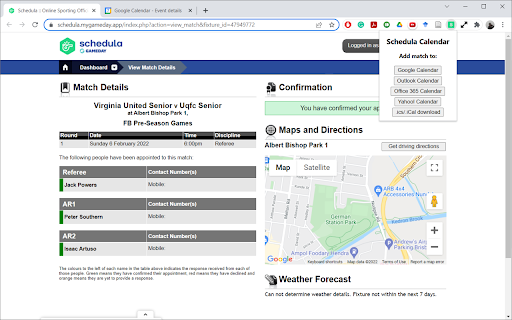
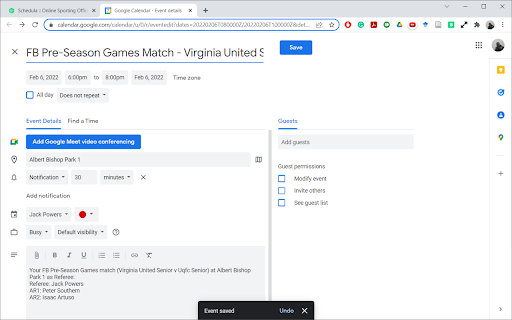
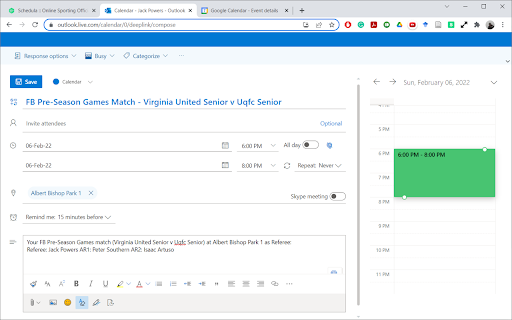
Add matches from Schedula to your online calendar Add your matches from Schedula to Google Calendar, Outlook Calendar, Office 365 Calendar, Yahoo! Calendar or the calendar application of your choice (through .ics/.iCal file download) all with a single click of a button, populating the competition, time, location, and referee team into your calendar. How to use: after the extension is installed, pin it to your toolbar by clicking the puzzle icon in the top corner and clicking the pin button beside the app name. Once the app is pinned, go to a match in Schedula and click the extension button. A drop down will appear allowing you to select the desired calendar application. Click on the appropriate button and the selected calendar application will open in a new tab with all match details populated. Disclaimer: Please note, no liability or responsibility is taken for non-attendance at appointed matches due to match details (such as date, time, location etc.) not populating correctly in your calendar application. It is your responsibility to ensure that the calendar event matches the Schedula appointment. If a match is updated or cancelled, the extension does not automatically update in your calendar, nor does it update the referee team if there are changes - it is your responsibility to monitor your email for any Schedula notifications and modify or delete the calendar event accordingly.

Calendar Express for Google Forms™
1-click sidebar to see your calendar as you fill out forms A quick, simple way to view your calendar in a sidebar while creating or filling Google Forms. Useful when you need to check which dates & times you are free for signing up for appointment slots on a form! - 1-click access to your calendar when viewing or editing Google Forms - Easily switch between days in the sidebar, or jump to full-screen Calendar - Click’n’drag to even move existing calendar events! NOTES - You must be signed into Google to view your calendar, we show a reminder just in case - This extension doesn’t work on any other sites besides Google Forms urls - You can’t add events to your calendar from the sidebar SECURITY/PRIVACY This Chrome extension is super simple and does not store ANY of your data. It simply embeds the same Google Calendar sidebar that shows up in Gmail, Drive, Docs, etc. and puts it into Forms. You must be signed into a Google account for it to load your calendar, and the extension does not store or maintain permissions to access your calendar. The extension is not affiliated with Google and only works when viewing or editing Google Forms.

CodeFill – LeetCode Autofill and Templates
Autofill coding templates on LeetCode. Inject snippets, save boilerplate, save time and speed up problem-solving. 🚀 CodeFill – Supercharge Your LeetCode Workflow CodeFill takes your coding practice to the next level by automatically injecting your custom code templates into the LeetCode editor. No more wasting time rewriting the same boilerplate — focus directly on solving problems. 🔑 Key Features — Multi-language support – Works with C++, Java, Python, JavaScript, TypeScript, Go, Rust, C, and C# — Smart customization – Configure templates for each language and choose whether to insert them at the top or bottom of the editor — Seamless integration – Runs automatically on LeetCode problem pages without extra clicks — User-friendly interface – Manage templates easily with an intuitive popup and options page, complete with dark mode 💡 How CodeFill Helps You — Saves time – Start coding instantly without rewriting imports, macros, or boilerplate — Ensures consistency – Maintain a personal coding style across all problems — Boosts productivity – Focus on problem-solving instead of repetitive setup — Reduces errors – Predefined templates minimize chances of missing common utilities — Keeps you organized – Centralized template management for all languages you use ⚡ How It Works — Configure your templates in the extension options — Open any LeetCode problem page — CodeFill injects your template automatically — ready to code instantly

Google Tasks enhancer
A chrome extension to enhance Google Tasks experience across Google Workspace. A chrome extension to enhance Google Task usage in Google calendar. Planning to add more features.

Boss Hub | Event
Administrators and vendors/organizers can upload venues/online events. Admins can receive a commission for each event booking. Evento offers different types of tickets - Free, Variable Tickets, No Stock Variable Tickets. It also supports single and multiple date events. It also offers multi-language and RTL front-end website, single language admin/organizer dashboard translation option, early bird discounts per ticket, taxes, coupons, PWA ticket scanner, admin e-commerce, reports, transaction reports, monthly revenue reports, push notifications, add to yahoo/google calendar, event countdowns!
