
kgakkpnnkchhinmapcgoeadmaejpjmcp

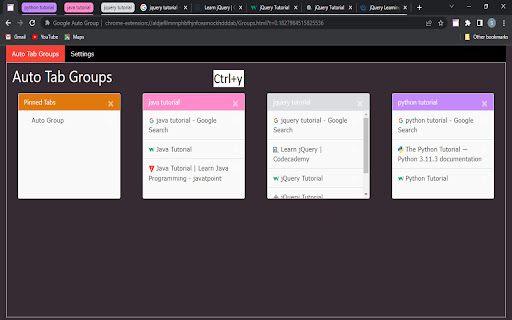


Every Google search you perform it will automatically generate a separate tab group and any child tabs opened from your Google… Every Google search you perform it will automatically generate a separate tab group and any child tabs opened from your Google searches will be automatically added to the same tab group. 1. Automatic Tab Grouping: Each individual Google search you perform will automatically generate a separate tab group. No more manually organizing tabs. 2. Seamless Child Tab Integration: Any child tabs opened from your Google searches will be automatically added to the same tab group. 3. Efficient Group Closure: Tired of closing tabs one by one? "Magic Tab Group" offers a convenient shortcut – simply press Ctrl+q to close the entire tab group in an instant, saving you time and effort. 4. Expand and Collapse Tab Groups: "Magic Tab Group" allows you to effortlessly expand or collapse your tab groups, giving you the flexibility to focus on specific topics or keep a broad overview of your browsing sessions. 5. Streamlined Tab Management: With this extension, you can easily manage and navigate through your tab groups. Locate specific tabs within a group or switch between different groups with ease. 6. Custom Auto Grouping: Take control of your browsing experience by adding any other website for auto-grouping. All sites from the specified domain will be automatically added to the same group, ensuring a seamless browsing workflow. "Magic Tab Group" – the Chrome extension that revolutionizes the way you manage your tabs. Streamline your workflow, increase productivity, and never lose track of important information again. Get "Magic Auto Group" now and enjoy a clutter-free browsing experience like never before!

Tab Group Maestro
Quickly search and find your Chrome tab groups. Quickly search and find your native Chrome tab groups with fast autocomplete. No more wasting time trying to find that window, continue where you left off! Features: - Cmd+Shift+2: Launch extension. This can be changed in Chrome Extensions settings. - Search your tab groups by name with fast autocomplete. Press enter to jump to the window of that tab group. - Cmd+Shift+1: Switch to edit mode to add current tab to a new or existing tab group. Type group name and press enter. Press Cmd+Shift+1 again to switch back to search mode. Note: This only works for open tab groups. Chrome doesn't expose closed tab groups to extensions. See the blog post for how to use it: https://medium.com/@semih.sezer/how-i-organize-my-chrome-tabs-in-2024-for-focus-and-productivity-d81802b0f14e More about Chrome's native Tab Groups: https://blog.google/products/chrome/manage-tabs-with-google-chrome/ Release History: 1.2.0: 14th August 2024 - Show tab groups in reverse accessed order, to keep the latest one at the top. - Do not show current tab group in the dropdown - Move focus to the selected tab group, instead of just focusing on the window

Tabius - Automatic Tab Grouping Assistant
An Automatic Tab Grouping Extension for Your Browser. Tabius is a customizable and easy to use Tab Grouping assistant for Chrome. It is also open source! If you use tab grouping or couldn't use it due to lack of options, Tabius is a must have extension for you. The extension is packed with useful features like: ✔️ Automatically create new tab groups when you open a link in a new tab. ✔️ Auto Collapse inactive tab groups. ✔️ Limit the browser to only create groups if the new tab matches the original tab's domain. ✔️ Create custom tab grouping rules: always create tab groups with a specific name and color from your favorite websites! ✔️ Save your favorite tab groups and restore them for later use! ✔️ Don't want to create tab groups from a specific site? Create a blacklist from the settings or add the site to the blacklist right from the toolbar! ✔️ Option to close an existing tab group when there is only 1 tab left in it. ✔️ Limit maximum number of tabs allowed in a group. ✔️ Automatically name tab groups based on domain/subdomain or the full URL. ✔️ View current tab groups and act upon them by clicking on the extension icon right from the toolbar. ✔️ Sync all your settings, tab groups, and custom lists with browser. ✔️ ..and many more features. I created this extension from my need. I use tab groups all the time and the extension helps enhance this feature. If you have any questions or feedback, feel free to email me: dev@faisalbin.com. This extension is made with ❤️ in Munich. What's new in v2.0.1 - You can now use the opener tab's title as the group name. To do so, select "Group Opener's title" from Settings>Group Naming Convention What's new in version 2.0 - Tabius has gone through a major redesign. - The extension has been rebuilt from the ground up. - You can now save your favorite tab groups for later. - Amend saved tab groups. - The popup is now more useful. - "nameless" group naming option. - Fixes scrolling issue if custom rules get too long. - Lots of bug fixes.

Auto Tab Groups
Automatically Set Your Tab Groups! This extension allows you to set custom rules that then auto sort your tabs. IT does this using Google Tab Groups. It lets you set up as many rules as you want. To add a new rule click add group button and fill out the TITLE, Domain / URL and COLOR fields. When you open the open extension the TITLE column will be the tab group name. The DOMAIN/ URL column will be the value searched in the website URL field that extension uses to sort the active tab. The COLOR column will be a box that when drop down is clicked allows the user to pick a color for the tab group. These preferences will be saved to users google profile when either the save button is clicked or delete button is confirmed and work across multiple devices with extension under same profile. In order to change or delete a rule you must first check the checkbox for the row and click edit or delete. If deleting values confirm the delete in delete window. If editing values makes sure all fields in rows are checked are not blank, and that color box is not set to grey. Otherwise a warning message will display letting you know to set these fields. The extension works as follows, say you have the value Test1 in Name Column, test1 in URL column, and the box set to Blue. Any website URL you visit with test1 ex.(www.test1thisisatest.com) will be automatically sorted into a group named Test1. You can also specify multiple terms to search with by separating them with commas. For instance, if you assign a group with TITLE column of Colors, and DOMAIN/ URL of blue, yellow, and green; any url you load with those search terms will go in the Tab Group Named Color. The final column COLOR, is the color of this tab group that gets set. By default the following keyboard shortcuts are enabled. You can use Ctrl+Shift+Y, Ctrl+Shift+H, and Ctrl+Shift+U to close, open and toggle tab groups respectively. You can also change this by going to chrome://extensions/shortcuts as well. There is a settings / options page you can get to by clicking the gear in the top right corner. Here you can enable a zoomed in view for larger font size and window for the popup window, change grouping from other windows behavior, and save and load your files from a local file on your computer.

Auto-Collapse Tab Groups
Are you a tab hoarder? Organize your tabs in tab groups and never get lost again by letting this extension collapse all tab groups that are not currently active. Pairs well with the "Auto-Group Tabs" extension.
