
kfiffbmdhmnneimcnenddboghfpifold
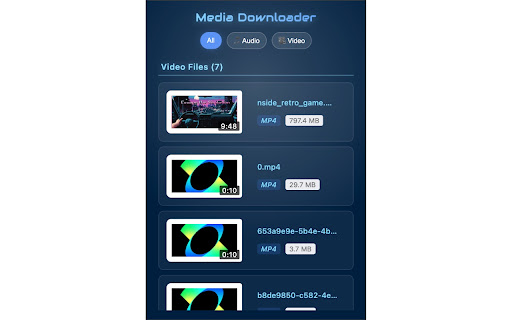
Brotwurst is your all-in-one solution for downloading media content from the web. This powerful Chrome extension makes it easy to detect and download videos, audio files, and other media content while browsing. Key Features: ✨ Smart Media Detection - Automatically detects media elements on any webpage - Supports various media formats including video and audio files - Works with streaming content (HLS support) 🚀 Advanced Capabilities - Shows file sizes before downloading - Supports multiple quality variants for streaming content - Fast and efficient downloads 💎 User-Friendly Interface - Clean, modern design - Responsive and intuitive controls - Smooth animations for better user experience 🛠️ Technical Features - Supports various media formats - HLS manifest parsing for streaming content - Efficient size detection using HEAD requests - Works across all websites How to Use: 1. Click the Brotwurst icon while on any webpage 2. View detected media files 3. Select your desired file 4. Click to download Privacy & Security: - No data collection - No ads or tracking - Open source for transparency Brotwurst is perfect for: - Saving educational content - Downloading permitted media files - Archiving your own content - Backing up media files Note: Please ensure you have the right to download any media content and comply with the website's terms of service and copyright laws. Support: For issues or feature requests, visit our GitHub repository or contact our support team. Make media downloading simple and efficient with Brotwurst!

Image downloader - Imageye
Find and download all images on a web page with Image downloader. With this Image Downloader, you can find, browse, convert and download all the images present on a web page. Additionally, you can: - Filter based on pixel width and height - Filter based on URL - Bulk download all images at once - Select which images you want to download - Check the size of each image - Copy the URL of the original image - Choose between various layout options - Support all major websites (Instagram, Facebook, Twitter, ...) - Perform a reverse image search - Convert .webp to .jpg - Convert any image type to webp, jpg or png (If you are a web dev and you need to convert all the images of a webpage you can now do it in one click) - Side Panel - Sort by Position in page - Capture selection (beta) Imageye - Image Downloader is a tool that helps you find the images published on a web page. The images may be protected by copyright and you should always assume that they are. Before reusing an image, make sure you check its license and the specific terms of reuse. Do not use any image, illustration or photograph without researching its copyright status first.

Bulk Image Downloader - HImage
Through this browser extension, you can capture and download images in bulk from web pages, helping to automate your workflow. Features: 1. Supports filtering images based on their size, shape, and format. 2. Allows filtering images from specific domains to avoid unwanted interference. 3. Supports searching for similar images using "Google Lens." 4. Automatically converts downloaded images to the specified format if you specify an image output format (JPG, PNG, WEBP). 5. Provides a tab mode that allows you to switch to a wider interface if you find the extension's pop-up window too narrow. It displays and processes captured images in a broader interface. 6. Supports batch renaming. 7. Supports capturing most web image formats, such as JPG, WEBP, PNG, GIF, SVG, ICO, AVIF, BMP. 8. The images to be downloaded will be packaged into a zip file, keeping everything organized.

Download All Files
Find and download all files from a website This extension checks the current page and finds items you can download. You can save everything at once or choose only what you need in a single folder. Privacy is important, the extension works only when you open it. It does not track you. All processing is done on your device. Main features • Find downloadable items on the page • Download everything at once or choose specific items • Save everything into one folder to stay organized Pro features • Package downloads into a single ZIP archive • No limits on the number of downloads Useful tool for saving resources from articles, study pages, courses, and archives.

Video Downloader Professional
Download videos from web sites or just collect them in your video list without downloading them. - download and save videos playing on a website to hard disk - select between different resolutions if the site supports it ( e.g. at Vimeo) - play found MP4 videos via Google Chromecast on your TV or play it on your Google Home. - add videos easily to your video list. There you have quick access to the videos and you can play them at any time, without having to return to the orignial web page. You also have the option to play the videos in any size (currently available at selected video providers like Youtube and Vimeo) If you have problems or videos which cannot be downloaded please don't give a bad rating but write us an email to support@link64.com and help us to improve this software. Thank you! Important: We had to lock the download of YouTube, Instagram, Dailymotion, Vk and Tiktok videos because of restrictions of the Chrome Store. There are always videos which are protected by the sites and cannot be downloaded. If you still want to download these videos, we recommend our app at www.videodownloaderultimate.com for all browsers. Privacy Policy: Video Downloader professional does not collect or send any personal data. Non-personalized data (which is the address of the video or part of it) is sent in these cases: - When you manually add videos to the video list a request is sent to the origin website to get information about the video (like title, thumbnail) - When you play a video in the video list, then the playing code of the origin website is loaded and executed. - When opening the Video Downloader professional menu a request is send to the origin of the found videos to receive the video length. - On some supported video sites, we are loading additional information from these sites to get the addresses of the video files.
