
penlilcpcjeoagahhcapkeahnoafmefp

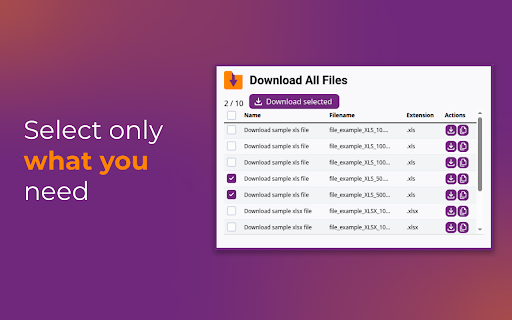

Find and download all files from a website This extension checks the current page and finds items you can download. You can save everything at once or choose only what you need in a single folder. Privacy is important, the extension works only when you open it. It does not track you. All processing is done on your device. Main features • Find downloadable items on the page • Download everything at once or choose specific items • Save everything into one folder to stay organized Pro features • Package downloads into a single ZIP archive • No limits on the number of downloads Useful tool for saving resources from articles, study pages, courses, and archives.

Bulk PDF Downloader – Download All PDFs on a Webpage with One Click
Download all PDF files linked on a webpage with a single click. Download every PDF on any webpage instantly. No more clicking each link individually. Stop wasting time opening PDF links one by one. Bulk PDF scanner and downloader for every website. This extension collect PDFs from any webpage with a single click and bulk download PDFs. Perfect for students collecting research papers, professionals gathering documents, or anyone who works with multiple PDF files. One-click downloads - Find and download all PDFs instantly Smart scanning - Automatically detects all PDF links on any page Time-saving - No more right-clicking or opening tabs manually Speed control - Choose download speed (fast, normal, or slow) Clean interface - Simple, modern design that's easy to use Perfect For: Students downloading research papers and notes Researchers collecting academic documents Professionals gathering invoices, forms, and reports Anyone dealing with multiple PDF files regularly Visit any webpage with PDF links Click the extension icon Press "Scan PDFs" Select All or Specific PDFs to Bulk Download Easily What You Get: ✓ Instant PDF detection and downloads ✓ Works on most standard websites ✓ No ads or unnecessary permissions ✓ Clean, user-friendly interface ✓ Real-time progress tracking ✓ Multiple download speed options Download smarter, not harder. Save time and clicks with Bulk PDF Downloader.

Batch Downloader
Scan a page (or selection) for links/media and bulk download them. Filters by type/extension. MV3. Quickly collect and download multiple files from any webpage in just a few clicks. Whether it’s PDFs, images, videos, or other file types, this extension scans the page (or just your highlighted selection), lists all detected links, and lets you filter and select exactly what you want before starting the downloads. - Scan full page or selected text to find direct file links. - Same-origin filter to limit downloads to the current site. - Copy URLs to clipboard for external use. - Optional subfolder: automatically save files into a specific folder within your Downloads directory. - Uses Chrome’s downloads API for fast, direct downloading with conflict-safe naming. - Works only with files already linked on the current page—no scraping behind paywalls or DRM-restricted content. - Perfect for researchers, students, and anyone who needs to grab multiple files without clicking each link one-by-one. DISCLAIMER: This tool is provided "as is" and "as available" without any warranties, express or implied, including but not limited to warranties of merchantability, fitness for a particular purpose, or non-infringement. Use of this tool is entirely at your own risk. The creator shall not be held liable for any direct, indirect, incidental, consequential, or special damages (including data loss, system failures, or business interruption) arising from its use. This tool is intended for lawful and educational purposes only. The creator does not condone or accept responsibility for any misuse of this tool, including (but not limited to) use that violates copyright laws, terms of service, or other applicable regulations. Users are solely responsible for ensuring their use complies with all applicable laws and rights of others.

Batch Link and File Downloader
Download all files / links from the current webpage. It supports pdf, documents, archives, images, video and other media file. Finds and downloads all files from any webpage with just one click. Perfect for bulk downloading PDF files, documents (Word, Excel, Powerpoint, etc.), images (jpg, png, gif,etc) , archives (zip, rar, tar, etc.), and more. ✨ Key Features 🔍 Smart Detection - Automatically finds all downloadable files on any page ☑️ Selective Downloads - Choose which files to download with checkboxes 🔄 Background Downloads - Close the popup, downloads continue running 🛑 Stop Anytime - Cancel downloads with accurate progress reporting ⏱️ Configurable Delays - Be respectful to servers (0-5 second delays) 📊 Real-time Progress - Visual progress bar with file counts and percentages 🎯 File Filtering - Filter by Documents, Archives, Media, or Code files 🎨 Modern UI - Clean, responsive interface

BulkDownloader
BulkDownloader – Download multiple files from a webpage with one click. BulkDownloader is a powerful Chrome extension that helps you download multiple files from any webpage with just a few clicks. Whether you need to save PDFs, images, videos, or documents, BulkDownloader makes the process fast and easy. Simply paste your list of links, review the files, and start downloading them all at once. Perfect for students, researchers, and anyone who needs to manage bulk downloads efficiently. Download up to 1000 files at once from pasted links Supports all common file types (PDF, images, videos, documents, and more) Modern, user-friendly interface with file-type icons Remove individual links before downloading No folder access issues—downloads go directly to your browser’s default location Paste your links into the input box. Click “Add Links” to review the files. Remove any unwanted links. Click “Confirm & Start Download” to download all files.
