
kenapidglechhkgphplibhcjacaapghd

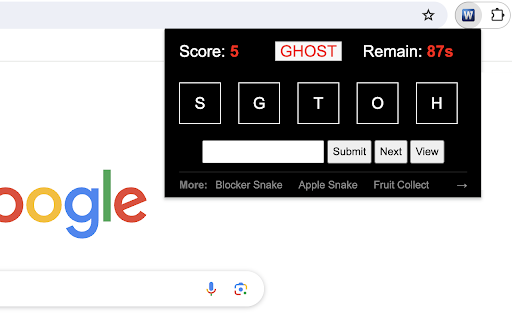


Unscramble letters to form words under a time limit for points. Word Scramble Challenge is an engaging and mind-stimulating game where players unravel the mystery of scrambled letters to form a valid word. The game tests your vocabulary and quick-thinking skills under a time constraint. 1) Starting the Game: When you launch the game, you'll see a randomized set of letters on the screen. These letters are a scrambled version of a non-anagrammatic word (a word that can't form another valid word when its letters are rearranged) that's 5 letters long. 2) Making a Guess: Look at the scrambled letters and try to form a valid word. Type your guess into the provided input box. 3) Submitting Your Answer: Type your guess and click "Submit" to verify it. Correct answers increase your score by 5 points, while incorrect guesses don't affect the score." 4) Keeping an Eye on the Timer: The game begins with a 60-second timer, displayed at the top right corner of the game screen. This timer counts down, and you must try to score as many points as possible before it reaches 0. 5) Game Over: When the timer hits 0, the game is over. An overlay will appear with a "Restart" button. Click the button to begin a new game. The timer will reset to 60 seconds, and your score will reset to 0. 1) Using the "Next" Button: If you're stumped and can't figure out the word, click the "Next" button. This will present a new set of scrambled letters from the pre-prepared word list for you to solve. 2) Viewing the Answer: If you're curious about the correct word for a particularly challenging scramble, click the "View" button. The answer will be displayed at the top of the screen. Tips for Success: - Take quick glances at the letters and trust your first instinct. Often, the correct word might just pop into your mind. - If a word doesn't immediately come to mind, shuffle the letters in your head or on a piece of paper. - Practice makes perfect. The more you play, the better you'll get at spotting words quickly. Have fun playing the word game! If you'd like to play the next level with longer words, simply click related link below the 'Restart' button. Plus, we've showcased our featured game extensions after the game ends to bring you even more fun! CHANGELOG ========== Version 0.1.2 - 0.1.9 - Update word list - Add google analytics - Add next level link - Add featured games after game over - Dynamic update of featured games - Prettify code and styles

Brick Break Game
Bounce the ball to break bricks placed in random locations. Brick Break is an entertaining game where you control a paddle to bounce a ball and destroy bricks. This game combines strategy, precision, and timing, offering endless fun directly from your browser. 1) Click the extension icon in your Chrome browser to open the game. You'll be presented with a 480x480 game area. 2) Game Area Layout: - Paddle: Located at the bottom, it's your tool to control the game. - Ball: Begins in the middle of game area, moving in a random downward direction. - Bricks: Randomly placed at the top of the game area in each round. 3) Controlling the Paddle: - Slide your mouse horizontally across the game area and the paddle will mirror its movement. 4) Game Rule: - The ball bounce off the paddle and left/right/top walls until all bricks are broken or it misses the paddle and hits the bottom wall. - Win: Clear all bricks to win the game. - Lose: The game ends if the ball passes the paddle and touches the bottom wall. - Restart: In case of a win/loss, a "Restart" button will appear. Click this button to reset the game and start fresh. 5) Tips for Success: - Focus: Keep a close eye on the ball and anticipate its bounce angles. - Strategic Positioning: Move the paddle to strategic positions to target hard-to-reach bricks. Give it a try and see how quickly you can break all the bricks! Ready for a challenge? Click 'Play More Levels' below the restart button to try Level-Up mode. Additionally, once you've finished the game, you'll find a selection of our featured game extensions at the bottom, added for your extra enjoyment. CHANGELOG ========== Version 0.1.1 - 0.1.9 - Add google analytics - Add the link of more levels - Show featured games after game over - Dynamic update of feature game list - Prettify code and styles Version 0.1.0 - Initial release of the game

Unique Triangle Hunt Game
Find unique triangle from the grid. This triangle hunt game is a fun and challenging way to test how well you notice details when you're in a hurry. The goal is to find the one unique triangle in a 3x3 grid within 100 seconds. Eight of these triangles are identical, but one is different and marked uniquely. To increase game difficulty, each triangle is rotated randomly, with a black line beneath it indicating its orientation. 1. Just click on the extension icon in the browser, you'll be presented with a grid of nine triangles and a section at the top showing your points and time left. 2. Click on the one you think is different. It will light up red. 3. If you're right, you get 5 points and automatically move to the next round. If you're wrong, keep guessing by clicking on another triangle. 4. You can keep playing to get as many points as you can until the time runs out. - In your quick review of the grid, focus more on any triangle that noticeably differs from the rest in triangle area. - Find the right mix of quickness and precision to boost your score the most. Good luck and enjoy the game! Plus, we've featured our other exciting game extensions after the game ends for even more fun! CHANGELOG ========== Version 0.1.1 - 0.1.7 - Add google analytics - Show featured games after game over - Dynamic update of featured game list - Prettify code and styles

Motion Card Match Game
It is a twist on the classic memory card game. Instead of flipping static cards on a board, cards with symbols (i.e. uppercase letters) will flow from the top of the screen. Match two cards with the same symbol consecutively to score points. Try to score as many points as possible before the cards slip away! 1) Start the Game: Click on the game Chrome extension icon in your toolbar. A popup window will appear displaying the game canvas. 2) Select Cards: Click on any card on the canvas to select it. The selected card will change its color to golden, signaling that it's been chosen. 3) Match Pairs: Once a card is selected, you must quickly find its matching pair from the cards on the screen. Click on the matching card. If you've found the correct match, both cards will disappear, and you'll earn points. 4) Continuous Flow: Cards will continue to flow from the top. If you don't match a card before it reaches the bottom, it will vanish, and you'll lose the chance to score with that card. 5) Score: For every successful match, you'll gain 10 points. The score is displayed at the top-left corner of the game canvas. 6) Endgame: The game doesn't have a set endpoint. The challenge is to see how high a score you can achieve. Have fun playing the card game! For a diverse gaming experience, feel free to explore our other featured game extensions on the Game Over page. CHANGELOG ========== Version 0.1.1 - 0.1.8 - Add google analytics - Show featured games after game over - Dynamic update of featured games - Prettify code and styles

Memory Card Game
Click on the cards to reveal images and find matching pairs! Are you ready to test your memory and matching skills? In this exciting and challenging game, your task is to uncover pairs of hidden images. You will see a grid consisting of 4x4 cards, each hiding an image. The goal is simple: find all matching image pairs! 1. Click on a card to reveal the image hidden beneath it. 2. Click on another card to uncover its image as well. 3. If the two revealed images are identical, their cards will vanish from the board. If not, they will be hidden again. 4. Keep searching for pairs until you've matched all the images. 5. The game ends when you've successfully cleared the board of all eight pairs. Please keep in mind: 1) You can only reveal two images at a time. 2) Pay attention and keep in mind the spots where the two distinct images were displayed. You have only one second before they disappear. Let's get started and enjoy the game! Looking for a challenge? Click 'Next Level' below the restart button to try next levels with more cards. For a variety of gaming experiences, feel free to explore our featured game extensions on the game over page. CHANGELOG ========== Version 0.1.1 - 0.1.8 - Add google analytics - Add the list of featured games - Add the link of next level - Dynamic update of featured game list - Prettify code and styles
