
kelmmbafkjmcbdcmepomfkpmcggakonp

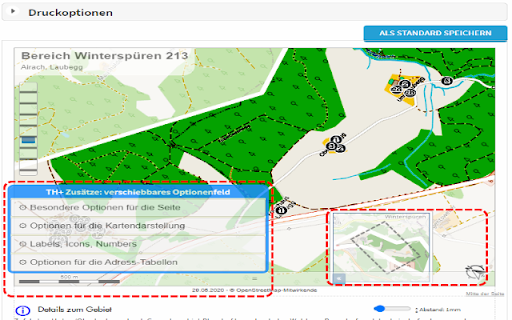
Modify your print-out of territory cards with injected bottons to ROTATE map view, HIDE table elements, TUNE descriptions. This extension was created because I had special needs for my territories. I wished to rotate the maps for better fit in territory-card. I wanted to change some captions... Look my new help- and manualpages on https://thelp.mathesoft.eu -- What does the extension? You visit territoryhelper.com and the extension inject a lot of helpful functions and tools. v3.10: - internal bugfixes and updated libraries - make screenshots from details of the territory card and move them between the address-tables - export some individual territory from the overview map as GeoJson. So you have a backup, or you may import again for not paint again a complex territory border.

List Highlighter for Trello
List Highlighter helps you focus on what you're working on. Trello boards can fill up with multiple lists pretty quickly. List Highlighter helps you make the important ones stand out by allowing you to change the list background colour. For more information, visit the List Highlighter homepage.

ScrollMaps
Allow you to use two finger scroll on your Mac trackpad in online maps. Allow you to use two finger scroll on your Mac trackpad in Google Maps. Install ScrollMaps and you can use two-finger scroll in various online maps. It's designed for Mac trackpads but because of the simple mechanism, it should work on all trackpads, or even a Magic Mouse. To zoom in the maps, simply use the pinch gesture. Inertial Scrolling works on the Mac, as well as on other operating systems that supports it natively. There are additional options in the options page, together with a small embedded map to try out different configurations. Supported maps providers: - Google Maps - MapBox - Esri ArcGIS - Apple MapKit JS - OpenStreetMap - and a few others When ScrollMaps is installed, it asks for permission to access different Google Maps domains so it can activate automatically. Those permissions can be turned off in Chrome's extension settings page, in which case ScrollMaps will only activate if you click on the extension icon on the top right. For other mapping sites, like MapBox, ArcGIS, Apple MapKit JS, and sites using Google Maps API or iframe, ScrollMaps does not activate by default, and requires clicking on ScrollMaps' extension icon. If you click on the browser icon again after activating, a dialog will pop up allowing you to enable ScrollMaps automatically on that domain or on all sites. If there is a bug or anything you want to fix in this extension / in Google Maps, please create an issue at https://github.com/mauricelam/ScrollMaps To activate ScrollMaps on a site outside of the google.com domain, click on the ScrollMaps extension icon to the right of the URL bar. Auto-activate ScrollMaps on all sites you visit, you can click on the icon again and select "Auto-activate on all sites". What's new in 4.0.0: - All permissions are now optional; permission revocations are now fully supported. In the Manage Extensions page in your browser you can now remove ScrollMaps permission to access google.com/maps and maps.google.com. If they are revoked, then you'll need to click on the extension "browser action" icon to grant permission before ScrollMaps can execute. - Updated to Manifest v3

WME Toolbox
Adds many features to the Waze editor IMPORTANT NOTE: If you previously used Tampermonkey to disable CSP so Toolbox can work, that is no longer required. Please change the Tampermonkey setting back to ensure browser security. - Layers menu with following features: - Highlight of level-locked segments - Highlight of manual locks (greater, equal, less than automatic lock) - Highlight segments with positive or negative elevation - Highlight of segments with house numbers - Highlight of named streets without any house number - Highlight of segments/nodes with time restrictions - Highlight of loops - Highlight of roundabouts which may cause issues - Highlight unconfirmed turns - Highlight of U-Turns - Highlight of reverse connections - Highlight of Dead-end loops - Highlight of soft turns - Highlight of TTS override instructions - Highlight of simple segments (which have unneeded geometry nodes) - Toolbar with following features: - Function to hide the left sidebar - Configuration panel for the plugin options - Quick access to keyboard shortcuts editor - Select segments panel to enable multi-selection based on filters - Properties editor panel to modify several segments at a time - Copy segment attributes - Clear road geometry - Cut segment in two - Select all roundabout segments - Redo a roundabout - Convert a roundabout to a standard road - Draw landmark inside a roundabout (to give it a name) - Select segments in place or map comment area - Suppress unneeded junctions on screen - Suppress unneeded geometry nodes on screen - Delete expired restrictions (past ending date) on screen - Auto fix loops - Autofix unconfirmed turns - Auto remove toll attribute on non freeway/ramp segments - Auto fix reverse connections, dead-end and unterminated roads - Auto fix u-turns - And more: - Popups to help new editors on basic editing - Option to hide user greetings on the left sidebar - Option to force fullscreen - New shortcuts for Toolbox features - Enable shortcuts on numpad - Pan the map from screen size Access to individual features depends on user rank and country of editing

Map Overlays
Provides an easy way to change the satellite images displayed in Google My Map and Waze Map Editor. There's several international maps available and some country specific (Romania, Poland, Check Republic, France). After installing the extension, you'll need to pin it to your Chrome toolbar. This will make its icon appear at the top of your browser window. Once pinned, you can use the icon to interact with the layer selection menu and other extension features. There is a shortcut, default Alt+L, to switch between the default layer and selected layer. You can change the keybinding in the chrome settings chrome://extensions/shortcuts Do not use layers for editing the maps unless you comply with the terms of use specific to each layer provider.
