
ihebciailciabdiknfomleeccodkdejn
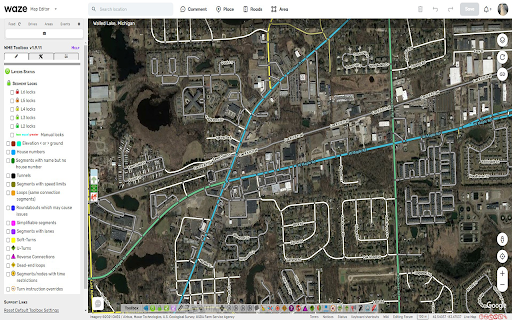
Adds many features to the Waze editor IMPORTANT NOTE: If you previously used Tampermonkey to disable CSP so Toolbox can work, that is no longer required. Please change the Tampermonkey setting back to ensure browser security. - Layers menu with following features: - Highlight of level-locked segments - Highlight of manual locks (greater, equal, less than automatic lock) - Highlight segments with positive or negative elevation - Highlight of segments with house numbers - Highlight of named streets without any house number - Highlight of segments/nodes with time restrictions - Highlight of loops - Highlight of roundabouts which may cause issues - Highlight unconfirmed turns - Highlight of U-Turns - Highlight of reverse connections - Highlight of Dead-end loops - Highlight of soft turns - Highlight of TTS override instructions - Highlight of simple segments (which have unneeded geometry nodes) - Toolbar with following features: - Function to hide the left sidebar - Configuration panel for the plugin options - Quick access to keyboard shortcuts editor - Select segments panel to enable multi-selection based on filters - Properties editor panel to modify several segments at a time - Copy segment attributes - Clear road geometry - Cut segment in two - Select all roundabout segments - Redo a roundabout - Convert a roundabout to a standard road - Draw landmark inside a roundabout (to give it a name) - Select segments in place or map comment area - Suppress unneeded junctions on screen - Suppress unneeded geometry nodes on screen - Delete expired restrictions (past ending date) on screen - Auto fix loops - Autofix unconfirmed turns - Auto remove toll attribute on non freeway/ramp segments - Auto fix reverse connections, dead-end and unterminated roads - Auto fix u-turns - And more: - Popups to help new editors on basic editing - Option to hide user greetings on the left sidebar - Option to force fullscreen - New shortcuts for Toolbox features - Enable shortcuts on numpad - Pan the map from screen size Access to individual features depends on user rank and country of editing

Yandex Map Editor extension
Additional features for Yandex Map Editor Yandex Map Editor extension enhances and simplifies the way you edit the map and search the information required to edit the map. The extension works in browsers based on Chromium (like Google Chrome, Yandex Browser, Opera). The extension allows to: • delete yellow joints of composite polygonal objects; • change transport route attributes in a batch like no exit and no entry options; • create object templates (clone objects) by adding templates to `Recently created` panel; • calculate and set time coefficient for transport routes to set total time to a desired value; • create linked objects (roads, rivers, railway lines) directly by add them as templates to `Recently created` panel; • transliterate object names according to map editor rules of transliteration russian names and serbian names between Cyrillic and Latin alphabets; • open Map editor user profile from Map editor club and Club of moderators; • show a circular cursor with a radius of 4,5 meters when drawing parallel parking; • add links to external map services which are opened with the current coordinates in the map editor; • automatically turn on satellite layer and search in point mode for russian Public cadastral map (Rosreestr) (https://pkk5.rosreestr.ru); • check duplicate name types when saving objects; • display view and edit forms in a compact way; • open map editor panels and Yandex Map in new window with a middle click; • minimize and maximize side panels; • enable dark theme for the Map editor; • search zip codes when creating and editing addresses (works for Russian post only); • display color labels under road type icons; • simplify time input for organizations and maneuvers; • block map movement; • add links to selected text in comments and Yandex.Messenger chats; • use hot keys to switch satellite background and search mode on Rosreestr map. ***New in version 16.0 - implemented option to block map movement, to add link in comments and chats, added hotkey for Rosreestr map. ***New in version 15.0 - implemented simplified time input for organizations and maneuvers. You can check the full history of changes by clicking on a version link at extension settings screen.

Webmapper
Constructs a map of the web using the user's browser history. Webmapper uses your browsing history to construct an interactive, personalized "map of the web as you see it". Every webpage you visit is placed on the map and sized by how often you visit it. Similar pages are grouped into clusters. **Interactive -- click on text to visit pages, or zoom in on domain names** **Zoomable -- use mousewheel / scrolling to zoom in and out on clusters** **Searchable** **Site-Specific -- click on polygons to construct a map specific to a site, e.g. a map of all your Google searches, or Wikipedia entries** **6 quality color palettes** **Map sites visited in the last 10, 20, 30, 50, or 100 days** Developers: Ryan Hamerly, Scott Chung, Sheta Chatterjee, and Milinda Lakkam

JOSM Strava Heatmap
A browser extension that simplifies using Strava Heatmap imagery in JOSM This browser extension makes it easy to use the Strava Global Heatmap in JOSM. Accessing this imagery externally requires a set of key parameters that you obtain by signing into the Strava website, copying the values from several cookies which must be included with imagery requests from JOSM in a custom header. The keys expire frequently and the process must be repeated. This extension gathers the url and cookie values automatically so you can quickly open the imagery in JOSM. Instructions ------------------- 1. Visit strava.com/heatmap and log in – sign up for a free account if you don't have one 2. Optional - Select the heatmap color and activity type you want to use 3. Click the button pictured below 4. Click the Open in JOSM button (JOSM, Remote control must be enabled) Using the imagery in other applications ------------------------------------------- The raw URL pattern and cookie header strings are also exposed for other potential uses. These can theoretically be used in any mapping application that supports adding a TMS imagery source with a custom cookie header like JOSM does.

Map Overlays
Provides an easy way to change the satellite images displayed in Google My Map and Waze Map Editor. There's several international maps available and some country specific (Romania, Poland, Check Republic, France). After installing the extension, you'll need to pin it to your Chrome toolbar. This will make its icon appear at the top of your browser window. Once pinned, you can use the icon to interact with the layer selection menu and other extension features. There is a shortcut, default Alt+L, to switch between the default layer and selected layer. You can change the keybinding in the chrome settings chrome://extensions/shortcuts Do not use layers for editing the maps unless you comply with the terms of use specific to each layer provider.
