
keioddmkdnaghickjojalofmgkgafjfo
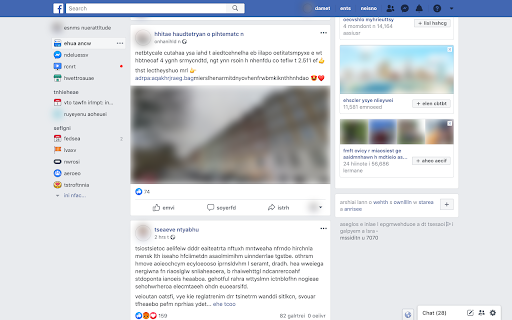

Mask sensitive data in screenshots. Take full page screenshots and export to PNG/JPEG/WEBP using online screenshot editor DataMask extension helps to blur images, scramble text and take website screenshots. DataMask opens screenshots in online editor by default where additional editing can be performed: draw, text blackout and reduce screenshot file size. DataMask is great fit for personal, support and editorial use. DataMask can help to make screenshots for news articles, video reports, graphic assets and support tickets. Free features: auto scramble all text and images on a website, take website viewport screenshot Paid features: edit website text, irreversible blur (blur+), hide parts of a website, take HTML element screenshots and freely draw blur rectangles You can try Pro features with a 7 day free trial by logging in with your Google account. How to use - Open a website - Click on DataMask icon or use the keyboard shortcut. Windows: CTRL+M, MacOS: Command+M Other useful features - Hide action hides DataMask banner without exiting masking mode - ESC keyboard shortcut is the same as Hide action - CTRL+Z undoes last change - Clear action returns website to initial state Permissions - activeTab is used to analyse and edit current tab content to hide sensitive information - storage is used to persist extension settings - sidepanel is used for displaying website script editor - communication with cooperating websites is used to transfer screenshots to DataMask Editor web app (https://datamask.tech/editor/) Follow DataMask updates and provide feedback Twitter: @DataMaskExt Facebook: https://www.facebook.com/datamaskext

Blur. The Image and Video blur extension
A browser extension that blurs all images on a page, for when you want to be discreet or don't want to look at certain images. Celebrating 100,000 installs, we've updated your favourite browser extension with a new look and feel! Here's to many more years of blurring! Watch this space as we continue to roll out new and exciting changes. The Blur Team. We’ve all had those times when we've 'accidentally' searched for something online and ended up seeing images we didn't want to see. Or maybe you’ve experienced browsing Facebook or Instagram at work or in a public place, only to catch someone glancing at your screen. Or perhaps you just want to read an article without being distracted by all the images and videos. Well, now you can. This add-on blurs all images and videos on a webpage, so you can concentrate on what’s important. You can choose to view the content or not. To see or not to see? The choice is yours. Shortcuts: ALT + K: Blur or unblur an image or video when hovering over it ALT + L: To quickly enable or disable the extension Language Support: We now support over 5 languages including English, Mandarin, Russian, Arabic, Bangla, Hindi and Urdu. Simply change your preferences via the settings tab. Themes: Change between light and dark theme or choose the system default. Two additional fun themes have been added, install to find out what they are. Allow list: You can also white list websites, simply open the extension and add the site to your allow list!

Easy Blur
Blur parts of a web page, before taking screenshots or screen recordings Do you often need to mask confidential or sensitive details on a web page? Why spend many hours blurring parts of your videos, when you can blur them before recording? Save time in video editing and post processing! Easy Blur helps you quickly select elements to 👉 Blur one or more elements 👉 Unblur them, if needed 👉 Customise the strength of the blur effect and the keyboard shortcuts Common use cases ✅ Blur sensitive parts when recording product demos and walkthroughs ✅ Blur parts when recording tutorials ✅ Blur parts when recording videos for social media posts This is an open source extension. View source code here: https://github.com/vivek-nexus/easy-blur

Blur Page
Hide sensitive information on page This BlurPage extension provides a different ways to hide any information on the page without leaving your Chrome. It allows you to hide anything on your screen including: 1. Hide multiple words You can hide multiple words in the same or different paragraphs 2. Hide multiple lines It is easy to hide multiple lines at the same time 3. Hide an area You can create an area that you want to hide everything behind 4. Hide an element This is the easiest way to hide an element. Just click a magic icon in the toolbar, and hover on any element on the page There are different effects that you can apply for an area or multiple areas: 1. Blur Make existing areas blurry. It also provides the ability of changing the level of blur 2. Redact Redact areas with different colors 3. Mask Replace text with asterisks In addition to that, BlurPage provides a smart way to manage the areas. 1. Persists areas Prepare areas and reload the browsers by accident! Don't worry, the areas are still there and ready to be blurred! 2. Do more Apply an effect to multiple areas at the same time For more information on the extension, you can visit its official website at https://blur.page

Blur It
Instantly blur sensitive data on any page. Perfect for screen sharing, demos, and tutorials. Hide text, images, or draw blur boxes. Blur sensitive data on any web page before you screen share or record. One click and it's gone. Try 10 free blurs, no credit card required. Blurring sensitive data after a recording wastes hours. Blur it live in your browser, before you hit record. What you see is what your audience sees. → Click to Blur: Hover any element on the page and click. Done. → Draw Box: Drag a custom rectangle over anything you want hidden. → Smart Blur: Auto-detect and blur emails, financial figures, or numbers across the entire page in one tap. → Adjustable Intensity: Soft blur for context, solid block for total cover. → Remember Blurs: Toggle on and your redactions persist across page reloads. Come back tomorrow, your data is still hidden. Gmail, Slack, Salesforce, Stripe, Notion, your internal admin tools. If it loads in Chrome, you can blur it. WHO IT'S FOR → Sales and CS teams running demos with real customer accounts. → Recruiters sharing candidate profiles and salary data. → Content creators and streamers protecting their inbox, API keys, and personal info on camera. → Teachers and trainers building clean educational walkthroughs. Everything happens locally in your browser. Blur It does not collect, store, or transmit your data. Ever. START WITH 10 FREE BLURS Sign up and start blurring. No credit card. Once you hit your limit, unlock unlimited blurs: Use code BLURIT39 at checkout for $10 off lifetime.
