
kefpncodjpjgihfakkgaepbcmfnfljdo
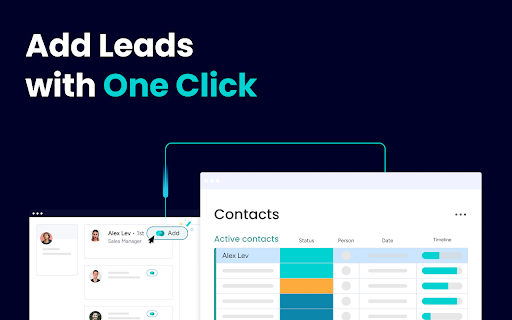

Add contacts, leads, and companies directly to your CRM This extension simplifies your sales process, enabling you to go from inbox to CRM effortlessly, saving time and closing deals faster. • Native to Gmail Access the extension directly within Gmail to capture leads and contacts without switching tabs or applications.

Streak CRM for Gmail
Manage sales and customer relationships directly inside Gmail. Streak is the CRM that lives in your Gmail inbox. Track deals and relationships inside Gmail with Streak CRM. Whether you're a sales professional, business owner, or freelancer, Streak helps you organize emails and close deals without leaving your inbox. ➤ Key Features: 📧 Gmail Integration: Fully embedded in Gmail. Syncs with Google Calendar & Drive. 📊 Customizable Pipelines: Track deals, support tickets, orders, fundraising, and more. 📈 Reports & Analytics: Pipeline status, conversion rates, activity trends, exported for deeper insights. ✅ Task Management: Set reminders, to‑dos, and deadlines. ⚙️ Integrations & Automation: Connect with the apps that power your business and automate repetitive tasks. 💼 LinkedIn Integration: Instantly add leads from LinkedIn to Streak. 🤖 AI Co-pilot: Smart data entry, deal summaries, Q&A, and call & meeting agenda generation. 📬 Email & Link Tracking: See when emails are opened and links are clicked. 📨 Mail Merge + Auto Follow-Up: Send personalized emails to multiple recipients and boost reply rates. 👥 Team Collaboration: Share pipelines, track team progress, and work together in real time. 📱 Mobile Access: Use Streak on the go with Android & iOS apps. 🔒 Enterprise-Grade Security: Built on Google Cloud with rigorous privacy standards. Join 750,000+ professionals who trust Streak to manage their customer relationships and close more deals - right from their inbox. 📌 Install & Get Started 1. Click “Add to Chrome.” 2. Authorize Streak in your Gmail account. 3. Pick a pipeline (sales, hiring, support, fundraising). 4. Import or add leads from your inbox to start tracking conversations and deals

inNotion: Import & Enrich LinkedIn Profiles for Notion
inNotion — Import & enrich LinkedIn profiles to Notion CRM. Get emails, phone numbers, add private notes and automate networking. Import LinkedIn profiles to Notion with automatic email and phone enrichment — no more tab switching. What it does ************* inNotion connects LinkedIn to your Notion CRM via your browser's side panel. Import profiles in one click, automatically enrich contacts with verified emails and phone numbers, automate your live events networking workflow, add private notes and reminders that stay in your browser, not in Notion. Your CRM always stays visible while you browse. No more copying data between tabs. Why it matters *************** Manual CRM data entry is super-slow & boring: open LinkedIn, copy name, switch to Notion, paste, go back, copy company, switch again. Repeat for every field, every contact. inNotion eliminates this. One click imports all profile data. Automatic enrichment adds contact details you'd otherwise search for manually. Side panel means zero context switching. Core features ************** - LinkedIn profile import: One-click People to Notion import from any LinkedIn page - Email & phone enrichment: Automatic contact data retrieval - Live events networking automation: keep the conversation rolling - LinkedIn import - Email/phone enrichment - Contextualized note & follow up reminder - Contextualized LinkedIn invitation message - Real-time sync: Changes appear in Notion immediately - Private notes & reminders: Browser-only storage, not synced to Notion - Side panel workflow: Your Notion CRM stays visible beside any webpage - QR code scanner: Capture LinkedIn profiles at in-person events (mobile) - Multi-database support: Switch between different Notion CRMs Built for ******** - Sales teams tracking prospects - Recruiters managing candidates - Freelancers organizing clients - Anyone running a CRM in Notion. Setup ****** 1- Install extension 2- Connect your Notion database 3- Import your first profile! Privacy ******** Data flows between your browser and Notion only. Private notes stay local. We don't store or access your information. Legal disclaimer ***************** inNotion is not affiliated with, endorsed by, or sponsored by LinkedIn or Notion. LinkedIn™ and Notion™ are registered trademarks of their respective owners. inNotion is an independent third-party browser extension.

Cloze Sidebar for CRM
See everything about your contacts and deals in one place - automatically Emails, files, meetings, phone calls, messages, notes, follow-ups and more. With ZERO data entry. "Best Personal Assistant I have ever used, and I've used them all." - @SealMaster_CO "Fantastic integration across multiple sources to create a single view of your relationships!" - SUJONEROPRJA "I closed three orders in the first 24 hours of use! This has never happened with any other CRM I've tried!" - Nicholas Hughes Cloze is like a personal assistant for your professional relationships that is always prompting you at the right moment and remembering what you don’t. It pulls from your apps to automatically create one view of every person and company - all their contact details, and your complete history - every email back and forth, your phone calls together, meetings, notes, files, social, and messages. It's all organized for you - without any busy work. With everything in one place, Cloze figures out who is important and keeps them top of mind, and will even remind you to reach out to a contact and refresh a fading relationship. CLOZE SIDEBAR¹ • See the context of people, companies, projects, and deals right beside your CRM • CRM's Supported: Salesforce.com, SugarCRM, PipeDrive, HubSpot CRM • Also Supported: Gmail, LinkedIn, Twitter, Github UNIFIED CONTACT MANAGEMENT • Brings all your contacts into one place • Automatically keeps contacts up-to-date • Enrich contacts from email signatures¹ • Organized by when you last talked, first met, location and more PROFESSIONAL-CLASS EMAIL • Bookmark a message and Cloze will remind you to follow-up later • Get reminded if you don’t receive a reply to an important email¹ • Be notified when a recipient opens an email or clicks on a link you sent¹ • Templates: Create and reuse template emails¹ Share them across your team² • Mail merge: Personalize email sent to many people at the same time¹ • Scheduled send: Write your email now, have Cloze deliver it later¹ • Supports Gmail, iCloud, Office365, Exchange, Outlook, Yahoo!, IMAP CRM WITHOUT THE BUSY WORK • Track the activity around projects and deals automatically¹ • Automatic reminders when it’s time to reach out to key contacts¹ • Next steps: Automatic reminders of what's next for any deal • Add To-Dos to track things you have to get done¹ • Agenda: one place to see all your meetings, reminders and follow-ups¹ • Pipeline: see all the email, calls, files, notes, meetings, and to-dos related to any deal in your pipeline¹ • Company views: see your complete history with a company without any setup¹ ONE VIEW OF EVERYTHING • Emails: Automatically organizes mail by people, company, project and deal • Calls: Automatically log your calls (AT&T, Verizon, T-Mobile USA, Sprint, RingCentral)¹ • Files: Automatically link files to your contacts (Dropbox, Google Drive, OneDrive, Slack)¹ • Notes: Automatically match notes to contacts (Evernote, OneNote)¹ • Messages: Track your Slack conversations about your clients and customers¹ • Calendar: Meeting context at your fingertips (Google Calendar, Office365, Exchange, Outlook, iCloud)¹ • Social: Twitter posts, Facebook and LinkedIn page activity AWESOME SEARCH • Search for contacts the way you think (“marketers at IBM”) • Organize and find contacts and deals by keywords • One place to search across Gmail, Google Calendar, Google Drive, Office365 mail and OneDrive, Slack, Dropbox, Evernote¹ WORK AS A TEAM² • One team-wide view of all communication for every deal and project • Always know who last talked to any customer, client, or prospect • Assign and track who's responsible for contacts, next steps and to-dos • Manage your all of your company's contacts, projects and deals in one place Cloze is free to use. ¹ Cloze Pro adds these features and is available as a 14-day no-obligation free trial or by monthly or annual subscription as an in-app purchase. ² Your Cloze Pro subscription entitles you to all Cloze Business features. Prices vary by location. Subscriptions will be charged to your iTunes account and will automatically renew unless cancelled at least 24 hours before the end of the current period. Once paid, a subscription is non-refundable for that period. Cloze is available on Chrome, iOS, Android and the web - your account works everywhere. • We won't spam your contacts • We won't sell your information • It's your information not ours

PromptLab - LinkedIn prospecting powered by AI
Stop copy-pasting LinkedIn into your CRM. PromptLab syncs contacts, companies, and messages automatically. PromptLab's Chrome extension brings your CRM directly into LinkedIn's side panel. Visit a profile, open a message thread, or browse a company page — and your CRM is right there, ready to act. ⚡ ONE-CLICK CONTACT & ACCOUNT CREATION Visit any LinkedIn profile and instantly see if they're already in your CRM. Add new contacts in one click — PromptLab automatically creates the company account, links the contact, and fills in title, employer, and company details. No duplicates. No manual entry. 💬 AUTOMATIC MESSAGE SYNC Open any LinkedIn conversation and PromptLab syncs it to the contact's CRM record in real time. Every message logged automatically. Nothing falls through the cracks. 🏢 COMPANY PAGE RECOGNITION Browse a LinkedIn company page and add or match the account in your CRM instantly. Industry, size, headquarters, and website — extracted automatically. 🎯 BUILT FOR SALES TEAMS Your reps spend hours a day on LinkedIn. PromptLab turns every profile visit and every conversation into a CRM action — without friction, without switching tools. WHO IS IT FOR? Sales teams using PromptLab CRM who prospect and communicate on LinkedIn daily. REQUIREMENTS A PromptLab account is required. supplier.trypromptlab.com PRIVACY This extension only activates on linkedin.com. It does not collect, sell, or share your personal data. Led with the user benefit, not the feature list Added bold section headers with emojis (Chrome store renders these well and Waalaxy uses this exact pattern) Compressed the wall of bullet text into scannable sections Added a "who is it for" section — this converts browsers into installers Removed the technical permissions section from the main copy (it reads like a legal disclaimer mid-pitch) Tightened the value prop: "every profile visit becomes a CRM action" is concrete
