
lfbajboiahaecepobmkcpadfeojchmmf


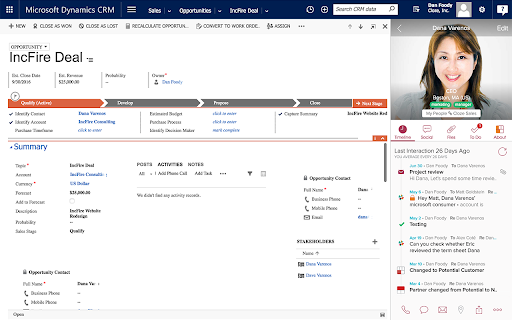

See everything about your contacts and deals in one place - automatically Emails, files, meetings, phone calls, messages, notes, follow-ups and more. With ZERO data entry. "Best Personal Assistant I have ever used, and I've used them all." - @SealMaster_CO "Fantastic integration across multiple sources to create a single view of your relationships!" - SUJONEROPRJA "I closed three orders in the first 24 hours of use! This has never happened with any other CRM I've tried!" - Nicholas Hughes Cloze is like a personal assistant for your professional relationships that is always prompting you at the right moment and remembering what you don’t. It pulls from your apps to automatically create one view of every person and company - all their contact details, and your complete history - every email back and forth, your phone calls together, meetings, notes, files, social, and messages. It's all organized for you - without any busy work. With everything in one place, Cloze figures out who is important and keeps them top of mind, and will even remind you to reach out to a contact and refresh a fading relationship. CLOZE SIDEBAR¹ • See the context of people, companies, projects, and deals right beside your CRM • CRM's Supported: Salesforce.com, SugarCRM, PipeDrive, HubSpot CRM • Also Supported: Gmail, LinkedIn, Twitter, Github UNIFIED CONTACT MANAGEMENT • Brings all your contacts into one place • Automatically keeps contacts up-to-date • Enrich contacts from email signatures¹ • Organized by when you last talked, first met, location and more PROFESSIONAL-CLASS EMAIL • Bookmark a message and Cloze will remind you to follow-up later • Get reminded if you don’t receive a reply to an important email¹ • Be notified when a recipient opens an email or clicks on a link you sent¹ • Templates: Create and reuse template emails¹ Share them across your team² • Mail merge: Personalize email sent to many people at the same time¹ • Scheduled send: Write your email now, have Cloze deliver it later¹ • Supports Gmail, iCloud, Office365, Exchange, Outlook, Yahoo!, IMAP CRM WITHOUT THE BUSY WORK • Track the activity around projects and deals automatically¹ • Automatic reminders when it’s time to reach out to key contacts¹ • Next steps: Automatic reminders of what's next for any deal • Add To-Dos to track things you have to get done¹ • Agenda: one place to see all your meetings, reminders and follow-ups¹ • Pipeline: see all the email, calls, files, notes, meetings, and to-dos related to any deal in your pipeline¹ • Company views: see your complete history with a company without any setup¹ ONE VIEW OF EVERYTHING • Emails: Automatically organizes mail by people, company, project and deal • Calls: Automatically log your calls (AT&T, Verizon, T-Mobile USA, Sprint, RingCentral)¹ • Files: Automatically link files to your contacts (Dropbox, Google Drive, OneDrive, Slack)¹ • Notes: Automatically match notes to contacts (Evernote, OneNote)¹ • Messages: Track your Slack conversations about your clients and customers¹ • Calendar: Meeting context at your fingertips (Google Calendar, Office365, Exchange, Outlook, iCloud)¹ • Social: Twitter posts, Facebook and LinkedIn page activity AWESOME SEARCH • Search for contacts the way you think (“marketers at IBM”) • Organize and find contacts and deals by keywords • One place to search across Gmail, Google Calendar, Google Drive, Office365 mail and OneDrive, Slack, Dropbox, Evernote¹ WORK AS A TEAM² • One team-wide view of all communication for every deal and project • Always know who last talked to any customer, client, or prospect • Assign and track who's responsible for contacts, next steps and to-dos • Manage your all of your company's contacts, projects and deals in one place Cloze is free to use. ¹ Cloze Pro adds these features and is available as a 14-day no-obligation free trial or by monthly or annual subscription as an in-app purchase. ² Your Cloze Pro subscription entitles you to all Cloze Business features. Prices vary by location. Subscriptions will be charged to your iTunes account and will automatically renew unless cancelled at least 24 hours before the end of the current period. Once paid, a subscription is non-refundable for that period. Cloze is available on Chrome, iOS, Android and the web - your account works everywhere. • We won't spam your contacts • We won't sell your information • It's your information not ours

DragApp: Gmail shared inbox
Turn Gmail into a collaboration tool for teams to manage shared inbox, Help Desk, CRM, Task Management and more from Gmail. Bring email collaboration, workflow automation and individual productivity into your Gmail inbox. Built for Google Workspace users. ✓ Manage shared inboxes or Google Groups like support@, sales@ or info@. ✓ Use shared boards in Kanban, list or preview views to create all types of workflows in Gmail. ✓ Know who is working on what with email assignment. ✓ Collaborate with team members within the context of a specific task with internal live chat and email comments. ✓ Create automation rules for your workflows. ✓ Create custom fields to add information specific to your company’s workflows. ✓ Personalize email templates and follow-up email sequences. ✓ Report on individual and team performance with email analytics. ✓ Integrate Drag to 5,000+ apps via Zapier. ✓ Manage workflows on the go with a mobile app. Watch our demo: https://www.dragapp.com/watch-demo/ Speak to a Customer Champion: https://www.dragapp.com/demo/ Read real customer stories: https://www.dragapp.com/customer-success-stories/ Refer Drag and get paid: https://www.dragapp.com/referral-program/ 🧮 Boards Use shared boards for different workflows, from a simple Help Desk and CRM to a Marketing board. 🙋♂️ Email Assignment Assign emails and tasks to the best-placed team members. You can see, at a glance, who’s working on what. 🎤 @mentions @mention your team to start a real-time chat with a team mate within the context of a specific email or task. 💬 Team chat A private space for you and your team to add email comments and context to any conversation. 📨 Shared drafts Work together on email replies. Write a draft reply and have a colleague check it before sending. 🏷️ Shared labels Share labels and organize your boards across your team with shared labels. ✅ Tasks Not everything comes as an email, sometimes there’s a separate task. You can add tasks directly to your inbox. 📤 Email templates Quickly select templates to send, instead of having to write them from scratch over and over again. 🕹️ Automations Easily automate repeatable workflows. Automatically send emails to boards, assign emails and create tasks for your team. 📊 Email analytics Understand what’s happening on boards. Get insights into how productive you and your team are. 📱Custom fields Custom fields have all of the different field types that you may need to organize your cards. For example ‘deal value’ for Sales CRM or ‘ticket criticality’ for Help Desk. 📁 File upload Share files with your team – upload all sorts of files to cards to close things faster. 🗂️ Merge cards Merge cards into collections to save time and energy. Group different emails and tasks into one single card to better manage your work. 🕵️ Email tracking Know who’s viewing your emails and when. Think WhatsApp’s ‘double-tick’ technology. 🧘 ”Reply as” Reply or compose new emails as yourself, your team, or as the shared inbox address such as sales@ or support@. 🚧 Collision detection Sometimes your team tries to do the same thing at once. Drag detects this and notifies users when they’re both working on the same thing. 📕 Email notes Can’t remember some details? Add notes to any email so you always have information to hand. ☑️ Checklists Most emails come with things to get done. Separate these out and add them as actionable tasks. 📆 Due dates Is there a deadline – something you need to get done by a date? Keep things on track by adding a due date. 🍭 Color coding Get a better overview of your boards by color-coding them based on time zones, urgency levels, or anything that works best for you. 🗄️ Activity log Get a full history of all actions on a board (and on a specific card). Learn what and when you need to deal with an email or task. 📇 Sort & filter Sort and filter boards so that you can focus on the things that matter most. By person, statuses, colors, labels, you pick how to filter boards. 🔗 Card and board permalinks Generate card and board links and use the URLs anywhere. Used for: ✓ Shared Inbox ✓ Help Desk & Customer Support ✓ Sales CRM ✓ Task Management ✓ Finance ✓ Operations ✓ Human Resources and Recruiting ✓ Project Management ✓ Customer Onboarding ✓ Marketing ✓ Remote Work ❤️ Trusted by over 30,000 professionals around the World. PRIVACY & GDPR We are committed to respecting everyone’s privacy and design our services in order to best achieve this.If you have questions, please email us at access@dragapp.com. For more details, please see https://dragapp.com/privacy and https://dragapp.com/gdpr. By installing this extension, you agree to DragApp's Terms and Conditions (www.dragapp.com/terms) and Privacy Policy (www.dragapp.com/privacy). Copyright © DragApp DragApp is not affiliated with Google or any Google-related services.

Gmelius: Shared Inboxes & AI Email Assistants for Gmail
Save 1 hour daily: AI Assistants sort your emails, draft replies & shared inboxes let your team take over conversations for you. Gmelius is the AI-powered email management platform built natively for Gmail. It lets generative-AI assistants sort, draft replies and dispatch messages, offers shared inboxes and shared labels inside Gmail, and keeps everything in perfect sync across your team and tools. ✨ AI Assistants for Gmail – Reply, Sorting and Dispatch agents cut routine email work by an hour a day. 📨 Shared Inbox inside Gmail – manage support@, sales@ or any group address with clear open → pending → closed statuses, assignees, tags, @mentions and notes. 🏷 Shared Gmail Labels – turn any Gmail label into a live thread your whole team can follow. 🎛 Custom views – flip an inbox or label into specific views depending on your operational needs. 🤖 Automation rules and SLA timers – create “If-This-Then-That” flows, auto-assign owners and stay inside promised response times. 📊 Analytics dashboards – track volumes, resolution time and teammate workload at a glance. All features live where you already work, so your team keeps its Gmail muscle memory and gains new productivity super-powers. ✨ Highest Star Rating in our Class. 🏆 Leader of the shared inbox space. 🚀 Y Combinator S19 This is our browser extension that completes our solution for Gmail and Google Workspace customers. Key features: ✨ AI Assistants for Gmail: Meet AI assistants whose job it is to manage your Gmail inbox. ✓ AI Reply Assistants - They draft replies to your emails. ✓ AI Sorting Assistants - They sort and classify your incoming emails. ✓ AI Dispatching Assistants - They route emails to the right teammates. 📨 Shared Inbox: Transform Gmail into a collaboration platform. Make great teamwork possible in Gmail by reinventing how your team manages inboxes like support@ or invoices@. Replace cluttered Google Groups and help desks with a shared inbox built for Gmail. Discover the smartest alternative to Google Groups, Help Desks, Hiver, Front, etc. 🏷️ Gmail Shared Labels ✓ Share existing or new Gmail labels with members of your team ✓ Synchronize conversations in real-time across all devices (e.g., mobile, desktop) 👥 Team Collaboration ✓ Real-time syncing across all devices ✓ No more bcc nor fwd! ✓ Email Notes and @mentions to add context to any conversation ✓ Assign or delegate emails to members of your team 🤓 Workflow Intelligence ✓ Automate repetitive tasks with rules for internal and external workflows ✓ SLA rules, auto responder, auto assignment and more ✓ Ex: “when this email gets answered add automatically reply and assign it to that team member” 📧 Shareable Email Templates for Gmail ✓ Make email writing easy and fast ✓ Improve your team's consistency and performance ✓ Proposal, Sales, Marketing, Custom Templates - easily created and shared Swiss-grade privacy and security Headquartered in Switzerland, Gmelius follows a strict Privacy-by-Design framework. Your data stays confidential, is securely processed, and is never used to train AI models. Explore our Trust Center any time. For more details, please see https://gmelius.com/legal/security Install the extension, start your 7-day free trial, and see how AI + Gmail can unlock real email productivity for your team. Need a guided tour? Book a demo at gmelius.com/request-demo =============================== © Gmelius. Less Email. More Life. Gmail is a registered trademark of Google Inc.; Gmelius is not affiliated with Google.

Folio: Manage Real Estate Deals from Gmail
Create and share real estate closing timelines from your Gmail inbox. Integrates seamlessly with Google Drive and Calendar. Folio helps real estate agents stay on top of transactions from Gmail™ and integrates seamlessly with Google Drive™ and Google Calendar™. Folio lives where you already work – in Gmail™ – and uses AI to automatically know which emails are related to a real estate transaction - making it quick and easy to create timelines that you can share in one click with clients and colleagues. Folio helps you keep your deals on track with transaction timelines and reminders that are integrated into your Google Calendar™. By organizing all relevant emails, documents and contacts into Smart Folders, Folio makes it easier for you to find important things. Never search for a document, email, or file again. It’s all right there! HOW FOLIO WORKS: 📬 Connect Folio to your work Gmail™ inbox. 📂 Using AI, Folio will organize emails, files, and contacts for each transaction into a Smart Folder. 💼 Folio will show a sidebar in your Gmail™, allowing you to manage the transaction timeline, share it with clients, assign tasks, and more. 📆 Automatically sync important transaction milestones to your Google Calendar™ and attachments to Google Drive™ to stay on schedule and organized. 💚 WHY OVER 100,000 REAL ESTATE AGENTS LOVE FOLIO ➤ Look like a pro! Save 20+ hours per deal ➤ Create and share professional closing timelines with your clients in seconds ➤ Manage events and delegate tasks straight from Gmail™ ➤ Customizable closing timelines and custom transaction templates to save you time ➤ Visualization on the go - use the Folio web app from any mobile device ➤ Automatic organization of emails into Smart Folders by transaction ➤ Google Calendar™ Integration - never miss a meeting, inspection, appraisal, or deadline ➤ Google Drive™ Integration - auto sync attachments and documents to dedicated folders ➤ Google Contacts Integration - no new contacts database, everything in one place ➤ DocuSign Integration - get all the signatures you need straight from your inbox 💡 FOLIO FREE PLAN: ✓ Manage up to 3 transactions at a time for free ✓ Shareable timeline webpage and email organization for each deal ✓ Reminders, notes and tasks straight from your email ✓ Sync all events/tasks with your Google Calendar™ ✓ Sync contacts for up to 3 Smart Folders ➡️ FOLIO PRO: ✓ Everything in Free Plan + ✓ Manage unlimited transactions and Smart Folders ✓ Unlimited custom timeline templates to save you even more time ✓ Unlimited contacts for every Smart Folder ✓ DocuSign integration to get all needed signatures from Gmail™ ✓ Automatic attachment syncing to Google Drive™ ✓ One-click to export entire transaction history into a PDF ✓ Customizable image background and logo for your timelines ⭐️ WHY FOLIO? ★ More than 100,000 real estate agents trust Folio to help them impress their clients and get more referrals ★ 4.7 star rating – read the reviews! ★ 2.5 billion emails organized and counting ★ 1 million+ hours saved by workflow compression 🔐 SECURITY & PRIVACY ✓ Security and privacy practices audited and approved annually by Google’s Trust and Safety team ✓ Personal data privacy: CCPA compliant ✓ Bank-level 256-bit security ✓ Annual security review conducted by Bishop Fox - the largest private professional services firm focused on offensive security testing 🎯 WHO IS IT FOR? - Real Estate agents who manage multiple deals - Real Estate agents who need to impress their clients, look like pros and get more referrals 💻 If you have any problems or feedback regarding Folio, write to us at support@amitree.com

ActiveInbox: Organize Gmail™ tasks
Overwhelmed by too many to-dos in your inbox? Turn Gmail into an effortless task manager to never forget anything. Turn Gmail into a task manager, and take control of all your conversations. Our mission is simple really... we want to give all of us the tools to achieve meaningful happiness. Our business supports this by making elegant software, infused with proven psychology, to help us all absorb the shocks of life and become truly effective. DESIGNED FOR EXECS, MANAGERS & FOUNDERS ActiveInbox has a free trial to get a taster of being in control. It's "A 'must try' if you want to easily keep yourself on track in an undoubtedly busy world" - Richard Gaspar ActiveInbox works where you already do: in Gmail and on mobile. There's no need to adopt a new tool to accomplish... Stop emails sinking into the inbox swamp by turning them into tasks with due dates and adding them to projects. Don't 'send and pray' emails you spent precious time writing. Deliver at the time they'll be read and let ActiveInbox track them to completion. Achieve inbox zero, then glide through your day, by having just one place to focus on emails and tasks, and breaking your Today list into digestible chunks. Oh, and we're the original Gmail plugin - ActiveInbox has been supporting customers since 2006.
