
kechpelddjhfgkniaobipdlbbfleajoj

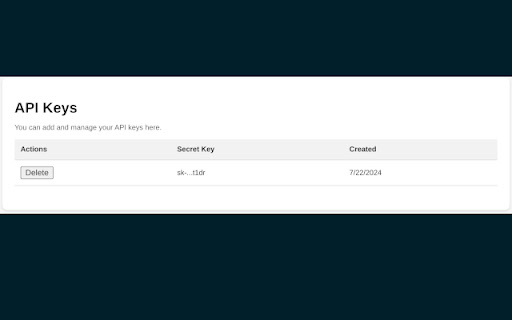
A minimalist Chrome extension to summarize websites. ### Website Summarizer - A Chrome Extension to Summarize Web Pages Website Summarizer is a minimalist Chrome extension that allows users to summarize web pages or selected text on a web page. This extension leverages OpenAI's GPT-4o-mini model to provide quick and accurate summaries, making it easier to digest large amounts of information. **Features:** - Summarize the entire web page or selected text. - Preview the text that will be summarized. - Clear the summary and preview text. - Maintain a history of the last 10 summaries. - Expand/collapse summaries in history and delete unwanted history items. - Easy management of OpenAI API key through a user-friendly settings page. **Installation Instructions:** 1. Click on the Website Summarizer extension icon in the Chrome toolbar. 2. Select text on a web page and click "Summarize Selected Text" or "Preview Selected Text". 3. If no text is selected, you can summarize the entire page by clicking "Summarize Page" or preview the page content by clicking "Preview Page". 4. Manage your API key in the settings page accessible from the extension popup.

Chrome Notes
A simple notepad extension for Google Chrome NEW: You can now use speech to text NEW: You can now open Chrome Notes with Ctrl+Shift+X (Command+Shift+X on mac) NEW: You can now download and upload complete backups NEW: Chrome Notes adds a right click menu option to send the selected text to a new note! NEW: You can now have multiple notes! NEW: You can now customize the font size! A simple notes extension, right in your browser! Easily copy around a few words to and from different browser windows and other apps. Thank you for over 100,000 users, 100 ratings and 4.5 stars! Chrome Notes remembers your notes and mode, even after closing your browser or restarting your computer! Notes are stored in local storage, so nobody else will ever see them, not us, and not Google, Microsoft, or Apple. Features: * Resizable notepad * Shortcut buttons for cut, copy, paste, and select all * Normal keyboard shortcuts work too * Save as a .txt file * Open in new window * Speak selected text out-loud * Remembers last notepad size for you next time * Store multiple notes, and quickly create, edit, share, or delete * Focus mode for distraction free writing * Adjustable font size * Right click and send selection to new note * Download and upload full backups * Speech to text (click the mic and speak to put your words on the notepad) * Keyboard shortcut Ctrl+Shift+X (Command+Shift+X on mac) to open Chrome Notes is the smart, simple notepad built for you 😊

XML Sitemap
A Chrome extension to view the sitemap of any website. This Chrome extension XML Sitemap allows you to easily view the sitemap of any website you visit. Simply click the extension icon, and it will attempt to fetch and display the sitemap from the current website's domain. This tool is particularly useful for web developers, SEO specialists, and anyone interested in exploring the structure of a website. Key Features: Automatic Sitemap Detection: The extension checks for the presence of a sitemap at the standard location (/sitemap.xml) for the current website. User-Friendly Interface: The sitemap is displayed in a clean and readable format, making it easy to navigate and find specific URLs. Cross-Domain Compatibility: Works with most websites, regardless of their domain or protocol. How to Use: Install the Extension: Add the Sitemap Viewer to your Chrome browser. Visit a Website: Go to any website you want to explore. Click the Extension Icon: Click the Sitemap Viewer icon in your toolbar to view the sitemap. This extension simplifies the process of accessing and viewing sitemaps, making it a valuable tool for anyone working with websites.

summarize.me — Gmail Summarizer
A chrome extension that shortens long emails into concise summaries. If you are tired of reading long and boring emails and missing important information in emails, use summarize.me! How to use it? ✓ Simply select the portion of the email that you want to shorten ✓ Go to the summarize.me extension button ✓ Click "Summarize" in the popup ✓ See the result inside the extension popup! [IMPORTANT NOTE] - summarize.me extension currently supports only chromium-based browsers such as Chrome and Brave. - summarize.me shortens emails based on extractive summarization principle! This means that the extension will not paraphrase or change the meaning of emails, but rather extracts key sentences from the given email. - summarize.me works perfectly with English language. Unfortunately, the application doesn't work flawlessly with other languages. [WHAT'S NEW?] Update 1.0.0 - Now, you are able to use the summarize.me features right inside the Gmail application with no need to open the extension popup constantly. To use this feature, simply open the extension once before you session, and enjoy this feature!

Shortcut Organizer
Chrome extension offering a sleek and customizable dashboard to organize your web shortcuts. Shortcut Organizer is a Chrome extension designed to enhance your browsing experience. It replaces the default start page with a sleek and customizable dashboard, allowing you to manage your shortcuts in an organized and efficient way. With Shortcut Organizer, you can create, rename, and reorganize your folders using an intuitive drag-and-drop feature. You can also add or edit shortcuts with custom labels and URLs, move shortcuts between folders, or even add a shortcut directly by clicking on an icon in the navigation bar. Additionally, you can customize your start page with a background image of your choice. The extension automatically fetches website icons, providing a clean and visually appealing display. Available in both English and French, Shortcut Organizer adapts to your needs with a seamless multilingual experience. Key Features: - Create, rename, and reorganize your folders easily with drag and drop. - Add or edit shortcuts with custom labels and URLs. - Move shortcuts between folders with an intuitive drag-and-drop feature. - Add a shortcut directly by clicking on an icon in the navigation bar. - Customize your start page with a background image. - Shortcuts automatically fetch website icons for a clean and aesthetic look. - Available in English and French to suit your preferred language. Why Choose Shortcut Organizer? - Ease of use: An intuitive interface, perfect for all users. - Efficient and organized: Save time and quickly access your favorite links. - Advanced customization: Personalize your start page to match your style and needs. - Open source: Contribute to the project's evolution and share your ideas on GitHub.
