
kgbcbbbcmkfnpebdllbppcofhmfeabol

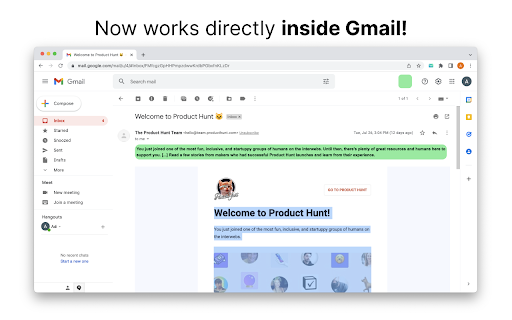
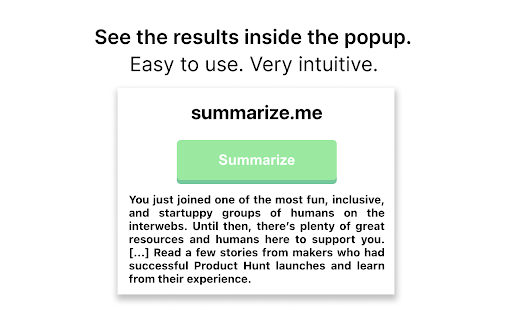
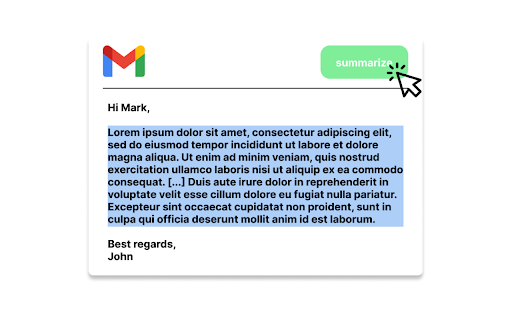
A chrome extension that shortens long emails into concise summaries. If you are tired of reading long and boring emails and missing important information in emails, use summarize.me! How to use it? ✓ Simply select the portion of the email that you want to shorten ✓ Go to the summarize.me extension button ✓ Click "Summarize" in the popup ✓ See the result inside the extension popup! [IMPORTANT NOTE] - summarize.me extension currently supports only chromium-based browsers such as Chrome and Brave. - summarize.me shortens emails based on extractive summarization principle! This means that the extension will not paraphrase or change the meaning of emails, but rather extracts key sentences from the given email. - summarize.me works perfectly with English language. Unfortunately, the application doesn't work flawlessly with other languages. [WHAT'S NEW?] Update 1.0.0 - Now, you are able to use the summarize.me features right inside the Gmail application with no need to open the extension popup constantly. To use this feature, simply open the extension once before you session, and enjoy this feature!

Briefly: AI meeting summary & email follow up
Capture meeting notes, transcribe, summarize and gather insights without distraction. Capture meeting notes, transcribe, summarize and gather insights without distraction. Let Briefly take your meeting notes, organize your thoughts, and be more focused during meetings, all within your browser. Briefly makes it easy to be more productive after meetings by generating summaries, action items, and composing thoughtful follow-up emails. It simplifies your post-meeting workflow by transforming your conversations into a variety of polished project documents like product requirements, marketing briefs, sentiment reports, investment memos, and more. Briefly works where you do. Update your CRM directly from Slack after receiving and reviewing meeting summaries and insights from your latest call. ✅ Never miss a thing Briefly transcribes all your meetings and categorizes them based on the topics and content covered. Capture important points with our voice-activated notes feature. Get your summaries delivered to your inbox after every call to make it easier to organize your meeting notes for a later time. 💡Objective summaries and takeaways Briefly uses AI to generate comprehensive summaries from transcriptions, identify key insights grouped by topic and personalized action items, so you don't have to comb through transcripts to synthesize notes. ✍️ Personalized follow-ups Timely correspondence and accurate action items can lead to higher close rates and follow-up meetings booked. Briefly automatically crafts compelling customized follow-up messages from the contents of your meeting. Send them out right after your meeting is over so you can save time when you’re in back-to-back meetings. 💼 Sync your CRM Keep all customer interactions in sync. Automatically sync meeting notes with customer contacts in either Salesforce or Hubspot using Slack. 📝 Craft your project docs Input your custom prompt and let Briefly convert your transcript into the requested document. Browse our popular templates, and tailor them until your results are perfect. Make the most out of the knowledge shared in conversation by using different prompts to draft multiple docs per call. 🥷 Unintrusive Briefly does not add a “ghost” note-taker into your meeting, and does not require you to record the meeting, allowing you to stay focused and not be distracted. 📑 No matter what platform you take your calls on, import your meeting transcripts from Zoom, Microsoft Teams, or any other platform directly to Briefly. Upload reports, articles, and any other text files and turn them into summaries and project documents via your dashboard. 🪄Briefly is great for: Product and Engineering Sales Marketing Customer Success Venture Capital 📌 How to Get Started: 1. Install Chrome Extension and pin the icon to your toolbar. 2. Sign in with Google. 3. Start your Google Meet and under Current Call, click “Start transcribing this meeting”. 4. After the call, open the Briefly extension and click the “Past Call” tab to view the transcripts and AI summaries for all your calls. 5. Click the AI follow-up tab to view the follow-up email and edit it from your Gmail inbox. 6. Check your spam if you’re not receiving your recaps shortly after the call. Your recaps are only sent to you. 7. To access your dashboard, go to the Past Calls tab by clicking "Create on web" or visit: https://app.brieflyai.com ** Important Note: Your transcripts, conversations, and summaries are NOT stored or collected by Briefly. Briefly is powered by OpenAI’s GPTchat.

AI Email Writer for Gmail - Letty
Write perfect emails in your own style with your personal AI email assistant Are you tired of spending hours drafting emails or finding the right words to reply? Letty, your personal AI email assistant, is here to save you time and boost your productivity. Powered by advanced AI, Letty helps you craft perfect responses, whether you're writing business emails, customer support replies, or everyday messages. With Letty, you’ll never have to struggle with email communication again. ✔️ **AI-Powered Email Writing**: Letty drafts emails and replies based on the context of your conversations, ensuring accuracy, tone, and style that match your personal or business needs. ✔️ **Smart Replies**: Get instant AI-generated replies that understand the context of your email threads. Whether you need a quick response or a detailed reply, Letty has you covered. ✔️ **Advanced Editing Tools**: Enhance your emails with smart editing features, from minor corrections to complete rewrites. Letty ensures your communication is always professional and polished. ✔️ **Tone Customization**: Adjust your email tone with ease. Whether you're aiming for formal, friendly, or something in between, Letty helps you strike the right balance every time. ✔️ **Language Support**: Perfect for non-native speakers—write flawless emails in English or translate messages with ease to avoid misunderstandings. ✔️ **Busy Professionals**: Spend less time writing and more time on important tasks. Letty’s smart suggestions help you manage multiple email threads efficiently. ✔️ **Customer Support Teams**: Respond quickly and accurately to customer inquiries, boosting satisfaction and loyalty with timely, well-crafted responses. ✔️ **Non-Native English Speakers**: Communicate confidently in English with Letty’s translation and editing tools, ensuring your emails are clear and error-free. ✔️ **Executives & Entrepreneurs**: Keep up with high email volumes without sacrificing professionalism. Letty helps you personalize responses and manage your inbox effectively. ✔️ **Freelancers**: Improve client communication with fast, professional responses that help you win more business. Letty is more than an AI tool—it’s your productivity partner. With personalized email drafting, smart replies, tone customization, and the ability to learn your unique writing style, Letty helps you get more done in less time. 1. **Install Letty** from the Chrome Web Store. 2. **Link your Gmail account** to Letty. 3. **Start composing or replying** to emails with Letty’s AI-powered suggestions, right inside Gmail. Your privacy is our top priority. Letty uses industry-standard encryption and never stores your email data. It simply analyzes the context of your conversations to generate replies without retaining any personal information. ✔️ **Which platforms does Letty support?** Letty is currently available for Gmail, with support for Outlook and Zoho coming soon. ✔️ **Can I customize Letty’s suggestions?** Yes! You can tailor Letty’s suggestions to match your preferred tone and style. ✔️ **Does Letty store my email content?** No, Letty does not store your email messages. It uses real-time context from your emails to generate replies without retaining any data. ✔️ **Need help?** Contact us at support@useletty.com for assistance.

Gmail Summary
Get email summaries with a single hover. Our Chrome extension is here to save you time and streamline your inbox. With just a quick hover over the icon, you can get a summarized version of any email - in any language! Try it now for free and revolutionize the way you manage your emails. You'll wonder how you ever lived without it. And the best part? It's totally free! PS.: It also summarize your emails that are not in english!

AI-Powered Email Summarizer
Summarize emails using AI to extract key points and suggest responses AI Powered Email Summarizer Extension Struggling with email overload? Our AI-Powered Email Summarizer is here to help! This Chrome Extension plugs right into Gmail, cutting through the noise by summarizing your emails, highlighting actions you need to take, and even suggesting replies. Why It’s Awesome for You? 1. Quick and Easy: No more wasting time on long emails. Get the gist in seconds. 2. Tailored Just for You: Choose what you want to see— email summaries, action items, or reply suggestions. 3. Secure and Private: We never compromise on your privacy. Your details are always safe. Why do you need it? Your inbox should help you, not overwhelm you. This tool turns email chaos into clear, actionable items, helping you stay on top of important tasks without the hassle. Imagine cutting your email time in half—or more! That's what our extension can do. Less time sifting through emails means more time for what truly matters to you. Try the AI-Powered Email Summarizer now and free yourself from email overload!
