
heplmghemcnjfdlabpcjcldanblnmkbb

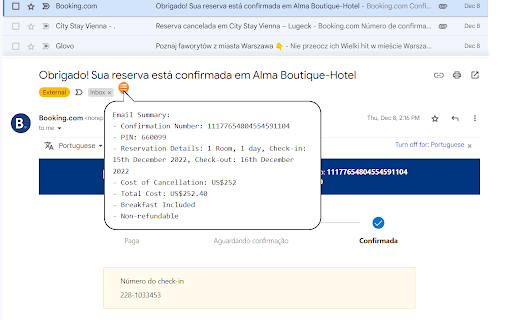
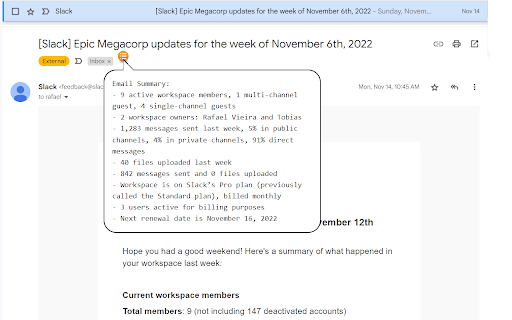
Get email summaries with a single hover. Our Chrome extension is here to save you time and streamline your inbox. With just a quick hover over the icon, you can get a summarized version of any email - in any language! Try it now for free and revolutionize the way you manage your emails. You'll wonder how you ever lived without it. And the best part? It's totally free! PS.: It also summarize your emails that are not in english!

Streak Email Tracking for Gmail
Know when your email is viewed. Real-time tracking built into Gmail for sales, support, hiring, and outreach. 👀 KNOW WHEN YOUR EMAILS ARE OPENED - Get real-time notifications when your emails are opened or links are clicked - Track activity from your Gmail inbox—no extra tools or apps needed - Use open data to follow up at the right time and close more deals ✉️ BUILT INTO GMAIL - Recently viewed folder helps you engage with active recipients - See full tracking details, including timestamps and devices - Toggle tracking on or off for individual messages 💁 WHO IT’S FOR - Sales reps who want to follow up when leads are warm - Founders and recruiters doing cold outreach - Anyone who wants to know what happens after hitting send 🤝 WORKS ALONE OR WITH STREAK CRM - Pairs with Streak CRM to track emails across your pipelines - https://chromewebstore.google.com/detail/streak-crm-for-gmail/pnnfemgpilpdaojpnkjdgfgbnnjojfik 📌 Install & Get Started 1. Click “Add to Chrome.” 2. Authorize Streak in your Gmail account. 3. Compose an email and turn email tracking on

summarize.me — Gmail Summarizer
A chrome extension that shortens long emails into concise summaries. If you are tired of reading long and boring emails and missing important information in emails, use summarize.me! How to use it? ✓ Simply select the portion of the email that you want to shorten ✓ Go to the summarize.me extension button ✓ Click "Summarize" in the popup ✓ See the result inside the extension popup! [IMPORTANT NOTE] - summarize.me extension currently supports only chromium-based browsers such as Chrome and Brave. - summarize.me shortens emails based on extractive summarization principle! This means that the extension will not paraphrase or change the meaning of emails, but rather extracts key sentences from the given email. - summarize.me works perfectly with English language. Unfortunately, the application doesn't work flawlessly with other languages. [WHAT'S NEW?] Update 1.0.0 - Now, you are able to use the summarize.me features right inside the Gmail application with no need to open the extension popup constantly. To use this feature, simply open the extension once before you session, and enjoy this feature!

Heimdall
Guard your inbox. Scan Gmail for subscription spam and unsubscribe in one click. Tired of a cluttered inbox? Heimdall scans your Gmail, finds annoying spam and promotional emails, and lets you unsubscribe from the ones you don't want — all in one click. Start cleaning your inbox for free. No credit card required. How it works: 1. Open Gmail in your browser 2. Click the Heimdall icon 3. Sign in with Google 4. Review your subscriptions and unsubscribe from what you don't need Free plan: - 2 free unsubscribes per week - Smart scan that finds subscription emails automatically - See exactly how many subscriptions are cluttering your inbox Upgrade to Pro ($2.99/mo or $19.99/yr): - Unlimited unsubscribes - Clean your entire inbox in minutes, not months What makes Heimdall different: - One-click unsubscribe from any sender - Undo anytime if you change your mind - Your email data stays on your device — never stored on our servers - No complicated setup. No selling your data. Just a cleaner inbox. Stop spam emails. Unsubscribe from newsletters. Clean up Gmail. Take back your inbox with Heimdall.

Simple Gmail Notes
- Store Notes in YOUR OWN Google Drive - 100% Free and Open Source - Show Note Abstracts in Email Summary Page - Support Chrome, Firefox, Edge and Safari (with notes synced) - Would NOT Modify Your Emails ** About Advertisements ** For free users, advertisements will occasionally show up in the sidebar of email pages. The advertisements will be displayed for a total of 3 times every 5 days. It's always a fixed advertisement for our internal product, without any tracking. Subscribers could remove the advertisements. ** Paid Features ** - Customer support within 1 business day - Hide logo - Autohide text area when the note is empty - Settings import and export - Set up custom Google Drive folder name - Remove advertisements (https://bart.solutions/simple-gmail-notes-support-package/) ** How to View the Notes in Mobile Devices (Android, iPhone and iPad) ** Please use Simple Mobile CRM for viewing notes in mobile devices. (https://www.simplemobilecrm.com/) ** About Edge Browser ** Some Edge users have reported crash on login. If you have experienced the same, please install the extension in Edge Addons Store instead. == 2.9.24.6 (2026-04-24) == - Boosted performance with faster note loading. - Fixed an issue with the sidebar banner display. == 2.9.23.9 (2026-04-02) == - Updated token logic based on new Google policy - Free users can create up to 50 new notes every month. - Subscribers can create unlimited new notes with no monthly cap. - Learn More: https://bart.solutions/simple-gmail-notes-about-max-notes-limit == 2.9.22.8 (2026-02-26) == - Urgent fix for login error - You can now filter your notes by color on the search results page (Subscriber option) - Misc issue fixes == 2.9.21.9 (2026-01-27) == - Bug fix for note background color - The latest team notes and comments are now visible in Gmail list note abstract (requires CRM team setup) == 2.9.20.1 (2025-12-23) == - Bug fix for abstract display - Update toolbar layout == 2.9.19.0 (2025-11-07) == - Urgent fix for users with Gmail conversation mode turned off == 2.9.18.12 (2025-10-25) == - Added a 'Review Subscription' link to the subscription section of the preferences page. - Faster abstract display == 2.9.17.0 (2025-09-29) == - Fixed the issue of recurring installation popups for some browsers - Added a subscriber option to prevent the new tab from showing during the SGN upgrade == 2.9.15.5 (2025-09-01) == - Added a subscriber option to make the SGN note area sticky (fixed in position) - Fixed misc issues == 2.9.13.5 (2025-08-03) == - Update subscription activation screen == 2.9.12.5 (2025-06-27) == - Issue fix and performance update == 2.9.10.8 (2025-04-07) == - Fixed issues with rich text encoding - Fixed issues with subscription verification - Show CRM attachment preview in abstract tooltip == 2.9.9.9 (2025-02-16) == - Further optimization - CRM team members can see the notes of each other in the email list page (need permission setup) == 2.9.6.19 (2024-11-18) == - Enhance abstracts display - Mouse over abstract to see full note and CRM comments == 2.9.5.7 (2024-10-01) == - Fix abstract note color and misc issues == 2.9.3.1 (2024-07-21) == - Fix issues related to note writing in Gmail with preview pane == 2.9.2.7 (2024-07-10) == - If the note contains Google Drive shared URL, a preview will be shown - Auto save as user types == 2.9.0.1 (2024-5-1) == - Migrate to web extension manifest v3 (https://developer.chrome.com/blog/resuming-the-transition-to-mv3) == 2.8.30.1 (2024-4-16) == - Misc bugs fixed - Warning: next version will upgrade to manifest v3, users are advised to store the preferences first (via screen capture or option feature) == 2.8.27.1 (2024-2-17) == - Fixed issue with delegated Gmail account == 2.8.25.3 (2023-12-19) == - Added CRM prompt under SGN text area - Users can show / hide CRM prompt in SGN preferences page - Users can show / hide CRM sidebar in SGN preferences page - Misc bug fixes == 2.8.24.1 (2023-11-11) == - Fix issue of SGN display for Gmail with note position of 'bottom' == 2.8.24.0 (2023-10-31) == - Fix issue of SGN display for Gmail with split pane enabled == 2.8.23.2 (2023-09-30) == - Supports automatic polling of SGN notes in CRM mobile app - Supports delegated Gmail user with CRM - Fixed misc bugs of SGN == 2.8.22.0 (2023-08-03) == - Fix issue for delegated Gmail user == 2.8.20.2 (2023-04-27) == - Add option in preferences page to strip HTML (useful when revert from richtext editor) - Share to CRM uses long abstract now == 2.8.19.1 (2023-04-05) == - Updated checking of CRM availability - New option in preferences page to disable CRM == 2.8.17.1 (2023-01-02) == - fix issue of note time display - Search result screen shows links now == 2.8.16.2 (2022-11-19) == - Further patch for Google Drive API issue - Fix problem of note deletion == 2.8.12.2 (2022-10-13) == - Urgent fix for Gmail UI change == 2.8.11.0 == - Added extra log for query error checking == 2.8.9.0 == - Fix issues that some users could not load the extension == 2.8.8.1 == - Fix issues related to note printing - Upgrade dependent libraries for better security == 2.8.5.2 == - Show more search results - Allow auto load of note template (subscriber option) - Fix issues of subscription checking (some subscribers may need to re-activate subscription in the preferences page) == 2.8.4.5 == - Show search button at the home page (can disable in preferences page) - Custom font color for each note (subscriber option) - Fix minor issues == 2.8.0.5 (2021-08-09) == - Support import and export of settings (subscriber option) == 2.7.6.1 (2021-07-11) == - Reduce required permissions - Fix login issue on edge - Added option for always using popup for login == 2.7.5.11 (2021-04-30) == - Faster note appearance in auto hide mode - Responsive width for sidebar display (user could manually select in options) - Fixed issues related to note deletion - Increased max note font size to 32px == 2.7.4.3 (2021-03-29) == - Added option of auto-hide text area for empty notes (subscriber only) - Added option to set up font size for printing - Fixed issue of text area auto-collapse == 2.7.0.3 (2021-01-09) == - Release a more stable version for Gmail UI adaption == 2.6.0.1 (2020-10-15) == - Enhancement for SGN stability - Update CRM opener location (after logged into CRM) == 2.5.2.4 (2020-08-05) == - Fixed alternate login URL for Chrome and Firefox - Added customer portal URL for subscription review in preferences page == 2.5.1.0 (2020-07-14) == - Added 'bold' option for notes - Added option to disable warning of '40 network requrests' == 2.5.0.0 (2020-06-17) == - Added multiple comments for emails (need CRM login) == 2.2.2.2 (2020-02-12) == - Fix issue for page with preview pane (Gmail UI change) == 2.2.1.14 (2019-11-28) == - Fix for Gmail UI change (for delegated email) == 2.2.1.13 (2019-11-27) == - Fix for Gmail UI change == 2.2.1.12 == - Urgent fix for 40 network requests error == 2.2.0.9 == - Urgent fix for Gmail UI change (again) - Shrink CRM Permission == 2.1.4.3 == - Urgent fix for Gmail UI change == 2.0.1.3 == - Fix Goolge Inbox related bug - Can show CRM project detail on Gmail desktop page == 2.0.0.11 == - Integration with Simple Mobile CRM (sync notes with mobile devices) == 1.2.1.0 == - Better Note Search Page - Memory Optimization - Misc Bug Fixes == 1.0.0.8 == - fixed problem with Google Inbox == 0.9.1 == - Bug fix for abstract display of search result == 0.9.0.4 == - Bug fix for abstract display of emails with special characters == 0.9.0 == - Able to set color to individual notes - Increased max height for textarea - User could select the Google Drive to connect during each login - Fixed bugs regarding to split view
