
keabeglapomgmmgkmenpdcaljmlnjpmk

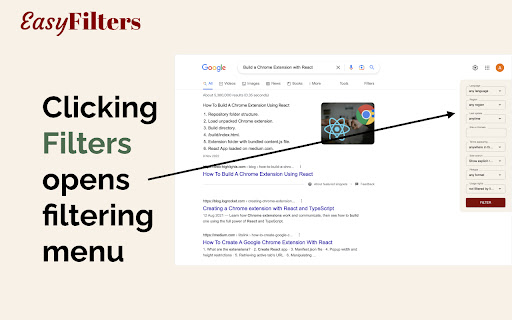


While searching, sometimes you are looking for a more recent articles or something from a particular region or a particular language. You can do it using "Filters". This extension exposes the various search filtering options right on the search results page, making it much more accessible.

LightWindow: link preview, browser-in-browser
While browsing the web — reading, clicking links, searching — it’s easy to lose track and open dozens of tabs. A search results page has 10 links, and you open each one in a new tab. Then every page you open has more links — and you open even more tabs. Soon your browser is overflowing with dozens or even hundreds of open tabs. You lose focus, forget why you opened a page, and can’t even tell where you are anymore. But the problem isn't you — it's the outdated 2D browsing model. 🌐 How 3D browsing helps solve the too many tabs problem While traditional solutions like tab managers still operate within the flat 2D model, LightWindow introduces a fundamentally new approach: adding a third dimension to viewing pages. Instead of opening every link in a new tab, you can open a floating preview window directly over the current page to take a quick look. Clicking a link inside this preview opens another nested window. This creates a tree of views — all inside a single tab. Preview windows don’t get lost, don’t clutter the interface, and most importantly — don’t overload your tab bar. You stay in the same flow and can quickly return to where you were. This reduces the pressure on the second dimension — tabs — keeping only the most essential pages there. 🧠 Why the third dimension is the logical next step To understand this, let’s recall the evolution of browsing: — In the 1D web, clicking a link replaced the current page. Navigation was linear — forward/back only. — In the 2D web, tabs arrived — a breakthrough that allowed multiple pages to stay open at once. But now the second dimension is overloaded. Countless tabs are breaking context and structure. It's time to go beyond the flat tab system. 3D browsing introduces depth and clarity. LightWindow brings this new model to life with a simple and intuitive hierarchy of views. 🚀 The result You’ll open fewer tabs — not because you’re trying to, but because now you finally have an alternative. Links no longer break your flow — they become part of it. ✨ Bonus features — Built-in address bar with autocomplete in every preview window — Page translation directly inside preview windows — Remembers window size and position for each nesting level — Customizable open methods: Ctrl + middle-click, Alt + click, hold-to-preview

Google date range search
Google date range search extension. A browser extension that helps you search Google within specific date ranges. It offers preset date ranges, custom ranges, and a calendar interface for precise date selection. - Searches in a preset date range - past hour/day/week/month/year - You can create custom preset buttons for frequently used date ranges - Searches in a custom date range - past n hour(s)/day(s)/week(s)/month(s)/year(s) - Searches in any date range - select any start and end date using a calendar interface 1. Click the "Custom" tab 2. Enter a number and select a unit (hours/days/weeks/months/years) 3. Click "Add to Preset" 4. The custom preset button appears in the "Preset" tab 5. You can add multiple custom presets 6. To remove all custom presets, click "clear custom presets" button at the bottom of the "Preset" tab

Search result previewer
Quickly get a peek inside the search results in the search page itself Enhance your search engine by getting instant preview of the results. The extension enables you to open a window inside the search page in which the results could be viewed easily. Open the pages in new tab that you really want to see and keep your machine and browser happy. Requires minimum of Chrome version 88.0.4324. In other words, you should have updated chrome at least once since January 2021. What does it do? - Enables you to see the search result from the search page tab itself. How to use it? - It's very simple and straightforward: 1. Search for anything 2. A small icon will appear for each search result 3. Click on it and a window expands from the bottom to display the particular link 4. Done Why to use it? - Simple, easy and straightforward usage - Uses the Manifest V3, which is more secure and privacy oriented than previous version and is recommended by Google - Tiny. Less than 25 KB - It's free Which search engines does it support? - For now only Google. Others will be added soon UPDATE version 1.1: - Now, keep the preview button to right or left according to your wish. Just click on the extension icon in the browser and a small popup will appear, asking you to set the position - The link currently opened will be highlighted, making it easier for the users to identify it in search result page

Advanced Search
Allows users to easily insert search operators for advanced searching on Google. The "Advanced Search" extension is a powerful and user-friendly tool that enhances your Google search experience. With this extension, you can effortlessly perform advanced searches using predefined queries and specialized operators. The extension provides a streamlined interface, allowing you to insert specific search parameters such as "user:", "post:", "location:", and "date:" directly into the search bar with the click of a button. Whether you're looking to refine your search results or perform complex queries, the "Advanced Search" extension simplifies the process, saving you time and providing you with more accurate and targeted search results. Take control of your search queries like never before with this convenient and intuitive extension.
