
olpllcgpnncabhakngjcmhiohijklafh
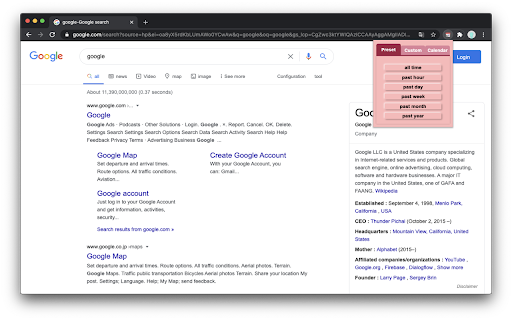


Google date range search extension. A browser extension that helps you search Google within specific date ranges. It offers preset date ranges, custom ranges, and a calendar interface for precise date selection. - Searches in a preset date range - past hour/day/week/month/year - You can create custom preset buttons for frequently used date ranges - Searches in a custom date range - past n hour(s)/day(s)/week(s)/month(s)/year(s) - Searches in any date range - select any start and end date using a calendar interface 1. Click the "Custom" tab 2. Enter a number and select a unit (hours/days/weeks/months/years) 3. Click "Add to Preset" 4. The custom preset button appears in the "Preset" tab 5. You can add multiple custom presets 6. To remove all custom presets, click "clear custom presets" button at the bottom of the "Preset" tab

Google Search date range shortcut
Add a date range shortcut to your Google search results.

Extension Update Monitor
Notify users when extensions are updated and log extension installs, uninstalls, and updates. This extension was created as an alternative to 'Extensions Update Notifier' (last updated June 2016) and 'Extension log' (last updated July 2019). It is quite possible one or both of these will not be updated to Manifest V3 and will disappear from the Web Store forever. An alternative that is currently available in the Web Store is 'Extensions Update Tracker'. Options are available to choose which extensions will trigger an update notification. A button badge counter may be used instead of a notification. Audio files may optionally be played on extension updates. Clicking on the extensions toolbar button will open a popup that will show the most recent extension updates. A log page may also be opened to view install, uninstall, and update data for extensions. Other options are available that may be viewed in the extensions Options page. Right click the toolbar button to access the Options page or to view the log page.

YouTube Time Machine
Search for forgotten YouTube videos using old camera naming patterns. Ever wondered what people were uploading to YouTube in its early days? This extension helps you discover forgotten YouTube content by searching for old camera file naming patterns. HOW IT WORKS: * When people uploaded videos in YouTube's early days, they often didn't rename their files * Camera manufacturers used specific naming patterns (like IMG_0101, DSC_0234) * By searching these patterns, we can find authentic, unedited videos from the past FEATURES: 📅 Search random characters based on date - Select any date and search with various camera models - Instantly search using today's date - The month and day of the selected date are used as characters in the searchquery (May 7th with iPhone model becomes IMG_0507) - Supports multiple camera formats including iPhone, Canon, Nikon, and more 🎲 Random Time Warp - Let fate decide and jump to a random point in YouTube's history - Combines random camera models with random numbers - Perfect for discovering unexpected vintage content WHY USE THIS EXTENSION? - Discover authentic, unedited content from YouTube's early days - Find rare videos that might be hard to find through regular search - Experience YouTube's history through real user uploads - Perfect for nostalgia lovers and digital archeologists - Simple and easy-to-use interface Start your journey through YouTube's past today! You can read about the process of making this extension on [my blog](https://frankmeeuwsen.com/youtube-timemachine/) This extension is inspired by the article from Thomas Germain: [The hidden world beneath the shadows of YouTube's algorithm](https://www.bbc.com/future/article/20250306-inside-youtubes-hidden-world-of-forgotten-videos) Both the author and the browser extension are in no way affiliated to Youtube, Google or Alphabet.

Google Search Quick Open
🧩 Extension Description Too lazy to click through every Google search result? This extension does it for you — instantly open search result links in new tabs with one click or shortcut. 🚀 How it works: Search anything on Google On the results page, click the extension icon or press ⌥ + A / Alt + A All visible search result links will open in new background tabs 💡 Smart filtering: Only the links currently visible on your screen (in the viewport) will be opened. This keeps things relevant and avoids opening too many unnecessary tabs.
