
mhhaoajilmlcoegdoehficcpcamjbnlf
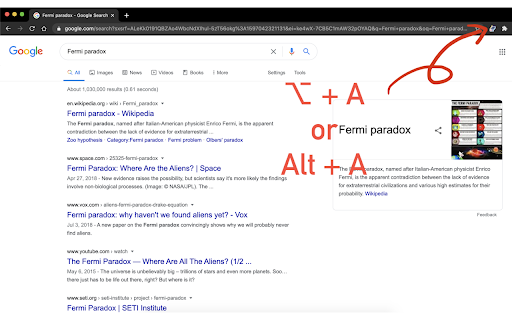

🧩 Extension Description Too lazy to click through every Google search result? This extension does it for you — instantly open search result links in new tabs with one click or shortcut. 🚀 How it works: Search anything on Google On the results page, click the extension icon or press ⌥ + A / Alt + A All visible search result links will open in new background tabs 💡 Smart filtering: Only the links currently visible on your screen (in the viewport) will be opened. This keeps things relevant and avoids opening too many unnecessary tabs.

New tab from search results
Open the Google search results link in a new tab. Only sites on a different domain will open in a new tab. This is useful when you want to open all the sites you want to see first. This software is released under the MIT License. https://github.com/nekotadon/New-tab-from-search-results/blob/master/LICENSE

Bulk URL Opener
Open multiple URLs at once and select links with a hotkey(Z) This tool allows users to open multiple URLs simultaneously with added flexibility and control. Users can input URLs into a text field, select how the links open (in new tabs or windows), and set a delay between opening each URL. - Mass URL Opening: Users can paste multiple URLs into a text box, and the tool opens them all in either new tabs or windows based on the selected option. - Selection Mode: Pressing the "Z" key enables a mode where users can highlight specific URLs on a page, then press "Z" again to open only the selected ones. - Opening Delay: A custom delay can be set between opening each URL, helping to control the flow of opened links and avoid overloading the browser. - Auto URL Formatting: URLs are auto-corrected by adding "https://" when needed, ensuring all links open properly. - Activate Selection Mode: Press the "Z" key to enable selection mode. A dashed selection box will appear, allowing you to click and drag over the area containing the links you want to select. - Select Links: As you drag, the tool will highlight all visible links within the selected area. - Open Selected Links: Once your links are selected, press "Z" again to open all highlighted links in new tabs. - Cancel Selection: If you want to cancel the selection, press the "ESC" key to reset the selection without opening any links. This feature gives you more control over which links to open, perfect for when you only need specific URLs from a webpage. - Efficiency: Saves time by opening multiple URLs at once, either from a list or selected on a page. - User Control: Customize how links are opened, with the option to set a delay for a smoother experience. - Easy to Use: Simple interface with keyboard shortcuts and flexible options, making it accessible for any user.

Open Selected Links
Opens multiple links in the selected content in the current or new window or a tab group. When viewing a page containing a list of links you want to open, such as a list of references in Wikipedia or a paper, it's convenient to be able to open them all at once rather than opening and dragging one at a time. This extension adds context menus item for selections to open all the links contained in them in the current window (optionally in a new tab group) or a new window. Alternatively, you can bring up the extension's popup menu to choose exactly which links to open (and now, you can also filter the link text with a regular expression!), whether to open them in the current or a new window, and whether to add them to a new or existing tab group. You can also open the tabs "snoozed" to reduce memory footprint prior to reading the tabs. Finally, you can set up keyboard shortcuts to open selected links with a keystroke. What's new in Version 1.8.4 * Fix opening links in a new window from the menu or command What's new in Version 1.8.2 * Add side-by-side mode * Multiple-display support * Hamburger icon to hide/show the popup config options * Filter enhancements * Disallow inserting newlines. * Don't crash if partially entered regexps are invalid * Make the placeholder text come back on deleting all the text * Make the filter URLs checkbox actually search both URL and link text * Give the filter focus if any keys are pressed

MSE-Multiple Search Engine
MSE brings AI, web, private, and meta search engines like ChatGPT, Gemini, DeepSeek & more — all in one click 🚀 MSE: MULTIPLE SEARCH ENGINE – Now with AI Power! MSE (Multiple Search Engine) is your one-stop solution to access the world’s most powerful search engines — all in a single click. No more typing "google.com" or remembering countless URLs. Just open MSE and explore! 🟢 AI-Powered Search Engines 🔥 (New!) ChatGPT, Gemini, DeepSeek, Copilot, Meta AI — explore the future of intelligent search. 🟢 Web Search Engines Google, Bing, Yahoo, Yandex, Baidu, and more — instantly accessible. 🟢 Private Search Engines (No tracking!) DuckDuckGo, StartPage, Gibiru, Disconnect, and others for a secure search experience. 🟢 Meta Search Engines Dogpile, MetaGer, Mamma, Kartoo, and more — get results from multiple sources at once. ❓ Why Use MSE? No setup needed — just click and search. Clean, fast, and easy to use. All search tools in one minimal extension. Perfect for researchers, students, developers, and curious minds. 🙏 Special Thanks Saurabh Shukla, Shahid Khan, Hitesh Choudhary, Pranab Adhikary — for inspiring this tool.
