
kdejdkdjdoabfihpcjmgjebcpfbhepmh
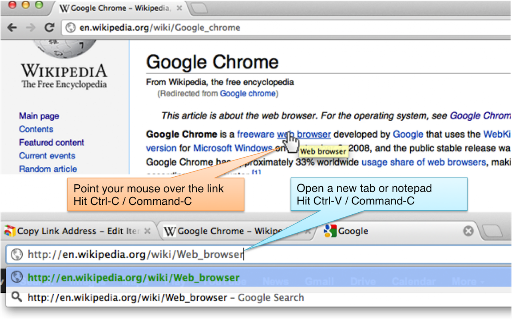
Copy link address without right-clicking. Just hover the link and hit Ctrl-C / Cmd-C! Use Chrome? Copy link address without right-clicking! Just use your standard keyboard shortcut! If you need to copy link addresses often, you know how annoying it is. You need to right-click, find the "Copy Link Address" menu item, and click it. This extension makes your life easy. Just point to your link and hit your standard keyboard shortcut (Ctrl-C, or Cmd-C for Mac) and you're done! Enjoy the extension! We love feedback.

Link Grabber
An easy to use extractor or grabber for hyperlinks on an HTML page Extract links from an HTML page and display them in another tab. Permissions Required: Link Grabber requires permission to copy links to the clipboard. No other special permissions are required. Features: * No usage information / analytics are collected from you * Use either browser action button or context menu item to activate * Configurable list of blocked domains * Filter links by substring match * Copy links to clipboard * Show/hide links that appear more than once on the page * Show/hide links to the same origin as the source page * Group links by domain

Rich URL
Copy, save and share information in a convenient format. Rich URL is an extension, which will help you to copy, share or save information from viewed pages in one or two clicks. Why use the extension for copying if there is a standard shortcut of Ctrl+C/Cmd+C for this purpose, ask you? With the extension, it will be a little faster and more comfortable. Find out more on the website https://richurl.madewithlove.in.ua/en/ Available options: ● Copying (formatted and plain) ▸ The current tab ▸ All tabs of the current window ▸ Tabs of all open windows ● Sending by e-mail ● Share on social media ● Making service API requests for, for example ▸ turning the URL of the current page into a QR code ▸ search in various services For coping and sharing such elements are available: ● Page URL ▸ convert Unicode characters ▸ clearing marketing and other service marks ▸ add to URL your own parameters (affiliate programs) ▸ URL shortening (bit.ly, is.gd, cutt.ly, t.ly) ● Page title ● Selected text on the page ● All page text

Copy URLs
Copy all open pages (title and/or address) to clipboard. Select what to export (all tabs or just the web-pages; all windows or current window only) and how to export it (choose between several formats -- simple url list, HTML, CSV etc.) You can define your own (custom) format to generate specific url list (for example -- JavaScript array or XLS table ready to be copy/pasted in Excel)

Auto Copy
Automatically copy selected text to the clipboard. Has many configurable options for controlling the behavior. When text is selected using the mouse it will automatically be copied to the clipboard. *** With Version 5 you may have to update your settings. Please check them to make sure things are working as expected. *** *** Once this extension is installed you must reload any open tabs in order for it to work *** Features: - Notification on copy - Options are sync'd across browsers - Remove selection on copy - Enable / disable in text boxes - Enable / disable in content editable elements - Paste on middle click - Use modifier key(s) to enable / disable auto copy - Use modifier key(s) to copy as a link - Always copy as a link - Copy without formatting - Trim whitespace - Copy delay - Clear clipboard - Include informational comment with optional formatting items - Use modifier key(s) to enable / disable informational comment - Blacklist websites to automatically disable the extension - Works with all URL types Go to the options screen to configure the features you'd like to use. Note: - This extension now works all URL types. In order for it to work with file:/// URLs you must check 'Allow access to file URLs' on the Extensions page. Content-scripts are automatically disabled in the Extension Gallery. Therefore, the extension will not work on this page or any page in the Gallery, so please test it on another page. See website for release notes.
