
kckbhmigneicofoakblhhafjpgjcmcam
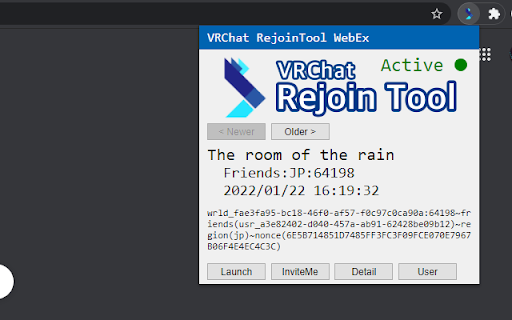
This software helps rejoin to the VRChat instance. This software creates a WebSocket connection to VRChat in the background and records the instance information to localStorage. You can launch VRChat or send Invite-me to rejoin instances more easily by this utility. You must be logged in to VRChat before using it. The cookie is used for VRChat's WebSocket API and InviteMe API.

VRChat Emoji and Sticker Manager
Store more than 9 emoji or stickers, toggle them on and off and change their animation styles. If you have VRChat Plus, you can use custom emojis and stickers. Emojis are floating images that display temporarily, and stickers are images that attach to surfaces indefinitely. However, there are some issues: - You can only add 9 emojis or stickers, so you have to keep deleting them and re-adding them if you want to use more. - You cannot change the animation styles of emojis, so you also have to keep deleting and re-uploading it to try different styles. - Images are limited to 1024² and have to be cropped to a square. - Animated emojis have to be uploaded as a spritesheet, which are hard to create. This extension solves all of these issues: - Add as many images as you want to the extension (via file picker, drag-drop or paste), and you can add or remove them from VRChat with a single click. - Change emoji animation styles with just two clicks. - Upload any size of image, including images larger than what the VRChat website allows. The actual limit is 2048², and images are resized if necessary. - Upload any shape of image. Images are padded with transparency to preserve aspect ratio. VRChat website doesn't let you do this. - Upload animated GIFs. GIFs are converted to sprite sheets automatically. - Use the same collection of images as either emojis or stickers by switching between Emoji mode and Sticker mode. If you have any issues with the extension, please report here: https://gitea.moe/lamp/vrchat-emoji-manager/issues?state=open If you appreciate this extension, consider donating here: https://ko-fi.com/ledlamp

VRChat Avatar Script
Allows saving of avatars on the VRChat website Injects a script into the VRChat website avatar page (followed by an avatar id) that allows saving to avatar groups (or just one for non-VRC+ users)

NeuroChat.AI
Experience note-taking with SynaptiNote's breakthrough voice-to-text AI tech from NeuroChat.AI. Experience a breakthrough in note-taking with SynaptiNote from NeuroChat.AI. Their groundbreaking voice-to-text AI technology will transform the way you take notes. SynaptiNote: Voice-to-Text Feature: SynaptiNote is a powerful voice-to-text feature offered by NeuroChat.AI. Intelligent transcription and enrichment of notes using advanced AI technology. Real-time grammar and spelling error correction. Expansion of notes with additional information. Smart follow-up questions based on research. SynaptiNote, effortlessly captures your thoughts and ideas while enhancing the quality of your notes. Take your notes to the next level with NeuroChat.AI.

VRChat VIP Friends - QOL Tweak for VRChat Web
This extension adds a statusbar to the VRChat Web UI to show the status of your most important friends right on top. The VRChat Web UI only offers a search function in your friends list to see the status of a specific friend. With this extension you no longer have to search for your friend every time you want to see his status, instead you will get a new status bar at the top of the page with an overview of the players you have specified in the extension options. To do so, click "★ VIP" on a users profile page or open the extensions options and write down a list of the players you want to appear in the statusbar, using the given form-field. Each line represents one player and must be formatted as follows: The statusbar will show the name you defined (Player01) and the status according to the Users ID. You can get a players User-ID by visiting his profile on vrchat.com and copy the last segment of the URL (starting with "usr_").
