
fjhkfhceedgdiofofklkoacehjanmbld
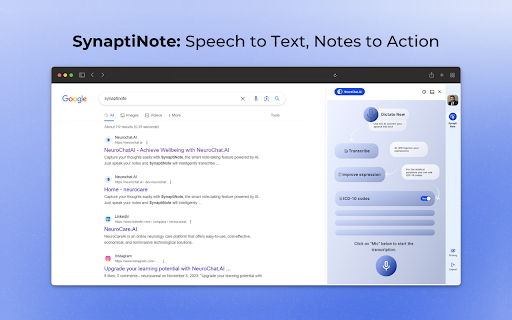


Experience note-taking with SynaptiNote's breakthrough voice-to-text AI tech from NeuroChat.AI. Experience a breakthrough in note-taking with SynaptiNote from NeuroChat.AI. Their groundbreaking voice-to-text AI technology will transform the way you take notes. SynaptiNote: Voice-to-Text Feature: SynaptiNote is a powerful voice-to-text feature offered by NeuroChat.AI. Intelligent transcription and enrichment of notes using advanced AI technology. Real-time grammar and spelling error correction. Expansion of notes with additional information. Smart follow-up questions based on research. SynaptiNote, effortlessly captures your thoughts and ideas while enhancing the quality of your notes. Take your notes to the next level with NeuroChat.AI.

AizaMD
Enhance your clinical documentation with AizaMD, the ultimate Chrome Extension to boost healthcare professionals' efficiency. AizaMD is an AI-powered, voice-enabled Chrome extension designed to revolutionize how healthcare professionals handle documentation. Speak naturally to create precise SOAP notes with ICD-10 Codes, eliminating the need for manual data entry and seamlessly integrating into EHR. With Ambient Intelligence and machine learning, AizaMD offers real-time transcription for accurate, efficient patient records, enhancing the documentation process without the traditional paperwork hassle. With AizaMD, “forget the paperwork—remember patient care." The tool simplifies clinical documentation into three straightforward steps: Step 1: Facilitates documentation through natural patient dialogue. AizaMD's Ambient Intelligence technology captures all details for precise record-keeping. Step 2: Instantly convert your encounter into comprehensive SOAP Notes with ICD-10 Codes, reducing manual input and enhancing documentation efficiency. Step 3 (A): Effortlessly integrate SOAP Notes into your current EHR system, simplifying patient record management and enhancing care quality. Step 3 (B): Achieve universal EMR compatibility with AizaMD's Chrome extension, allowing seamless synchronization across different EMR systems for accessible and updated notes. This process not only streamlines administrative tasks but also saves significant time each month, allowing healthcare professionals to focus more on patient interaction and care. With AizaMD, a physician can potentially save **6 minutes per appointment,** doctors can accumulate up to **44 hours** of saved time each month. This translates into a considerable **550X return on investment** monthly. AizaMD not only saves time but also enhances the quality of interactions between doctors and patients. Designed for versatility, AizaMD is compatible across various devices, ensuring access and functionality wherever you are. We prioritize your data's security by being HiTrust certified and HIPAA compliant all patient information is safeguarded with the utmost standards. AizaMD is committed to adapting to your needs, learning from individual speaking styles and clinical practices for continuous improvement. Enhance your patient interaction with AizaMD—more eye contact, less keyboard contact."

Appdron AI
Powerful & Sleek ChatGPT UI For Marketers & Content Creators Experience Appdron AI's ChatGPT UI, perfect for savvy marketers and content creators. Simply press the launch button at the bottom right of the page or press Command+J ("command" key on Mac or the "Windows" key on Windows) and instantly Become a Productivity GOD. Get it now and unleash your potential. This Preloaded AI tool will be ready to help you. It comes preloaded with many useful tools and functions. Unleash your inner copywriting god and revolutionise your sales game with AI-powered assistance that helps you effortlessly craft high-converting sales copy. Overcome writer's block and supercharge your productivity with AI-powered article writing that frees up valuable time to earn more money. And never struggle with email responses again with AI-powered epic replies that allow you to effortlessly compose captivating emails in mere seconds. With these powerful tools at your disposal, there's no limit to what you can achieve!

Fextralife Fix
This little extension removes the twitch embed from the fextralife website. If you want to use that site for some reason. This little extension removes the twitch embed from the fextralife website. If you want to use that site for some reason.

IKiPop by IKiBlast
IKiPop by IKiBlast brings a touch of IkimerIA into your browser and let you access to all your favorite AI IKiPop is a versatile free Chrome extension designed to use ArtificiaI Intelligence while browsing. This multilingual add-on enhances your browsing by providing numerous features, whether for customers connecting to IKiBox, our private solution, or anyone wanting to tap into their preferred models like Bing, ChatGPT and Google Bard into your browser. It can be used freely by anyone looking to connect with their own public or private AI models. The plugin enables you to literally chat with your browser page content: • Pose questions and receive responses based on the webpage context. • Create concise summaries of online content to grasp key points swiftly. • Translate web pages into other languages, expanding your global reach. • Generate unique phrasing for selected text. • Extract crucial points from videos. • Clarify complex terms or concepts. • Segment extensive text into more digestible parts. • Decipher the purpose and functionality and review changes of code. These functionalities are effortlessly available through a user-friendly menu and enhance your web exploration experience. IKiPop seamlessly integrates with popular platforms, enabling direct assistance. Its floating chat boxes facilitate complex discussions, supporting multiple conversation threads with ease. A distinctive feature of the tool is the capacity to swiftly connect with various AI providers, allowing immediate access to your favorite services, with the ability to switch between them conveniently. Here's how to set up and use IKiPop: • Install the extension and pin it for immediate accessibility. • Click on it to access its settings panel and select the API mode you wish to interact with (you can add or remove model from your default list in the 'Modules' tab). • Once set, you just need to refresh the tab or open a new one to see a context menu appear when you select a piece of text, providing shortcuts to the main tools. • An immersive chat interface can be accessed via settings or right-clicking a selection. • Open settings for configuration, adjusting according to your needs, such as language or model selection. • Personalize available tools and theme in the menu and tweak the response length and its sensibility through the “Advanced” tab. If the menu doesn't appear post-installation, refresh the page or restart your browser. In case a model doesn't function as anticipated, you have the flexibility to switch. Note that we prioritize your privacy and don't collect or transmit any data beyond what you share during your conversations. Please exercise caution and avoid sharing sensitive information when using public AI services.
