
jmdbbnfpnikpaabfcoohpchnndpbjkoc
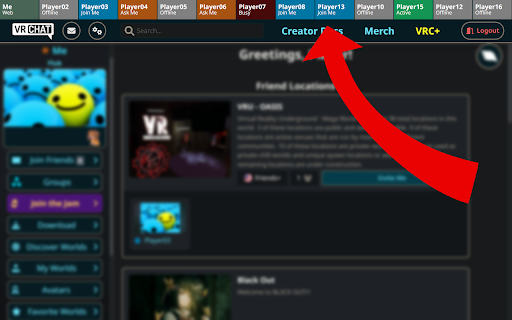


This extension adds a statusbar to the VRChat Web UI to show the status of your most important friends right on top. The VRChat Web UI only offers a search function in your friends list to see the status of a specific friend. With this extension you no longer have to search for your friend every time you want to see his status, instead you will get a new status bar at the top of the page with an overview of the players you have specified in the extension options. To do so, click "★ VIP" on a users profile page or open the extensions options and write down a list of the players you want to appear in the statusbar, using the given form-field. Each line represents one player and must be formatted as follows: The statusbar will show the name you defined (Player01) and the status according to the Users ID. You can get a players User-ID by visiting his profile on vrchat.com and copy the last segment of the URL (starting with "usr_").

Better vrchat DOT com
Extension to make the official VRChat website a bit more convenient Here's the English translation of the provided text: ※The VRChat API is not officially supported, so there is a possibility that this extension may become unavailable, behave unexpectedly, or your logged-in account may be banned. Use at your own risk. For Firefox users, please download from here: https://addons.mozilla.org/ja/firefox/addon/better-vrchat-dot-com/ ----Feature List---- • Added a refresh button for the number of users in instances where friends are present ・Pressing the refresh button will also display the recommended capacity and maximum capacity of that world • Added a feature to hide the number of users in an instance ・Not enabled by default, please enable it in settings ・For those who feel intimidated by the number of users and find it difficult to enter, please give it a try • Feature to hide the "Make Avatar Public" button and "Delete Avatar" button on the avatar information page ・Each can be individually shown/hidden ・Disabled by default, so please enable in settings if you want to hide them • Each feature can be individually enabled/disabled in settings ----Latest Updates---- • Compatible with the website as of 08/08/2024 • Removed the feature to display the number of users in an instance as it has been implemented officially • Changed the behavior of the button to update the number of users in an instance ・Now also displays the recommended capacity and maximum capacity of that world • Added a feature to hide the number of users in an instance ・Not enabled by default, please enable it in settings • Redesigned the settings screen UI Past update history can be viewed from the GitHub repository ----About Safety---- This extension does not require entering ID / password. It sends the token (authentication information) stored in cookies to the VRChat server because it uses the VRChat API. The extension itself does not acquire any authentication information such as ID / password / token.

Candi-Tab
A chrome extension for tab page - Custom Drag-and-Drop Layout. Build muscle memory for your most-used tools. Click faster, think less. - Setup once, use everywhere. Keep your workspace consistent across all your devices instantly. - Use themes like GitHub, Dracula, or Tokyo Night to match your editor and reduce eye strain. - Hands-free navigation. Filter bookmarks or search the web without leaving your keyboard. - Lightweight and ad-free. Opens instantly so you can focus on your code, not the dashboard.

VRChat Emoji and Sticker Manager
Store more than 9 emoji or stickers, toggle them on and off and change their animation styles. If you have VRChat Plus, you can use custom emojis and stickers. Emojis are floating images that display temporarily, and stickers are images that attach to surfaces indefinitely. However, there are some issues: - You can only add 9 emojis or stickers, so you have to keep deleting them and re-adding them if you want to use more. - You cannot change the animation styles of emojis, so you also have to keep deleting and re-uploading it to try different styles. - Images are limited to 1024² and have to be cropped to a square. - Animated emojis have to be uploaded as a spritesheet, which are hard to create. This extension solves all of these issues: - Add as many images as you want to the extension (via file picker, drag-drop or paste), and you can add or remove them from VRChat with a single click. - Change emoji animation styles with just two clicks. - Upload any size of image, including images larger than what the VRChat website allows. The actual limit is 2048², and images are resized if necessary. - Upload any shape of image. Images are padded with transparency to preserve aspect ratio. VRChat website doesn't let you do this. - Upload animated GIFs. GIFs are converted to sprite sheets automatically. - Use the same collection of images as either emojis or stickers by switching between Emoji mode and Sticker mode. If you have any issues with the extension, please report here: https://gitea.moe/lamp/vrchat-emoji-manager/issues?state=open If you appreciate this extension, consider donating here: https://ko-fi.com/ledlamp

VRCWorldJoinHistory
VRChatのワールド履歴を記録・閲覧します。VRChatホーム画面から現在のワールドを取得しているため、ホーム画面を開いていないタイミングでは記録出来ない点注意してください。 VRChatで「先週行ったあのワールドどこだっけ?」を無くすためのツールです。 VRChatのホーム画面から情報を取得するためVRChatプレイ中にブラウザでVRChatのホームを開いていないと記録されない点注意してください。
