
joaffhoebddkohkafembmdkfmmcgmepj

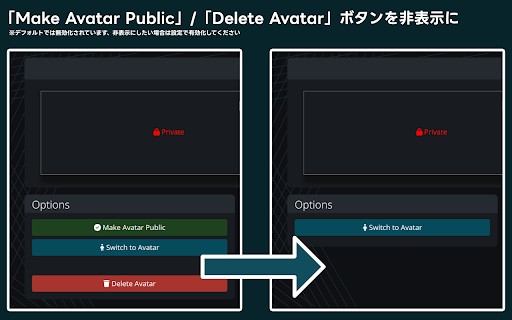
Extension to make the official VRChat website a bit more convenient Here's the English translation of the provided text: ※The VRChat API is not officially supported, so there is a possibility that this extension may become unavailable, behave unexpectedly, or your logged-in account may be banned. Use at your own risk. For Firefox users, please download from here: https://addons.mozilla.org/ja/firefox/addon/better-vrchat-dot-com/ ----Feature List---- • Added a refresh button for the number of users in instances where friends are present ・Pressing the refresh button will also display the recommended capacity and maximum capacity of that world • Added a feature to hide the number of users in an instance ・Not enabled by default, please enable it in settings ・For those who feel intimidated by the number of users and find it difficult to enter, please give it a try • Feature to hide the "Make Avatar Public" button and "Delete Avatar" button on the avatar information page ・Each can be individually shown/hidden ・Disabled by default, so please enable in settings if you want to hide them • Each feature can be individually enabled/disabled in settings ----Latest Updates---- • Compatible with the website as of 08/08/2024 • Removed the feature to display the number of users in an instance as it has been implemented officially • Changed the behavior of the button to update the number of users in an instance ・Now also displays the recommended capacity and maximum capacity of that world • Added a feature to hide the number of users in an instance ・Not enabled by default, please enable it in settings • Redesigned the settings screen UI Past update history can be viewed from the GitHub repository ----About Safety---- This extension does not require entering ID / password. It sends the token (authentication information) stored in cookies to the VRChat server because it uses the VRChat API. The extension itself does not acquire any authentication information such as ID / password / token.

Control Panel for Twitter
Gives you more control over Twitter and adds missing features and UI improvements Control Panel for Twitter is a browser extension for Twitter - its main goals are to reduce the amount of algorithmic content you see, give you more control over your timeline and make the UI less distracting. By default, your Home timeline will be the reverse-chronological "Following" timeline, which will only contain tweets and quote tweets from the people you follow. The algorithmic "For you" timeline will be hidden, and Control Panel for Twitter will keep you on "Following" if Twitter tries to automatically take you off it. Everything is configurable, so start by opening the options popup and customizing to your liking. Changes you make in the options will be applied immediately. • Use the "Following" (chronological) timeline by default • Hide the "For you" (algorithmic) timeline • Retweets • Show in separate tab / Hide • Quote Tweets • Show in separate tab / Hide • Enable muting of Quote Tweets • Hide "See new Tweets" • Hide "Who to follow", "Follow some Topics" etc. in the timeline • Hide inline prompts in the timeline • Full-width timeline content • Hide the sidebar and let timeline content go full-width • Add "Add muted word" to the "More" menu • Fast blocking (skips confirm dialog) • Hide quotes and replies to blocked and muted accounts • Hide Retweets in user profiles • Retweets in Lists • Default to "Latest" tab in Search • Hide the quoted tweet when viewing Quote Tweets • Redirect to twitter.com • Tweak new layout • Hide Toggle navigation • Replace X branding changes • Hide Views under tweets • Hide "Verified" Notifications and Followers tabs • Restore headlines under external links • Restore Quote Tweets link under Tweets • Restore other links under Tweets • Default sorting of replies • Latest / Likes • Premium blue checks • Replace with Twitter Blue logo / Hide • Hide Premium blue check replies • Hide Premium upsells • Hide Grok • Hide Jobs • Hide Subscriptions • Don't use the Chirp font • Disable bold and italic text in tweets • Use normal text font style in navigation bar • Navigation density • Comfortable / Compact • Use normal font weight in dropdown menus • Uninvert Follow / Following buttons • Monochrome / Themed • Unblur sensitive content • Hide sidebar contents • Hide Explore page contents and use it only for searching • Hide "Discover more" tweets • Hide metrics • Reduced interaction mode • Hide the action bar under tweets – replies are now the only means of interacting • Hide the Compose Tweet button • Disable the home timeline • Find yourself wasting too much time on Twitter? Try preventing use of the home timeline • Notifications • Hide badges only / Hide Hide UI items you don't use • Bookmark button under tweets • Share button under tweets • "View post engagements" under your tweets • Tweet box in timeline • Account switcher • Messages drawer • Explore • Communities • Hide "More" menu items you don't use TWITTER, TWEET and RETWEET are trademarks of Twitter Inc. or its affiliates

x-zombie-killer
X(旧Twitter)のインプレゾンビを一気に非表示にします。 Androidスマホをご利用の方はKiwi Browserをインストールし設定の「拡張機能」から本拡張機能をインストールいただくことでご利用いただけます!… X(旧Twitter)のインプレゾンビを一気に非表示にします。 Androidスマホをご利用の方はKiwi Browserをインストールし設定の「拡張機能」から本拡張機能をインストールいただくことでご利用いただけます! 詳しい使い方:https://itokoba.com/x-zombie-killer-support 更新履歴:https://itokoba.com/x-zombie-killer-support/updates インストール時点で以下の文字、単語を自動で非表示にします。 非表示対象 - アラビア文字 - サンスクリット文字 - デーヴァナーガリ文字 - (古)マラーティー語 - 絵文字のみの投稿 - その他日本語のスパム表現 「api.itokoba.com上にある自分のデータ読み取りと変更」という権限はライセンスキーの認証を行うために利用しています。 各種設定などについてはサポートページをご覧ください。 https://itokoba.com/x-zombie-killer-support また、各種規約も必ずご確認ください。インストール時点で同意したものとみなします。 利用規約:https://itokoba.com/x-zombie-killer-support/terms-of-service プライバシーポリシー:https://itokoba.com/x-zombie-killer-support/privacy-policy 特定商取引法に基づく表記:https://itokoba.com/x-zombie-killer-support/tokushoho

VRChat Avatar Script
Allows saving of avatars on the VRChat website Injects a script into the VRChat website avatar page (followed by an avatar id) that allows saving to avatar groups (or just one for non-VRC+ users)

選択したテキストをすぐVRChatで検索できるやつ
■ v1.4.0 □ 変更 ・Chrome Extension v3にアップデート ・VRChat公式サイト上でのお気に入りエクスポート機能が動かなくなっていたので一旦削除
