
kceglpglilklghkgofolieongaolnaob
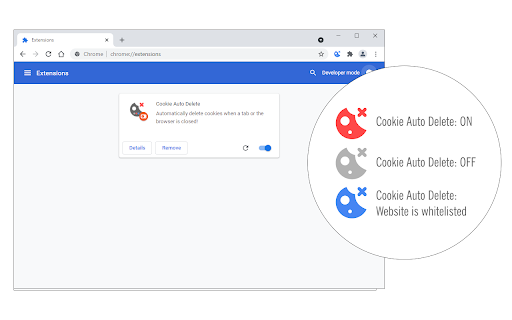

Automatically delete cookies when a tab or the browser is closed! Cookie Auto Delete is an extension that helps you quickly erase cookies for a tab when it closes (Tab-Only mode). Moreover, you can set the addon to remove cookies for all tabs when the browser is closed (Session-Only mode). The toolbar icon serves as an ON|OFF switch to quickly turn the addon ON or OFF. This addon can potentially improve your privacy as it deletes cookies (and most importantly third-party cookies) which are used to track user's behavior across multiple websites. Please note that, if you want to switch modes, open the addon options and mark the desired option. Moreover, this addon has a whitelisting tool to easily exclude a domain from Cookie Auto Delete. Simply add a domain comma separate to the designated area on the options page. Note: this extension is made in collaboration with the author of Cookie Switch ON|OFF (https://chrome.google.com/webstore/detail/cookie-switch-onoff/okclohaghlaedgghhngcenaandmajmmk) To report bugs, please fill the bug report form on the addon's homepage (https://mybrowseraddon.com/cookie-auto-delete.html).

Cookie Switch ON|OFF
Switch cookies ON or OFF with just one click! Cookie Switch ON|OFF is a lite browser addon that helps you quickly turn storing cookies (browser cookie) in your browser ON or OFF with just one button. When toolbar icon color is green, Cookie is allowed in your browser, and when it turns red, it means Cookie is denied globally. Now you can reload any website without cookies storing. If you need to whitelist a domain (i.e. www.example.com) please head to the options page and add the desired domain to the designated area. Please note, domains need to be added comma separated. You can enter URLs and the addon will convert them to domain (i.e. domain-1.com, domain-2.com, domain-3.com, ...). To report bugs, please fill the bug report form in the addon's homepage (https://mybrowseraddon.com/cookie-switch.html).

Auto Tab Discard (suspend)
Increase browser speed and reduce memory load when you have numerous open tabs. "Auto Tab Discard" is a lightweight browser extension that automatically reduces the amount of memory used by open but inactive tabs, helping to conserve battery life on portable devices by disabling JavaScript code and DOM events on discarded tabs. There are two options on the extension's interface to either discard tabs or release discarding (the "x" buttons) The features of "Auto Tab Discard" are: * Improves browser performance and reduces memory usage by automatically or manually discarding inactive, idle, or forgotten tabs. * Includes a list of hostnames or regular expressions that can be excluded from auto-discarding. * Preserves the discarded state of tabs when the browser is closed and reopened. * Indicates the discarded state of a tab through the favicon or title. * Restores the state of a tab, including scroll position and text box content, after it is released from being discarded. * Allows for the forced discarding of specified hostnames. The options for configuring whether tabs should be discarded or not include: * Pinned tabs * Tabs that are playing media * The presence of a power source * Unsaved content or user input in a tab The available plugins for "Auto Tab Discard" are: * Release the discarded state of the next or previous tab. * Release the discarded state of all tabs in the active window. * Automatically discard all newly opened inactive tabs. * Store YouTube's timestamp before a tab is discarded. * Permanently delete (remove) old discarded tabs that are inactive. * Unlike the "The Great Suspender" extension, this extension uses the native method for discarding tabs, which means that even if the extension is removed or the browser crashes, your browser will automatically restore everything for you. https://webextension.org/privacy-policy/extension/tab-discard.html

Cache Killer
Clears the browser cache automatically. On or Off extension by single click Cache Killer automatically clears your browser cache whenever you open a new tab or refresh a page. You can easily enable or disable the extension with a single click

Cache Killer
Automatically clear your browser cache before loading a page. Can be enabled/disabled with a single mouse click Please be aware that the extension reverts to the "off" state whenever the browser restarts. To prevent this, use the "Enable on start" option in the extension settings (right click on extension button, then "Options").
