
kcegfokddmccbjghijnlboejhcfppoch


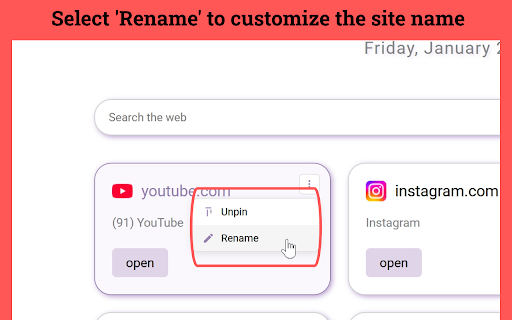

Organize Speed Dial New Tab with websites and quickly access your favorite sites from a new tab in Chrome with easy setup Speed Dial New Tab - Your Gateway to Online Productivity 🚀 Tired of a cluttered new tab page? Want to access your favorite websites with lightning speed? ⚡ Speed Dial New Tab transforms your new tab into a personalized dashboard, giving you instant access to your most-visited sites. Say goodbye to endless scrolling and hello to streamlined browsing! 🖱️ Effortless Organization and Navigation Speed Dial New Tab makes it a breeze to organize your online world. 📌 Visual Bookmarks: See your favorite websites at a glance with site previews. 💡 Intuitive Interface: Enjoy a clean and minimalist design that puts you in control. 🕒 Digital Clock: Keep track of time with an elegant clock and date display. Boost Your Productivity Speed Dial New Tab is more than just a pretty face. It's designed to enhance your productivity and streamline your browsing experience. 🚀 Quick Access: Reach your most-visited websites with a single click. 🧹 Reduced Clutter: Eliminate distractions and focus on what matters. ⏱️ Time-Saving: Spend less time searching and more time doing. ✅ Improved Workflow: Access your frequently visited sites instantly. Seamless Integration and Smart Features Speed Dial New Tab seamlessly integrates with your Chrome browser. 1️⃣ Most Visited Sites: Automatically displays your top frequently visited websites. 2️⃣ Pin Important Sites: Keep your essential websites always visible at the top. 3️⃣ Rename Options: Customize site names for better organization. 4️⃣ Smart Favicons: Automatic favicon loading with intelligent fallback system. More Than Just a Speed Dial Speed Dial New Tab offers core features to enhance your browsing experience. 🔍 Built-in Search: Quickly search the web without leaving your new tab page. 🕒 History Integration: Access your recently visited websites with ease. Experience the Difference Speed Dial New Tab is the new tab page replacement for Chrome. It's the perfect tool for anyone who wants to: Boost their productivity Organize their online world Save time and effort Enjoy a more streamlined browsing experience Why Choose Speed Dial New Tab? 🤔 Here are the key reasons why Speed Dial New Tab is the best choice for your new tab page: ➤ Easy to use: Speed Dial New Tab is incredibly user-friendly, even for beginners. ➤ Essential features: Focus on core functionality that enhances your browsing experience. ➤ Clean design: Enjoy a minimalist interface that helps you stay focused. Unlock the Power of Speed Dial New Tab 🗝️ Speed Dial New Tab is your key to a more productive and efficient online experience. With its intuitive interface and smart features, Speed Dial helps you take control of your browsing and achieve your online goals faster. Whether you're a student, a professional, or a casual internet user, Speed Dial New Tab can help you make the most of your time online. Speed Dial New Tab and Chrome: A Perfect Match 🤝 Speed Dial New Tab is designed to integrate seamlessly with your Chrome browser, providing a native look and feel that enhances your workflow. It's like an extension of Chrome itself, offering essential tools you need to navigate the web with speed and efficiency. Embrace a Faster, More Organized Web 🌐 With Speed Dial New Tab, you can say goodbye to the chaos of a cluttered new tab page and embrace a world of organized access to your favorite websites. It's time to take control of your browsing experience. Take Control of Your New Tab Page 💻 Your new tab page is the gateway to your online experience. With Speed Dial New Tab, you can transform this blank canvas into a productivity tool. Imagine starting each browsing session with a clean, organized dashboard that puts your frequently visited websites at your fingertips. Speed Dial New Tab: Designed for the Modern Internet User 👨💻 In today's fast-paced digital world, efficiency is key. Speed Dial New Tab is designed for the modern internet user who values speed, organization, and convenience. Download Speed Dial New Tab today and experience the difference! ⬇️ Frequently Asked Questions ❓ How does Speed Dial New Tab work? Speed Dial New Tab automatically displays your most visited websites and allows you to pin important sites for quick access. How do I pin a website? Click the menu icon on any speed dial and select "Pin" to keep it at the top of your dashboard. Can I rename my speed dial entries? Yes! Use the menu options to give your speed dials custom names for better organization. Can I sync my speed dials across devices? Yes! With Chrome sync, your speed dials will be available on all your devices. What browsers are supported? Speed Dial New Tab works with Chrome version 88 and newer, supporting the latest Manifest V3 standard.

Custom Cursor for Chrome™
Fun custom cursors for Chrome™. Use a large collection of free cursors or upload your own. Customize your Chrome browser experience with our free collection of mouse cursors at Custom Cursor. At Custom Cursor we have created a giant collection of hand-drawn cute cursors. We have over 10,000 different packs available on our website for you to enjoy. With your help, our collection has grown so big that we divided it into categories that should fit every taste, like: - Minecraft; - Cute Cursors; - Anime mouse packs; - Memes; - Spy x Family pointer packs with Anya Forger; - Among Us; - Two types of Minimal pointers for work and studies; - Games; - Roblox; - And many, many other funny elements for you to play with. Some of our mouse pointer packs are bundled with the Custom Cursor browser extension, but most of them await you on our website. Keep an eye out for new and trending additions. To simplify navigation, we've organised our collection into Editor's Picks collections, each with a unique theme. Examples include: - Green arrows for autumn; - Christmas themed arrows; - Holidays editor's picks; - Halloween; - Custom Cursor collaboration with Daieny Schuttz; - Pink pointers editor picks; - Summer mouse decorations; - Rainbow colors; and much, much more on our website. If you can't find what you're looking for, use the "UPLOAD CURSOR" button to add your own. Manage your personal arrow collection on the Upload page and adjust cursor size in the "Manage" section. Newly added collections will be uploaded to the Custom Cursor for Chrome extension and can be found at the bottom of the collection list. Your added packs will appear in “My Collection”. Create your own collection of mouse cursors from any images with Custom Cursor Creator tool on our website. It will allow you to create new packs from almost any arrow or pointer shaped image on the internet. ------------------- ! After installing the extension, refresh previously opened tabs to use it on those pages. Note that the extension may not work on Chrome Web Store pages or the home page. Open another website (e.g., google.com) to test the extension. If you like the extension you can also check our Custom Cursor for Windows app. Preview arrow appearance by clicking on it in the extension window and moving the mouse to the empty space within the window.

New Tab Page Extension
Transform your Chrome New Tab with PresentBoard! Pick from stunning dashboards or create your own with free, customizable widgets. Tired of boring new tabs? PresentBoard lets you customize your new tab page with a wide range of useful widgets, making it your gateway to a more organized and efficient workflow. Personalize Your New Tab with Dozens of Free Widgets: ✔ Stunning, dynamic, and calming backgrounds ✔ World clocks ✔ Daily quotes ✔ To-Do lists, Checklists & Notes ✔ Agenda, Monthly, Weekly & Yearly Calendars ✔ Bookmarks & Shortcuts to your favorite websites ✔ Countdowns ✔ Live Weather updates ✔ News headlines ✔ Stock prices, Graphs & KPIs ✔ Google Analytics & Google Photos integrations ✔ Custom data aggregation (JSON, CSV, etc.) with graph views ✔ Embedded websites and much more—all in one place! ★ Your Privacy Matters: Minimal Permissions, Maximum Security ★ Unlike other extensions, PresentBoard only requires the "replace new tab" permission. This ensures your browsing data stays completely private. ★ Seamless Integrations: Google Calendar, Google Photos, Google Analytics ★ Seamlessly integrate your Google Calendar and iCal sources for real-time event synchronization. Set your Google Photos as rotating backgrounds and preview insights from Google Analytics right on your dashboard. ★ Search Google & ChatGPT side by side ★ You can search for information using Google and ChatGPT simultaneously—giving you the best of both worlds: Google's vast search capabilities and ChatGPT’s intelligent responses. ★ Customization like no other ★ With PresentBoard, you have complete control over how your dashboard looks and functions. Whether you prefer a clean and simple layout or a feature-packed dashboard, you can easily customize your dashboard to meet your needs. Choose from almost 20 different widgets and place them anywhere on the dashboard in any size you want. ★ LATEST UPDATES ★ Spring 2026 - Tons of new features - New Pomodoro Widget - Google Search with ChatGPT & Gemini side by side Winter 2025/2026: - New AI Chatbot widget - New Dashboard Launcher widget - Added Quick Launcher Views in many widgets - Google Tasks integration into check list widget Autumn 2025: - Stability, performance improvements - Bug fixes Summer 2025: - Better screen size adaptation - Stability & performance improvements Spring 2025: - New introduction video available! - Expanded widget library with new options for media, stocks, and charts. - Improved design for menus and quick edit buttons. - Numerous bug fixes for enhanced usability. - Enhanced iCalendar integration with filtering options. - New aggregators in Google Analytics widget. - Improved Bookmarks widget and Chrome API usage. - Most visited & Recently closed wesites now available within Bookmarks widget. Present Board is still getting improved. Please leave me a feedback in the support tab. Thank you for using Present Board!

Speed Dial 2 New tab
Speed Dial 2 is an easy-to-use extension that lets you save and organize your most visited websites and customize your new tab page. Radically better new tab page! Level up your workspace with our unique tools designed to make you more productive. Transform and customize your new tab experience to your liking. 🏆 Acclaimed & featured as one of the "Best New Tab" extensions on multiple tech blogs! 📌 More than 10 years in the Chrome Web Store 👏 More than 2 million downloads, trusted by happy users around the world 💼 Used by professionals from leading tech companies 🥷🏼. Private and secure ✦✦ Key Features ✦✦ • Save unlimited number of your favorite websites and organize them into groups • Easy access to bookmarks and recently closed tabs • Beautiful themes and powerful customization • Dark and light theme support • Collaborate and share a group of bookmarks with your friends • Synchronization with other computers and mobile devices • Private and secure — we don’t share or sell your data • Clean and intuitive design • Available in 9 languages • Beautiful custom new tab page • Bookmark organization Note: For the best experience, after installing Speed Dial 2, click the ‘Keep it’ button on the ‘Change back to Google’ notification. This will show Speed Dial 2 every time your open a new tab. ✦✦ Privacy & Security ✦✦ The information we gather or process is used solely for the core functionality of Speed Dial 2 and to improve the quality of our service. We do not sell your information to any third parties. Speed Dial 2 is designed to be a secure and private place for your bookmarks. We have been in the Chrome Web Store since 2011 and earned the trust of more than 1 million users. We are GDPR compliant and CCPA ready. For more information on privacy and the security of your data visit https://www.speeddial2.com/privacy-policy * Keep your new tab page it organized * Save your most visited websites for convenient access, organize them into groups, and customize them to suit your needs. * Find anything, instantly * Quickly find anything you need, including your browser bookmarks and recently closed tabs. * Make it yours! * Choose from a variety of themes and customize the look and feel of your new tab page with custom backgrounds and more. Version 3.8.0 - Improved Bookmarks Sidebar panel - Allow file:// URLs for custom icons Version 3.7.4 - Improved search functionality - Improved synchronization - Fix for alphabetical sorting Version 3.5.8 - 3.5.9 Improvements to sync, hotfix for account access Version 3.5.6 Add an option to customize the keyboard shortcut Version 3.5.2 Added a keyboard shortcut Ctrl (⌘) + U to open Speed Dial 2 action menu from any page Version 3.5.0 Upgraded extension to Manifest V3 Version 3.3.8 We made it easier to use Speed Dial 2 with your keyboard. Press the "Tab" key to focus on bookmarks, and use arrow keys to navigate through your new tab page. Open the selected bookmark by hitting Enter or open it in a new tab with Ctrl/⌘ + Enter Access the search by pressing the forward-slash "/" and start typing. The search will show you the bookmark results as you type and offer to switch to a different group in the dropdown menu. Version 3.3.6 Fixed the issue preventing bookmarks from opening in the new tab Version 3.3.5 Added an option to display number of visits for each bookmark Version 3.3.3 Show time created and Group name in bookmark search results Version 3.3.2 Improved dialog for adding new bookmarks Version 3.3.1 Bugfix for bookmark ordering after the synchronization Version 3.2.9 Improvements to the backup and synchronization Version 3.2.6 - Allow to rename the Home group - Updated logos of most popular websites Version 3.2.5 Improved loading speed of bookmark thumbnails and minor bug fixes Version 3.2.4 Customize your new tab page with carefully selected fonts that look great in your browser! Version 3.2.3 Added the changelog with the latest features Version 3.2.2 Allow to set the opacity of a background image Version 3.2.0 Add Alphabetical order for bookmarks and groups

Chrome Auto Refresh
Chrome Auto Refresh – Easy auto refresh for any tab. Instantly organize automatic tab reloads. Simple and fast. 🚀 Welcome to our extension – The Ultimate Auto Refresher for Google Chrome! Experience a new level of simplicity in browser auto refresh chrome with this tool, your go-to solution for keeping your web pages fresh, up-to-date, and always in sync. If you ever asked yourself how to auto refresh a web page, you’re in the right place! 🌟 Why Choose Our tool? Our main feature is simplicity. With the Chrome auto refresh extension, you can start reloading any tab in seconds. Just type your interval, hit start, and let extension do the rest—no extra tools, no clutter. It’s the easy auto refresh chrome users love, and it’s built for speed and efficiency. 📝 Effortless Setup and Instant Results To use this auto refresh chrome extension, simply: 1️⃣ Enter the number of seconds for the refresh interval 2️⃣ Click Start 3️⃣ Watch your page auto refresh instantly No settings, no complicated menus—just pure auto easy reload. 🔄 Perfect for Professionals and Everyday Users Whether you’re an SEO specialist monitoring rankings, a social media manager awaiting updates, or just someone who needs a reliable chrome auto page refresh tool, this tool is your best companion. Automate your work with minimal effort and maximum effect. 💡 Features at a Glance • Super easy tool—just one field and one button • No unnecessary features—only pure auto refresh web • Works with any web page or tab • Lightweight, fast, and secure • Compatible with the latest Chrome versions • With the auto refresher extension, refreshing your browser becomes a breeze. 🛠️ How Does Chrome Auto Refresh Work? Extension brings you the power to auto refresh tab without ever leaving your current page. This is the tool solution designed for both power users and newcomers alike. Just enter the time and let auto refresh for chrome handle the rest. 🔥 Stand Out With Special Simplicity Forget about complicated tool or heavy auto refresh add on chrome tools. Our extension does one thing—refresh page auto—and it does it flawlessly. If you want a chrome plugin auto refresh that gets the job done without distractions, you’ve found it. 🖥️ Versatile and Reliable Auto Refresher Plus This tool is ideal for: • Stock market trackers needing auto page refresher chrome extension • Online shoppers awaiting deals • Web developers using auto refresh website during testing • Social media users needing twitter auto refresh • News junkies needing auto refresh browser for instant updates ⏱️ Customizable Auto Page Refresh for Chrome Set your preferred interval and reload tab exactly when you want. Enjoy the flexibility of extension and never miss an important update. 🔍 Optimize SEO Monitoring and Web Development As an SEO expert, you can track website changes, rankings, or crawl results without manual intervention. Stay ahead of the competition with smart auto refresh at your fingertips. ⚡ Stay Focused with Chrome Auto Refresh Tab No more switching between tabs or windows. The extension lets you work on your tasks while it handles the reload. 🎯 Multiple Use Cases, One Solution • for flash sales • Auto refresh plugin for live sports updates • for auction bidding • for chat applications • refresher for analytics dashboards 🌍 Universal Compatibility Not only is this tool the extension for chrome, but it also works seamlessly on Windows, Mac, and Linux. You can even use similar features on other browsers, like auto refresh safari. 🔐 Privacy and Security First Our tool only does what it promises—auto refresh a page, nothing else. No tracking, no personal data collected. Focus on your browsing, not your privacy settings. 💬 Frequently Asked Questions ➤ How to auto refresh page with this extension? - Just install, enter the interval, and start! ➤ Is this a browser chrome solution? - Yes, it’s optimized for Chrome and works perfectly as an auto refresh chrome browser tool. 🔄 Stay Updated on Every Web Page Use the extension to auto reload a website, auto refresh tab, or even an entire session. Set and forget, while your tool does the heavy lifting. 🙌 Start Reloading Smarter, Not Harder Download the extension now and see how easy this can be. Refresh auto with the click of a button and make your browsing smarter, faster, and easier than ever before!
