
kbodjdlbmkpgllbekpgmnhbeipcdbhkc

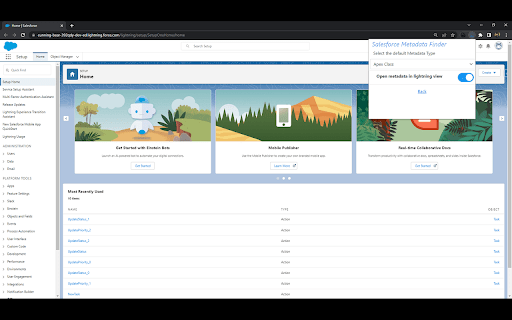
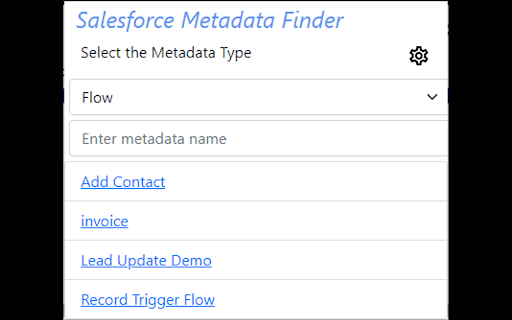
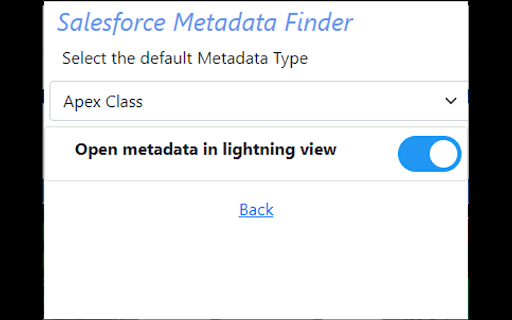

Chrome extension to search Salesforce Metadata This extension can be used to open the metadata used in the salesforce org without going to the Salesforce setup. Supported Metadata > Apex Class > Apex Trigger > Visualforce Page > Custom Label > Profile > Permission Set > Flow In the new update user can select whether the metadata opens in classic or lightning view. User can also set the default metadata type. These can be configured using settings icon on the home page.

Salesforce Inspector Advanced
Productivity tools for Salesforce administrators and developers to inspect data and metadata directly from the Salesforce UI. Salesforce Inspector Advanced - The Ultimate Developer Toolkit for Salesforce Transform your Salesforce development workflow with this comprehensive browser extension designed for developers, admins, and architects. Salesforce Inspector Advanced provides powerful tools to inspect, analyze, and optimize your Salesforce org. 🔍 INSPECT & ANALYZE • Object & Field Inspector: Deep dive into object metadata, field usage analysis, and relationship mapping • Flow Analyzer: Comprehensive flow analysis detecting performance issues, security vulnerabilities, and best practice violations with actionable recommendations • Org Analyzer: Identify unused resources, code quality issues, security vulnerabilities, and migration opportunities across your entire org 💾 DATA MANAGEMENT • Advanced SOQL/SOSL Editor: Intelligent code editor with autocomplete, syntax highlighting, and inline suggestions for fields, objects, and relationships • Data Export: Query and export data with advanced filtering, sorting, column management, and support for GraphQL • Data Import: Bulk import with Bulk API support, hard delete capabilities, and smart field mapping • Inline Editing: Edit records directly in the data export view with bulk update capabilities ⚡ APEX DEVELOPMENT • Apex Runner: Execute anonymous Apex, batch jobs, and queueable classes with real-time log monitoring • Log Viewer: Advanced log analysis with flame charts, profiler, resource tracking (SOQL, DML, callouts), and unit test execution with code coverage • Code Editor: Full-featured editor with syntax highlighting, auto-indentation, and intelligent suggestions for Apex classes and methods 🔧 METADATA & DEPLOYMENT • Metadata Browser: Explore and download metadata with automatic package.xml generation • Metadata Import: Streamlined metadata deployment with relationship handling 🌐 API & INTEGRATION • API Explorer: Test Salesforce APIs with templates, history, and response formatting for REST, Bulk API, Chatter, Reports, and more • Platform Event Manager: Subscribe, monitor, and publish platform events, push topics, and change data capture events 🤖 AI-POWERED FEATURES • AI Flow Analysis: Leverage ChatGPT, Claude, Mistral, or Agentforce to analyze flows and generate SOQL queries • Intelligent Suggestions: Context-aware autocomplete for fields, picklist values, and relationships 🎨 USER EXPERIENCE • Customizable Interface: Custom favicon colors, editable shortcuts, and personalized settings • Quick Access Popup: Fast access to common tasks, user management, and org navigation • Modern UI: Clean, responsive interface with keyboard shortcuts and intuitive navigation 🔒 SECURITY • OAuth 2.0 with PKCE: Secure authentication with support for external connected apps • Security Analysis: Detect SOQL injection vulnerabilities, XSS risks, and access management issues Perfect for developers who need to: • Analyze and optimize Salesforce Flows • Query and manipulate data efficiently • Debug Apex code with advanced log analysis • Manage metadata and deployments • Test APIs and integrations • Identify org health issues and optimization opportunities Whether you're building new features, debugging issues, or maintaining your org, Salesforce Inspector Advanced provides the tools you need to work faster and smarter. https://github.com/dufoli/Salesforce-Inspector-Advanced This extension is based on the original Salesforce inspector extension made by Søren Krabbe and Salesforce inspector reloaded by Thomas Prouvot.

Salesforce Advanced Search & Record Details
Salesforce Advanced Search plugin works in both Classic and Lightning: i) Search any keyword, text or field api name used anywhere in below Salesforce Components, in the result section plugin shows the total number of files where keyword has been used in different components. Plugin also provides to choose which all components to search in for the keyword via checkbox selection: 1) Apex Classes 2) Apex Triggers 3) Visualforce Pages 4) Visualforce Components 5) Email Templates ii) Show Field API Names with Labels of an object in details page, you can toggle between Show and Hide Field API Names without refreshing the page iii) View All Fields and Values provides a way to view all the fields (Label and API Name) and values for a given record of an object, even those that are not in the Page Layout. The show cached checkbox gives the ability to view cached values without querying the SF database. iv) Delete Record allows the admin to delete a record. It's also available for Firefox: https://addons.mozilla.org/en-US/firefox/addon/salesforce-advanced-search/

Ebsta For Salesforce
Ebsta for Salesforce in Google Chrome. Ebsta's Chrome Extension helps thousands of Salesforce seamlessly integrate Gmail, Google Calendar and Salesforce. Sync emails and calendars, track emails, personalised cadences, send later, meeting scheduler and more... ✓ Automatically sync emails to Salesforce ✓ Advanced two-way Google and Salesforce calendar sync ✓ Unlimited email and click tracking ✓ Gmail send later ✓ Meeting scheduler ✓ Access to Salesforce email templates in Gmail ✓ Supports Custom objects and fields out-of-the-box ✓ Integrations with 50+ websites. ✓ Install in less than 10 seconds ✓ Join over 10,000 Salesforce users Ebsta's Chrome Extension seamlessly integrates Gmail and Salesforce. Put the power of Salesforce in Gmail. Ebsta allows you to view, edit and update Salesforce on the fly. It also automatically cross-references Salesforce to show you related customer records as you browse through Gmail. It takes less than 10 seconds to install and works out-of-the box, supporting custom fields and objects. Ebsta enables users to manually or automatically sync emails and attachments to Salesforce. Our automatic email sync feature is easily configurable and supports Contacts, Leads, Accounts, Opportunities and Custom Objects. Ebsta's Google and Salesforce calendar sync ensures everything is up-to-date, wherever you're working. It syncs events within 5 minutes and supports multiple calendars, time-zones, meeting updates, recurring events and deleted events out-of-the box. It's also jam-packed with productivity features to supercharge Gmail. Ebsta's email tracking in Gmail provides immediate insight into what happens after you send. See if your email was read, ignored or buried deep in a full Inbox and never opened. All clicked links are automatically tracked too. Ebsta will also give you insight into the performance of your team's emails so you can make tweaks and changes to boost your open rates! Build out personalised cadences and automated follow-ups, including emails, to nurture relationships with customers. Some of Ebsta's other best-loved features include meeting scheduler, where recipients can quickly pick a time that works for everyone, access to Salesforce templates within Gmail and send later. Ebsta works on over 50 leading websites, including social media (such as LinkedIn, Twitter and Xing), prospecting websites (such as Zoominfo and Crunchbase) and job boards (like Career Builder, Indeed, Reed, Dice and Monster). Privacy Policy : https://www.ebsta.com/privacy-policy/ Terms and Conditions : https://www.ebsta.com/terms Security : https://www.ebsta.com/security

Salesforce Field Detective
A helpful extension for Salesforce users. Add API names of object's fields to the page, making it easier to identify fields The Salesforce API Name Assistant is a powerful Chrome extension designed to streamline and simplify the lives of Salesforce users and administrators. It revolutionizes the way you work with Salesforce objects by effortlessly adding API names to object fields with just one click. Say goodbye to the tedious and time-consuming task of manually assigning API names to fields; this extension does it for you in a matter of seconds. Instant API Name Generation: With a single click, the Salesforce API Name Assistant generates API names for all the fields within a Salesforce object. No more inspection and lots of tabs opened anymore to check manually for field names. Time Savings: The Salesforce API Name Assistant dramatically reduces the time it takes to set up API names for your Salesforce fields, allowing you to focus on more important tasks. Data Consistency: Ensure consistency in your Salesforce database by following a standardized naming convention for API names. Reduced Errors: Minimize the risk of errors associated with manual API name creation, enhancing data accuracy. User Empowerment: Empower Salesforce users of all levels with a user-friendly tool that eliminates the need for complex coding or development skills. The Salesforce API Name Assistant is compatible with all major Chrome browsers and seamlessly integrates with your Salesforce environment, providing a hassle-free experience for users. We support both Classic and Lightining, and Custom and Standard objects Make your Salesforce data management more efficient and error-free with the Salesforce API Name Assistant. Say goodbye to manual API name creation and streamline your Salesforce processes. Add the extension today to experience the future of Salesforce object field management.
