
gemcgnkghpnfbmlfimdbdgfepcgenphf
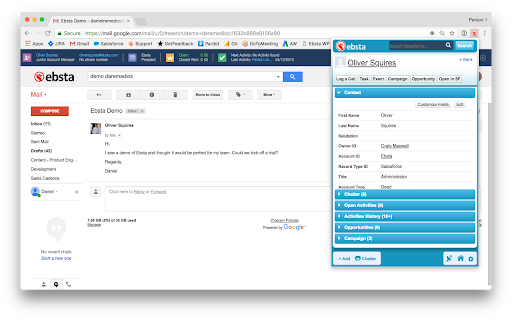

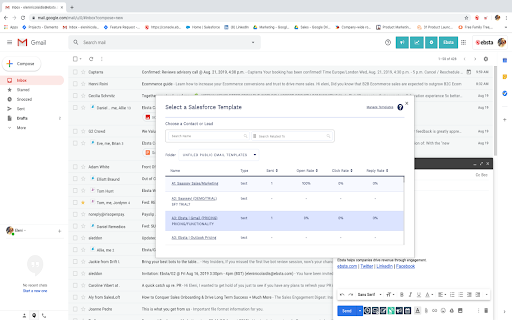
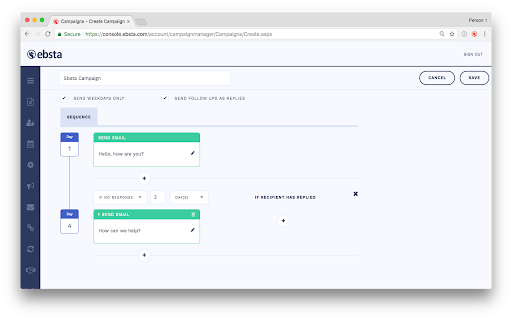
Ebsta for Salesforce in Google Chrome. Ebsta's Chrome Extension helps thousands of Salesforce seamlessly integrate Gmail, Google Calendar and Salesforce. Sync emails and calendars, track emails, personalised cadences, send later, meeting scheduler and more... ✓ Automatically sync emails to Salesforce ✓ Advanced two-way Google and Salesforce calendar sync ✓ Unlimited email and click tracking ✓ Gmail send later ✓ Meeting scheduler ✓ Access to Salesforce email templates in Gmail ✓ Supports Custom objects and fields out-of-the-box ✓ Integrations with 50+ websites. ✓ Install in less than 10 seconds ✓ Join over 10,000 Salesforce users Ebsta's Chrome Extension seamlessly integrates Gmail and Salesforce. Put the power of Salesforce in Gmail. Ebsta allows you to view, edit and update Salesforce on the fly. It also automatically cross-references Salesforce to show you related customer records as you browse through Gmail. It takes less than 10 seconds to install and works out-of-the box, supporting custom fields and objects. Ebsta enables users to manually or automatically sync emails and attachments to Salesforce. Our automatic email sync feature is easily configurable and supports Contacts, Leads, Accounts, Opportunities and Custom Objects. Ebsta's Google and Salesforce calendar sync ensures everything is up-to-date, wherever you're working. It syncs events within 5 minutes and supports multiple calendars, time-zones, meeting updates, recurring events and deleted events out-of-the box. It's also jam-packed with productivity features to supercharge Gmail. Ebsta's email tracking in Gmail provides immediate insight into what happens after you send. See if your email was read, ignored or buried deep in a full Inbox and never opened. All clicked links are automatically tracked too. Ebsta will also give you insight into the performance of your team's emails so you can make tweaks and changes to boost your open rates! Build out personalised cadences and automated follow-ups, including emails, to nurture relationships with customers. Some of Ebsta's other best-loved features include meeting scheduler, where recipients can quickly pick a time that works for everyone, access to Salesforce templates within Gmail and send later. Ebsta works on over 50 leading websites, including social media (such as LinkedIn, Twitter and Xing), prospecting websites (such as Zoominfo and Crunchbase) and job boards (like Career Builder, Indeed, Reed, Dice and Monster). Privacy Policy : https://www.ebsta.com/privacy-policy/ Terms and Conditions : https://www.ebsta.com/terms Security : https://www.ebsta.com/security

Rival
Supercharge Your Sourcing with the Rival Chrome Extension Supercharge Your Sourcing with the Rival Chrome Extension Say goodbye to scattered tabs, clunky spreadsheets, and sourcing chaos. The Rival Chrome Extension brings the full power of Rival Recruit wherever you work—so you can focus less on tracking and more on hiring top talent. Why You’ll Love It: Recruiters often find themselves lost in a maze of profiles, browsers, and tools while trying to find the perfect candidate. Sound familiar? The Rival Chrome Extension cuts through that noise—streamlining your workflow and saving you hours. Seamlessly layer Rival insights on top of your favorite sourcing platforms like LinkedIn, GitHub, Facebook, Twitter, and more. Instantly access rich candidate data without ever leaving the page. Here’s How It Works: Wherever you’re sourcing, Rival shows up with two powerful tools: Find & Qualify – Instantly view a candidate’s social presence, skill level, career trajectory, company fit, key achievements, and even their likelihood to make a move—all in one concise panel. Why It Matters: At Rival, we believe your tools should work the way you work—not the other way around. This extension is designed to meet you where you are, simplify your process, and help you hit your hiring goals faster.

Ebsta for Bullhorn
ebsta for Bullhorn connecting you to Bullhorn in Google Chrome. Ebsta for Bullhorn Easily manage all your contacts, candidates and sales efforts in Bullhorn without interrupting your day. BENEFITS • Retain and share more knowledge across your business • Significantly reduce workflow and improve company performance • Increase the ROI of Bullhorn, LinkedIn and Job boards • Identify more sales opportunities FEATURES • Search, view and edit Bullhorn records without logging in. • Create client, contact and candidate records from any web page • Attach people found on the web to shortlists and distribution lists • Create tasks and notes on the fly Ebsta doesn't try to change the way users work. Instead we make it super easy to engage with Bullhorn whilst browsing websites in Chrome.

ZoomInfo Chrome Extension
Access ZoomInfo's best-in-class contact and company data on any website using our Chrome Extension. Free for ZoomInfo customers. 📣Tap into ZoomInfo’s industry-best B2B contact and company data on any website using our Chrome Extension. Free for ZoomInfo Sales and Talent customers! 💥Fueled by ZoomInfo's premier B2B intelligence platform, you can effortlessly retrieve phone numbers, email addresses, and key buying signals without navigating away from your current tab. 🔍Identify leads on LinkedIn or company websites and seamlessly send prospects an email or add them to an automated sequence, all within the ZoomInfo Chrome Extension. 💫Say goodbye to manual data entry. Export your searches to Salesforce, Outreach, HubSpot, or any of our 70+ compatible integrations. 📱Supercharge your sourcing with direct contact information for millions of candidates — all without leaving LinkedIn, Indeed, or company websites. ✅ Add qualified candidates to an automated email sequence or a Project in TalentOS and manage your search by applying tags to candidates or companies. 🖱Export lists of candidates from ZoomInfo's best-in-class data solution to your ATS with one click.

Record and Metadata Comparator for Salesforce
Compare Record data values and object metadata in Salesforce Compare Object Metadata and it's record values in Salesforce (now supports Lightning!) and see all differences in just four clicks! Credits: 1. sorenkrabbe for his extension "salesforce-inspector" available @ https://chrome.google.com/webstore/detail/salesforce-inspector/aodjmnfhjibkcdimpodiifdjnnncaafh I have used the code shared by him to improvise and develop this extension. I would share the code of this extension on github soon. 2. Maninder Singh for enabling the extension to work in Lightning -https://www.linkedin.com/in/mansinghinder/ This extension compares any two objects or its records (could be from same org or different orgs) and highlights all the differences found. It can show you the following Please watch the video tutorial available @ http://youtu.be/mkarbbYWveY to understand the exact functionality and its uses. 1. Open up the custom object definition or it's list view or any of it's record in salesforce. This is your source record. Click on the extension icon and then click on the "Select Source Record" button. 2. After that, open up the custom definition of the same object or it's list view or the record (could be from same org or different org). This is your target record. Click on the extension icon and then click on the "Select Target record" button. 3. The extension would create a popup and in that show you all the differences that were found. Steps to compare Record Values: 1. open any record from a standard/custom object in one org. This is your source record. Click on the extension icon and then click on the "Select Source Record" button. 2. After that, open up any other record for the same object (could be from same org or different org). This is your target record. Click on the extension icon and then click on the "Select Target record" button. 3. The extension would create a popup and in that show you all the differences that were found. Do recommend the extension with you friends and colleagues if you like it. Also, if you like the extension, please don't forget to Rate it on the Chrome Extension Webstore. Thanks again and I hope this extension saves your time and makes you more productive! For any queries: rajivashokbhatt+metadatacomparator@gmail.com
