
kapnjjcfcncngkadhpmijlkblpibdcgm

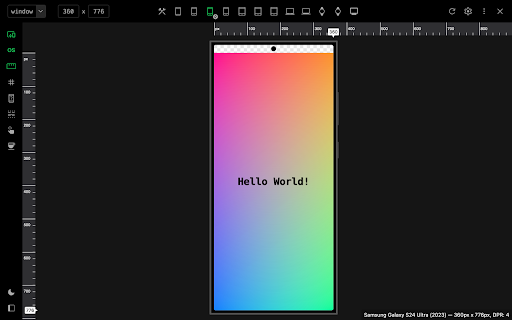


Emulate devices, resize screens, and perfect your web design effortlessly with this cutting-edge testing and presentation tool. Enhance your web design experience with our dynamic testing and presentation tool, designed to create, test, and showcase your digital experiences on any device, from wearables to very big screens. Customize your workspace fully and use or create your own device mockups, explore various display resolutions, and harness advanced emulation features like touch fingerprint simulation, user-agent emulation, and breakpoint guide, all within a professional-grade environment built for high-quality development and debugging. Push your limits with an intuitive zoomable workspace, precise ruler and grid tools, and a sleek presentation mode called 'Coffee Mode' — think of this tool as a first-level approximation of how your digital experience looks and feels across multiple devices. Limitations: While our tool provides comprehensive device simulations, it does not replace the need for physical device testing.

U-Eyes: Mobile Simulator
Test any website on iPhone & Android mobile devices. A powerful mobile simulator with screenshots & beautiful device mockups. 👁️ Welcome to U-Eyes, the ultimate Mobile simulator designed for developers, designers, QA testers, and marketers who demand pixel-perfect precision. In today's mobile-first world, ensuring your web projects look and function flawlessly across all devices is not just an option; it is a necessity. U-Eyes is your all-in-one toolkit, integrated directly into your Chrome browser, to test, capture, and share your responsive web designs with unparalleled ease and accuracy. Stop switching between multiple tools and your physical phone. Streamline your workflow with U-Eyes. U-Eyes transforms your browser into a powerful and versatile testing environment. At its core, it provides an intuitive way to switch your browser's resolution to match a vast array of popular mobile devices. From the latest iPhones and Android flagships to various tablets, you can instantly see how your website adapts. This immediate feedback is crucial for nailing down your responsive design and catching layout issues before they reach your users. 🚀 Experience a true mobile view without ever leaving your desktop. Our extension meticulously adjusts the viewport, user agent, and touch events to emulate the real device environment as closely as possible. This isn't just about resizing a window; it's about creating a comprehensive testing ground for your responsive layouts. Apple iPhone Series (17 Air, 16 Pro, SE, etc.) Samsung Galaxy Series (S22, Z Fold, etc.) Google Pixel Series (7, 6a, etc.) Apple iPads and other tablets Custom resolution and device profiles ✨ Beyond simple emulation, U-Eyes is a powerful responsive viewer that allows you to inspect and debug your CSS media queries in real-time. Identify breakpoints, adjust your styling, and ensure every element aligns perfectly, no matter the screen size. Our goal is to make responsive web development faster, more intuitive, and significantly more productive for you and your team. 📸 Capturing your work for presentations, bug reports, or portfolios has never been easier. U-Eyes includes a sophisticated screenshot tool with multiple powerful modes. You can capture exactly what you see within the emulated device screen, providing a clean, professional-looking image of your mobile layout. This is perfect for sharing progress with clients or logging visual bugs with precise context. Need to create stunning visuals for your app store page or marketing materials? Our screenshot functionality includes an optional high-fidelity device mockup feature. With a single click, you can frame your screenshot within a sleek, realistic phone body. Create a beautiful iphone mockup to showcase your iOS-optimized design or use a generic phone mockup for broader appeal. This feature elevates your screenshots from simple captures to presentation-ready assets. But what about pages that are longer than the screen? We have you covered. U-Eyes features a full-page screenshot capability that automatically scrolls down the page and stitches together a complete, high-resolution image. Capture everything from the header to the footer in one seamless file, saving you the hassle of manual scrolling and image editing. This is a game-changer for documenting long landing pages or entire user flows. 🎬 Sometimes a static image isn't enough to demonstrate a feature or document a complex bug. That is why U-Eyes includes a built-in screen recorder. Record your interactions within the mobile emulator and save them as a crisp, lightweight WebM video file. This is ideal for creating short demos, tutorials, or providing developers with a clear, animated bug report that shows exactly how to reproduce an issue. Perfect your screen mobile presentation with dynamic video. ☁️ Collaboration is key in modern web development. U-Eyes simplifies sharing with its integrated cloud upload feature. With a single click, you can upload any screenshot or video recording to a secure cloud service and instantly get a shareable link. No more emailing large files or struggling with third-party hosting services. Share your work with colleagues and clients effortlessly. This powerful Mobile simulator extension is built for a variety of professionals: ➤ Web Developers: Debug media queries and test JavaScript events in a controlled mobile environment. ➤ UI/UX Designers: Quickly check design consistency and user experience across dozens of screen sizes. ➤ QA Testers: Document bugs with precise visual evidence using annotated screenshots and video recordings. ➤ Marketers & Project Managers: Create stunning promotional materials and present project progress with professional mockups. Frequently Asked Questions Q: How do I view webpage as mobile using this extension? A: It is incredibly simple. Once you install U-Eyes, just navigate to the webpage you want to test, click the U-Eyes icon in your browser toolbar, and select a device from our extensive list. The page will instantly reload in a perfectly sized mobile view, emulating the chosen device. Q: Is this tool more than just a phone simulator? A: Absolutely. While its core function is a high-fidelity phone simulator, U-Eyes is a complete workflow enhancement tool. It combines emulation with advanced screenshot capabilities (including full-page and mockups), screen recording, and cloud sharing. It is a comprehensive suite designed to cover all your responsive testing and documentation needs. Q: Can I trust this mobile browser extension with my work? A: Yes. U-Eyes operates entirely locally within your browser. Your data, screenshots, and recordings are your own. The optional cloud upload feature only activates when you explicitly choose to share a file, and it uses a secure connection to do so. Why choose U-Eyes? Here is a summary of its standout benefits: • All-in-One Solution: No need for multiple extensions for testing, screenshots, and recording. • High Accuracy: Emulates device resolutions and user agents for reliable testing. • Workflow Efficiency: Capture, annotate, and share your findings in seconds, not minutes. • Professional Presentation: The device mockup feature makes your work look its best. • Lightweight and Fast: Built to be performant and not slow down your browser. Here is what you get with the U-Eyes toolkit: 1️⃣ A massive, up-to-date list of mobile and tablet devices. 2️⃣ One-click screenshots with an optional, beautiful device mockup. 3️⃣ Full-page, scrolling screenshots for long pages. 4️⃣ High-quality screen recording to WebM video. 5️⃣ Instant cloud uploading for easy sharing and collaboration. Stop guessing how your website looks on mobile. Install U-Eyes: Mobile Simulator today and take complete control of your responsive design workflow. See your work through your users' eyes and deliver a flawless mobile experience every single time.

CSS Peeper
Inspect website styles in seconds. Supercharge your workflow, and save hours of work. CSS Peeper is the ultimate Chrome extension for designers and developers who want a seamless way to inspect and extract design properties from any website. Say goodbye to digging through complex code. CSS Peeper provides an intuitive, organized interface to access key design details. Professionals deserve tools that save time. Let CSS Peeper streamline your workflow and help you work smarter, not harder. Join 500,000+ professionals who are already making the most of their time. Supercharge your workflow with advanced design inspection features and save hours of work. No more digging in a code. 👉 Get CSS Peeper for Free! Install now and start inspecting websites in seconds. Visit https://csspeeper.com for more details. ✦ Inspect design properties effortlessly. Stop digging through the code. Save hours by quickly inspecting element properties with a simple point-and-click. ✦ Explore colors used on your favorite sites. Browse a variety of colors, find inspiration, and easily check contrast. Love a palette? Export it to your favorite design tool. ✦ Identify typography. Explore the typography across any site, uncover unique font pairings, and check the most relevant text properties. ✦ Explore assets. Browse and download all images, icons, and graphics used across a website. ✦ Instantly preview and copy the CSS of any element, turning great design into reusable code. ✦ Browse and explore the typography in use on any website. Preview the typography hierarchy to understand font choices, sizes, and styles, helping you design confidently and efficiently. ✦ Effortlessly identify typography instances and gain deeper insights into font style applications. Navigate to a dedicated screen to inspect each type of style with precision. ✦ Browse colors by semantic grouping including typography, background, border, and more. Identify colors in context to get more insights. ✦ Inspect individual color instances and explore their use cases, including value, category, class, and design token. ✦ Explore gradients color by color and preview every shade to recreate stunning visual effects with precision. ✦ Contrast scanner helps you stay aligned with the best accessibility practices. Instantly assess contrast issues, ensuring your websites are beautiful and accessible. ✦ Smart Inspector offers an advanced way to inspect design details at a glance. It provides deeper insights into design properties, including color contrast, shadows, and elevation effects. ✦ Switch to Sidebar Mode to gain full access to the website’s viewport. You can see the full list of available features at https://csspeeper.com/pricing By using the CSS Peeper extension, you agree to our Terms & Conditions (https://csspeeper.com/terms-and-conditions) and Privacy Policy (https://csspeeper.com/privacy-policy). CSS Peeper is proud to support Learn to Code, a nonprofit that supports our mission to help everyone become better coders. By using affiliate links, we invite you to help our mission when you are shopping at partner stores, at no cost to you. Support is always optional, and can be permanently disabled at any time.

Designer Tools
A collection of tools to help you design and develop websites with precision. Designer Tools helps web designers and developers achieve pixel-perfect results with ease. It includes features like rulers, guidelines, and multiple ways of measuring elements and spacing. You can customize your setup with grids, move or remove guides, and tweak settings to match your workflow. PLUS subscribers gain access to extra tools and resources to enhance their design process.

Window Resizer
Resize the browser window to emulate various screen resolutions. This extension re-sizes the browser's window in order to emulate various resolutions. It is particularly useful for web designers and developers by helping them test their layouts on different browser resolutions. The resolutions list is completely customizable (add/delete/re-order). You can set the window's width/height, window's position, preset icon (phone, tablet, laptop, desktop) and even the option to apply the new dimensions to the entire window or just to the viewport. The extension also features customizable global key shortcuts, an option to export your settings and import them on another computer and more! Please report all bugs (or suggestions) using the support link on the extension's details page.
