
pjldgnhfobpnhbdmfmofkfppdilefnjj


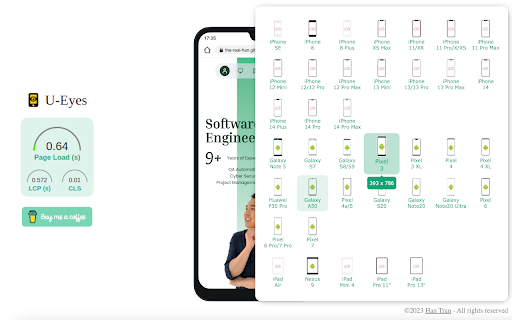


Test any website on iPhone & Android mobile devices. A powerful mobile simulator with screenshots & beautiful device mockups. 👁️ Welcome to U-Eyes, the ultimate Mobile simulator designed for developers, designers, QA testers, and marketers who demand pixel-perfect precision. In today's mobile-first world, ensuring your web projects look and function flawlessly across all devices is not just an option; it is a necessity. U-Eyes is your all-in-one toolkit, integrated directly into your Chrome browser, to test, capture, and share your responsive web designs with unparalleled ease and accuracy. Stop switching between multiple tools and your physical phone. Streamline your workflow with U-Eyes. U-Eyes transforms your browser into a powerful and versatile testing environment. At its core, it provides an intuitive way to switch your browser's resolution to match a vast array of popular mobile devices. From the latest iPhones and Android flagships to various tablets, you can instantly see how your website adapts. This immediate feedback is crucial for nailing down your responsive design and catching layout issues before they reach your users. 🚀 Experience a true mobile view without ever leaving your desktop. Our extension meticulously adjusts the viewport, user agent, and touch events to emulate the real device environment as closely as possible. This isn't just about resizing a window; it's about creating a comprehensive testing ground for your responsive layouts. Apple iPhone Series (17 Air, 16 Pro, SE, etc.) Samsung Galaxy Series (S22, Z Fold, etc.) Google Pixel Series (7, 6a, etc.) Apple iPads and other tablets Custom resolution and device profiles ✨ Beyond simple emulation, U-Eyes is a powerful responsive viewer that allows you to inspect and debug your CSS media queries in real-time. Identify breakpoints, adjust your styling, and ensure every element aligns perfectly, no matter the screen size. Our goal is to make responsive web development faster, more intuitive, and significantly more productive for you and your team. 📸 Capturing your work for presentations, bug reports, or portfolios has never been easier. U-Eyes includes a sophisticated screenshot tool with multiple powerful modes. You can capture exactly what you see within the emulated device screen, providing a clean, professional-looking image of your mobile layout. This is perfect for sharing progress with clients or logging visual bugs with precise context. Need to create stunning visuals for your app store page or marketing materials? Our screenshot functionality includes an optional high-fidelity device mockup feature. With a single click, you can frame your screenshot within a sleek, realistic phone body. Create a beautiful iphone mockup to showcase your iOS-optimized design or use a generic phone mockup for broader appeal. This feature elevates your screenshots from simple captures to presentation-ready assets. But what about pages that are longer than the screen? We have you covered. U-Eyes features a full-page screenshot capability that automatically scrolls down the page and stitches together a complete, high-resolution image. Capture everything from the header to the footer in one seamless file, saving you the hassle of manual scrolling and image editing. This is a game-changer for documenting long landing pages or entire user flows. 🎬 Sometimes a static image isn't enough to demonstrate a feature or document a complex bug. That is why U-Eyes includes a built-in screen recorder. Record your interactions within the mobile emulator and save them as a crisp, lightweight WebM video file. This is ideal for creating short demos, tutorials, or providing developers with a clear, animated bug report that shows exactly how to reproduce an issue. Perfect your screen mobile presentation with dynamic video. ☁️ Collaboration is key in modern web development. U-Eyes simplifies sharing with its integrated cloud upload feature. With a single click, you can upload any screenshot or video recording to a secure cloud service and instantly get a shareable link. No more emailing large files or struggling with third-party hosting services. Share your work with colleagues and clients effortlessly. This powerful Mobile simulator extension is built for a variety of professionals: ➤ Web Developers: Debug media queries and test JavaScript events in a controlled mobile environment. ➤ UI/UX Designers: Quickly check design consistency and user experience across dozens of screen sizes. ➤ QA Testers: Document bugs with precise visual evidence using annotated screenshots and video recordings. ➤ Marketers & Project Managers: Create stunning promotional materials and present project progress with professional mockups. Frequently Asked Questions Q: How do I view webpage as mobile using this extension? A: It is incredibly simple. Once you install U-Eyes, just navigate to the webpage you want to test, click the U-Eyes icon in your browser toolbar, and select a device from our extensive list. The page will instantly reload in a perfectly sized mobile view, emulating the chosen device. Q: Is this tool more than just a phone simulator? A: Absolutely. While its core function is a high-fidelity phone simulator, U-Eyes is a complete workflow enhancement tool. It combines emulation with advanced screenshot capabilities (including full-page and mockups), screen recording, and cloud sharing. It is a comprehensive suite designed to cover all your responsive testing and documentation needs. Q: Can I trust this mobile browser extension with my work? A: Yes. U-Eyes operates entirely locally within your browser. Your data, screenshots, and recordings are your own. The optional cloud upload feature only activates when you explicitly choose to share a file, and it uses a secure connection to do so. Why choose U-Eyes? Here is a summary of its standout benefits: • All-in-One Solution: No need for multiple extensions for testing, screenshots, and recording. • High Accuracy: Emulates device resolutions and user agents for reliable testing. • Workflow Efficiency: Capture, annotate, and share your findings in seconds, not minutes. • Professional Presentation: The device mockup feature makes your work look its best. • Lightweight and Fast: Built to be performant and not slow down your browser. Here is what you get with the U-Eyes toolkit: 1️⃣ A massive, up-to-date list of mobile and tablet devices. 2️⃣ One-click screenshots with an optional, beautiful device mockup. 3️⃣ Full-page, scrolling screenshots for long pages. 4️⃣ High-quality screen recording to WebM video. 5️⃣ Instant cloud uploading for easy sharing and collaboration. Stop guessing how your website looks on mobile. Install U-Eyes: Mobile Simulator today and take complete control of your responsive design workflow. See your work through your users' eyes and deliver a flawless mobile experience every single time.

Mobile View Tester: Responsive Web Design Tool
Mobile-first design validation. Quickly preview and optimize website performance across multiple device screen sizes. Transform Your Web Design with Precision Mobile Device Testing In today's mobile-first world, ensuring your website looks perfect across all devices is crucial. Mobile View Tester is the ultimate Chrome extension that empowers web developers, designers, and digital professionals to create flawless responsive websites with ease. Comprehensive Mobile Device Simulation Our powerful tool provides instant, accurate previews of your website across a wide range of mobile devices. From the latest smartphones to tablets, see exactly how your design performs in real-world conditions. No more guesswork or multiple device testing – get comprehensive insights with a single click. Key Features: Instant Preview of 85+ Devices Supports iPhone, Android, and Tablet ,Laptop Screens Accurate Screen Resolution Simulation One-Click Device View Switching No Technical Setup Required Designed for Professionals Whether you're a web developer, UI/UX designer, freelancer, or part of a digital agency, Mobile View Tester streamlines your responsive design workflow. Catch layout issues before they reach your users, ensuring a seamless mobile experience. Install the Chrome Extension Open Your Website Select From 85+ Device Profiles Instantly Validate Your Design Lightweight and Fast Minimal Browser Resource Usage No External Software Needed Works Directly in Chrome Privacy and Security Perfect For:

Desktop - Mobile Responsive Testing Tool
All-in-one Chrome extension for SEO, UI/UX, responsive design, grammar, and security checks. Optimize websites with a single click. 🚀 Elevate Your UI Testing & Responsive Design with WebOpt! Tired of endless troubleshooting across devices? Say goodbye to UI and responsive design headaches with WebOpt – the ultimate tool for ensuring your website looks perfect and performs seamlessly on any screen size. Whether you're testing for desktop, tablet, or mobile, WebOpt has got you covered! Frustrated with the constant battle of making your website look perfect on every device? Put an end to the guesswork with WebOpt – your ultimate companion for flawless UI testing and responsive design. Whether it’s a desktop, tablet, or smartphone, WebOpt ensures your website shines across all screens. ✨ Key Features: 📱 Multi-Device Responsive Testing: Ensure your design looks stunning on every device. WebOpt allows you to test responsiveness across multiple screen sizes and resolutions, providing instant feedback on how your site adapts to different environments. 🌐 Network Capture & Analysis: Track every network request your website makes, from initial load to resource fetching. WebOpt captures network traffic during your tests, allowing you to analyze load times, response times, and the efficiency of your site’s performance. 🕒 Response Time Calculation: Get precise metrics on network response times. Understand how your website performs under different conditions and pinpoint areas that need optimization. With detailed charts and insights, you can ensure a fast, user-friendly experience for your visitors. 📊 Network Monitoring Charts: Track your website’s network performance with WebOpt’s detailed monitoring charts. These charts offer clear insights into network activity, including load times and response times, helping you pinpoint bottlenecks and optimize your site’s speed and efficiency. With WebOpt, you can ensure that your website delivers a smooth and fast user experience across all devices. 📝 Issue Reporting: Capture issues directly from your tests and create detailed reports with ease. WebOpt integrates seamlessly with Jira, Slack, Notion, ClickUp, Asana, GitHub, and GitLab, enabling you to track and manage issues within your existing workflow. Simply click to document and assign issues, ensuring nothing slips through the cracks. 📸 Screenshot Capture & Editing: Capture and edit screenshots of your tests in real-time. Highlight issues with tools like pencil, square markers, and text annotations. Make your reports clear and actionable with visual evidence of every issue. 🌟 Why Choose WebOpt for UI Testing? ✔️ Real-Time Feedback: See how your site performs across devices instantly, saving you hours of testing time. ✔️ Detailed Network Insights: Track every request, response time, and potential bottleneck with precision. ✔️ User-Friendly Interface: Navigate complex UI and responsive testing tasks with ease, thanks to our intuitive design.

Device Simulator
This Chrome extension simulates the web app environments (User Agent and required APIs) of video streaming devices like set-top boxes, Tizen, PS WebMaf. It can be used for developers to use their desktop browsers to test web applications developed for those devices. When you have selected a simulator for a loaded URL for the first time, it remembers your selection, and use the selection next time automatically.

Mobile simulator - responsive testing tool
Smartphone and tablet simulator on computer with several models to test mobile responsive websites. 🚀 Simulate mobile viewports, check responsive web design, create impactful client demos, and save hours of testing. Mobile FIRST is the most powerful and reliable responsive simulator extension, trusted by developers and designers for over 5 years. Our rating on the Chrome Store speaks for itself! 📱 PRE-CONFIGURED DEVICES (New ones added regularly) • 58+ devices ready to use out of the box • 45 smartphones (old and recent models) • 5 tablet models • 11 special devices (smartwatches, kiosks, desktop...) 🔥 NEW & MAIN FEATURES • 🛠️ Custom devices: Create and save your own devices with custom screen resolutions and viewports • 👆 Realistic touch scrolling: Simulates native finger gestures for an authentic mobile browsing feel • 🎬 One-click video capture (WEBM, GIF, MP4) for your demos and tutorials • 📸 Transparent PNG screenshots, perfect for client emails or presentations • 🌚 Dark mode for enhanced visual comfort ✨ Inside Mobile FIRST, many technical tricks are integrated to reproduce the mobile experience as closely as possible. (Note: While highly accurate for day-to-day dev, this simulator does not replace final testing on a real device for 100% full validation.)
