
jolmkddbfhhillmepjmbhjedjnnpgmom
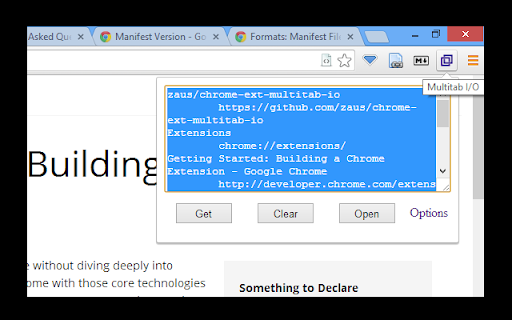
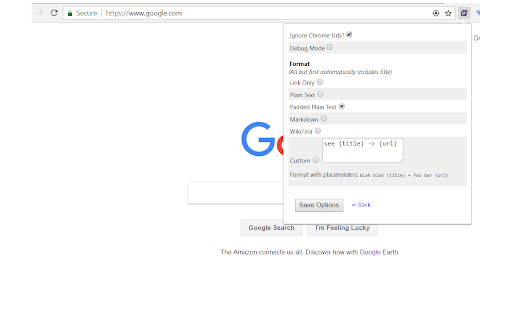
Simplified import/export of your current browsing session: it creates a list of the open tabs from the active window, allowing you to share this list however you choose (e.g. via email or basic text file). You can also paste that list of urls to open them all in new tabs. Specifics on usage: 1. It checks for links, one per line 2. Links must be the only thing on the line 3. Links are identified by starting with 'http' or containing '://' 4. Anything not matching link criteria is ignored (i.e. title lines) Permissions: 1. Tabs and Browsing Activity -- required to get the list of open tabs, and open tabs for the pasted urls. Does not check for anything else. Inspired by "Tab-Snap", which graciously provides its source code. Likewise, view full source for this extension at https://github.com/zaus/chrome-ext-multitab-io

Tab Extract
A simple & lightweight tool to reduce tab clutter, using just the address bar. ● Too many disorganized tabs open? ● Slow to find the tab you're looking for? ● Want to reduce tab and window clutter quickly? Tab Extract helps you easily re-organize your tabs according to the subject or site, or quickly find a tab, or easily remove multiple tabs. How it works: Tab Extract will move all tabs from any window with a keyword match (in their URL or page title), into a new window. To use, type "ex" followed by a tab/space into the address bar, then enter keywords. ✓ "ex facebook news" will extract all facebook tabs and any tab with "news" or "facebook" in their title or URL, into a new window. ✓ "ex ." merges all tabs into the same window. This works because all URLs have a "." in them. ✓ Batch-remove tabs by extracting tabs to a new window using Tab Extract, and then closing the window. ✓ Tab Extract can merge tabs from across different windows into the same window by using a common keyword amongst the tabs. Notes: There is no need to select anything in the auto complete box, just press enter. If your Chrome has saved some "ex " as a search term for autocomplete, clear your history. Migrated from Chrome Extension Manifest v2 to Manifest v3 - Background script now runs as a service worker - Updated minimum Chrome version to 88 - Removed alert() for service worker compatibility (omnibox already provides feedback) Support for Marvellous Suspender suspended tabs - Extension now searches within the original URL and title of suspended tabs - Suspended tabs are moved while maintaining their suspended state Support for Chrome's natively unloaded tabs - Removed status filter to include tabs in all loading states - Fixes issue where unloaded tabs were not being found Fixed compatibility with modern Chrome versions that use tab unloading for memory management

Tab List
List opened tabs for current window. Tab groups are recognised and displayed. Filter list, focus or close tab, bookmark tab group. It is a simple but effective extension that will help you manage your ever growing number of tabs. If number of tabs you have opened makes it hard to manage, then this extension will help you. When you have tabs grouped, it will open by default in Group View, you can bookmark grouped tabs, your tabs will be in the "Bookmarks Bar/Tab List" folder. You can switch to list view, tabs will be colour coded according to the group it belongs to. Version 1.2.2 12/01/2024 - Show groups of tabs - Provide Group view when appropriate with ability to switch to list view - Bookmark group - Dark/Light theme aware Version 1.1.4 05/01/2024 - Allow for search term (if valid url) to be opened in new tab Version 1.1.3 19/04/2022 - Remove unused permission Version 1.1.2 15/03/2018 - Search bar is now sticky Version 1.0.1 01/11/2017 - When filtered list contains one item then press Enter to highlight this tab.

Tab Manager
Easily organize all your open tabs in multiple windows from toolbar popup! This extension is designed to organize tabs from the toolbar popup. The UI for the extension can also be opened in a standalone popup window or a new tab (choose an item from the toolbar button context-menu). Tab Manager add-on supports multi-window and incognito mode. To work with this addon, just open the extension UI and start managing your tabs. Within the UI you can see a search bar at the bottom. Above that, there is the list of open tabs for window #1 (a new section is added for each new window). Within each row (tab item) in the list, there are several buttons. The first is the pin button which can be used to pin a desired tab(s). Next is the HTTP/HTTPS sign which shows if a website supports SSL protocol or not. The third icon is the tab icon which updates automatically depending on the tab URL. You can see the tab title right after the tab icon. There are also two buttons on the right side for editing or removing the current item. Please note that within the extension interface, all tab items are draggable. Once you drag an item, the actual tab will be re-positioned as well. Note: The extension interface supports dark mode. To switch the interface theme to dark, please press the moon icon in the bottom-right toolbar. To report bugs, please fill out the bug report form on the addon's homepage (https://mybrowseraddon.com/tab-manager.html).

TabPlus
The most feature-packed tab manager. Save & organize your tabs, sync across devices! Tab++ allows you to save your tabs for later. You can organize, categorize, and name them, then restore individual tabs or tab groups at any time. You can even sync them across devices! Tab++ is inspired by similar extensions like OneTab, only with WAY more features... Like folders, cloud-syncing, easy backup and restore, and more! # Note: Usage help can be found in the options page. # NEW IN v1.7.3 - Dark mode, woot! - Implemented more settings in the options page - Confirmation prompt before clearing all data - Don't save pinned tabs by default (configurable) - Bug fixes & improvements to automatic corruption recovery
