
iphchnegaodmijmkdlbhbanjhfphhikp

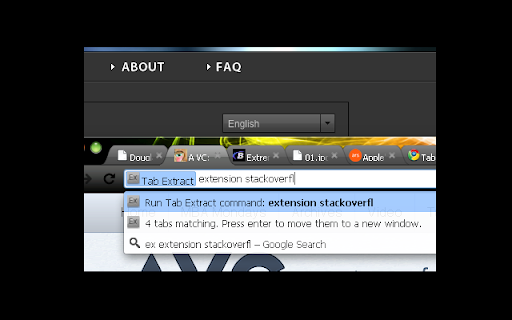
A simple & lightweight tool to reduce tab clutter, using just the address bar. ● Too many disorganized tabs open? ● Slow to find the tab you're looking for? ● Want to reduce tab and window clutter quickly? Tab Extract helps you easily re-organize your tabs according to the subject or site, or quickly find a tab, or easily remove multiple tabs. How it works: Tab Extract will move all tabs from any window with a keyword match (in their URL or page title), into a new window. To use, type "ex" followed by a tab/space into the address bar, then enter keywords. ✓ "ex facebook news" will extract all facebook tabs and any tab with "news" or "facebook" in their title or URL, into a new window. ✓ "ex ." merges all tabs into the same window. This works because all URLs have a "." in them. ✓ Batch-remove tabs by extracting tabs to a new window using Tab Extract, and then closing the window. ✓ Tab Extract can merge tabs from across different windows into the same window by using a common keyword amongst the tabs. Notes: There is no need to select anything in the auto complete box, just press enter. If your Chrome has saved some "ex " as a search term for autocomplete, clear your history. Migrated from Chrome Extension Manifest v2 to Manifest v3 - Background script now runs as a service worker - Updated minimum Chrome version to 88 - Removed alert() for service worker compatibility (omnibox already provides feedback) Support for Marvellous Suspender suspended tabs - Extension now searches within the original URL and title of suspended tabs - Suspended tabs are moved while maintaining their suspended state Support for Chrome's natively unloaded tabs - Removed status filter to include tabs in all loading states - Fixes issue where unloaded tabs were not being found Fixed compatibility with modern Chrome versions that use tab unloading for memory management

Awesome Button Bar
Button bar, combining downloads, bookmarks, extensions, history, view source, print, and more from a single button. Awesome! Extensions, history, downloads, bookmarks, view source, options, new window, and print are all here. Recently added buttons are duplicate tab, second home, and refresh all tabs. Showing each button on the bar is optional so you don’t have to have them all if you don’t want them all. Also, each button can be configured to open either in the current window or in a new window. Note: print to a new window now works too!

Extentie - extension manager
A simple and elegant Chrome extension manager allows you manage your extensions in a popup window. Extentie is a simple and beautiful tool that allows you to toggle and manage Chrome extensions in a popup. Latest update: - Now you can create your own groups to manage your extensions - Revamped from ground up, added more features

Tab Ahead
Tab Ahead lets you type ahead to quickly find open tabs by title and URL. This extension helps you to quickly navigate through (the mess of) your currently open tabs by typing parts of their respective page titles or URLs using a fuzzy search (approximate string matching) algorithm. Aspiring to bring Sublime Text's »Goto Anything...« to your Chrome Tabs. Options: You can choose to search through the current window or through all windows. The default setting is searching through the current window. Privacy: We do not find you to be all that interesting. Your questionable browsing history should remain between you and the NSA. Tab Ahead functions without any outbound communication. Period. Keyboard/Hacker-friendly: You can leave your mice at home. Sponsor/Support: Support the development of this extension via PayPal https://www.paypal.com/paypalme/janraasch/14,00 or GitHub Sponsors https://github.com/sponsors/janraasch. Version History: v1.6.0 - Update extension manifest to v3. v1.5.0 - Improve fuzzy search. v1.4.0 - Add dark color scheme for users of dark mode. v1.3.1 - Maintenance release & initial release for Firefox. v1.3.0 - Improve fuzzy filter and disable autocomplete on search input. v1.2.2 - Equal margins for search input field. v1.2.1 - Even faster popup response times. v1.2.0 - Speed up drop-down response time. v1.1.0 - Add option to search through all windows. v1.0.9 - Match icon colors with popup. v1.0.8 - New popup-icon. Fix windows focus and closing bugs. v1.0.7 - Fix bug where popup was not closed after selection. v1.0.6 - Improve build. v1.0.5 - Release some more. v1.0.4 - Release often. v1.0.3 - Improve UI. v1.0.2 - Relase early. v1.0.1 - Add default shortcut & fuzzy search. v1.0.0 - Initial release.

Tab Master 5000
The swiss army knife of tab, history, bookmark, session, and extension management. Tab Master 5K replaces your New Tab page with a full-featured tabs, history, bookmarks, apps, extensions, and sessions manager. -- Tabs - Close, pin, and mute tabs from your New Tab page. - Re-order tab tiles by dragging and dropping them. - Close all tabs from a specific website. - Close duplicate tabs, and optionally make them pulsate. - Manage tabs through icons, the right click menu, or through a table view. - Search tabs in the top search bar. - Option to sort tabs by website or alphabetical order, and apply the order to your Chrome window. - Option to view tabs across all windows. - Automatically discard tabs from memory and customize how long they have to be inactive to trigger it. -- Customization - Full control of the New Tab's appearance with a flexible theme editor. - Import any wallpaper as a background. - Adjust the size of the grid tiles. - View a screenshot of each tab in the grid. - Enable screenshots to cover the background of a New Tab page when you hover over a tab tile. You can adjust the strength of the blur and opacity of backgrounds in Preferences. -- Session Management - Session manager built in for saving and restoring your current tab sessions. - Synchronize your saved sessions, and keep them persistently updated with the current Chrome window. - Tab sessions can be exported and imported. - View, sort, and filter your session tabs as tiles in the grid view. -- Chrome Management - View, sort, and filter your bookmarks, history, apps and extensions as tiles in the grid view. You can change how apps launch, create app shortcuts, enable/disable, or uninstall them. - Quickly navigate the extension with keyboard shortcuts. - Undo tab actions by pressing CTRL+Z, or through the context menu while a New Tab page is open. - Add websites you do not want to view to a comma separated blacklist in Settings -> Preferences. Websites added to the blacklist will have their tabs closed under any circumstance. Please report any issues on this store page's Support tab. If you like this extension, or think it could be better, please rate it and leave feedback. You can also fork and pull request this extension on its public Github repository: https://github.com/jaszhix/tab-master-5000-chrome-extension
