
ccbillglagbffammojaidpaailialkje

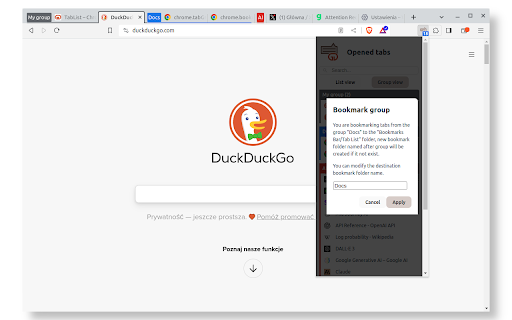


List opened tabs for current window. Tab groups are recognised and displayed. Filter list, focus or close tab, bookmark tab group. It is a simple but effective extension that will help you manage your ever growing number of tabs. If number of tabs you have opened makes it hard to manage, then this extension will help you. When you have tabs grouped, it will open by default in Group View, you can bookmark grouped tabs, your tabs will be in the "Bookmarks Bar/Tab List" folder. You can switch to list view, tabs will be colour coded according to the group it belongs to. Version 1.2.2 12/01/2024 - Show groups of tabs - Provide Group view when appropriate with ability to switch to list view - Bookmark group - Dark/Light theme aware Version 1.1.4 05/01/2024 - Allow for search term (if valid url) to be opened in new tab Version 1.1.3 19/04/2022 - Remove unused permission Version 1.1.2 15/03/2018 - Search bar is now sticky Version 1.0.1 01/11/2017 - When filtered list contains one item then press Enter to highlight this tab.

List Opened Tabs
An extension for list, search, rearrange, close tabs and switch to another tab. "List Opened Tabs" is a Google Chrome extension that can let you list, search, rearrange, close tabs and switch to another tab. It's very useful if you opened a lot of tabs in a window. Change log: v1.2.0: TabGroup indicator, remove close button for pinned tabs, favicon issue fixed, 3rd-libs upgrade. v1.1.1: Update to ManifestV3. v1.1.0: Bug fixed, UI fine-tune and add badge to show the number of tabs in current window. v1.0.1: Rearrange Bug fixed.

Tab Manager v2
Search, group, move, and clean up tabs across browser windows with a keyboard-first workflow See every tab across every window, find what you need fast, move matching tabs in bulk, manage native tab groups where supported by the browser, and clean up duplicates without window hopping. - Search open tabs by title or URL, with optional browser history results in the same search box - Select matching tabs and move, group, or close them in bulk - Manage native tab groups directly where supported by the browser: rename, recolor, collapse, and ungroup them in place - Reorder tabs with drag and drop across windows from one focused view - Highlight duplicate tabs and clean them up quickly, with an option to ignore URL hashes - Stay on the keyboard with shortcuts, focus mode, and the command palette - Adjust theme, tab width, font size, toolbar visibility, URL display, and more - Support Firefox container-aware workflows when the browser exposes those APIs Free and open source. Core functionality runs locally in your browser. Open source: https://github.com/xcv58/Tab-Manager-v2 Support and issues: https://github.com/xcv58/Tab-Manager-v2/issues

Extentie - extension manager
A simple and elegant Chrome extension manager allows you manage your extensions in a popup window. Extentie is a simple and beautiful tool that allows you to toggle and manage Chrome extensions in a popup. Latest update: - Now you can create your own groups to manage your extensions - Revamped from ground up, added more features

TabPlus
The most feature-packed tab manager. Save & organize your tabs, sync across devices! Tab++ allows you to save your tabs for later. You can organize, categorize, and name them, then restore individual tabs or tab groups at any time. You can even sync them across devices! Tab++ is inspired by similar extensions like OneTab, only with WAY more features... Like folders, cloud-syncing, easy backup and restore, and more! # Note: Usage help can be found in the options page. # NEW IN v1.7.3 - Dark mode, woot! - Implemented more settings in the options page - Confirmation prompt before clearing all data - Don't save pinned tabs by default (configurable) - Bug fixes & improvements to automatic corruption recovery
