
jnbamieaacddlfcoanmbkclnpoafhmie
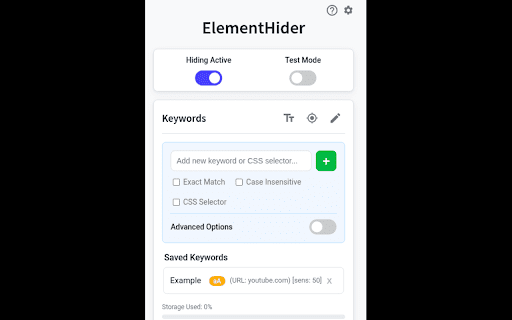


ElementHider is a browser extension I built to help you hide or blur any part of a web page as easily as possible. I got tired of constant distractions from ads, spoilers, and irrelevant content, so I made this to create a cleaner, more focused browsing experience. Just type in the keywords you don't want yo see and ElementHider takes care of the rest. Features * Hide by Keyword: This is the main feature. You can automatically hide any content that contains specific words or phrases you define. It's a powerful way to filter out spoilers or topics you aren't interested in. * Hide Anything Else: If a keyword isn't enough, you can also use a point and click method to hide any individual element on the page, like a sidebar, an ad, or a "suggested for you" box. * Blur Instead of Hide: If you don't want to completely remove content, blur it instead. Just hover over the blurred area to reveal it when you're ready. * Extension is built to hide unwanted content, even on dynamic sites like social media feeds where new content loads as you scroll. * Customizable Site-Specific Rules: For more control, you can apply rules to specific websites only. Use a safe test mode to highlight what will be hidden before it disappears. You can also adjust hiding sensitivity and set keywords to be case-insensitive or exact match. ElementHider was designed to work on any website, including YouTube, X (Twitter), Facebook, news sites, and shopping sites. Extension permissions are required to read the sites to detect the elements and keywords on the site but no data is collected or sent to the developer or any 3rd party. All the data (keywords, settings) are saved into your Chrome sync storage so everything stays within Chrome and your Google account.

Remove Element
Creates a contextual menu item to remove an element from the DOM Right-click anything on the page and remove it. Useful if an ad is in the way of you reading an article. If you accidentally remove too much, just refresh the page - removing items is temporary. After installation you must reload any open pages for the extension to work.

Zapit - Click to Remove Element
Instantly hide unwanted elements on any website with a single click. Clean up your browsing experience! ➡️Enable Zapping Button is now a Toggle ➡️New and Improved UI ➡️Open Zapit with Shortcut (CTRL+Q) Can be customized in settings ➡️Import and Export Zaps moved to settings ( ⚙️in Header ) ➡️Zaps for Current Website and All Saved Zaps Moved to Zaps (⚡in Header ) Section 🔥 New "Zap" Feature ✔️The "Hide Elements" feature is now called "Zap" ✔️Click on any element to Zap (hide) it instantly. 💾 Zaps Now Persist Across Sessions ✔️No need to zap the same elements repeatedly – now you can permanently delete things from a website! ✔️No need to zap the same elements repeatedly! 📂 Import & Export Zaps ✔️Save your zapped elements and transfer them between devices. ✔️Easily back up your custom browsing experience with the Element Killer Extension. 👀 New Zap Management Sections ✔️"Saved Zaps for Current Website" – See a list of all elements you've zapped on the website you're currently viewing. ✔️"All Saved Zaps" – View every zap you've created across different websites in one place. 🗑️ Easily Manage & Delete Zaps ✔️Remove any zaps you no longer need with just a click. ✔️Keep your zap list clean and organized. Zapit - Click to Remove Elements is a powerful Chrome extension that allows you to permanently delete things from a website with ease. Whether you want to clean up clutter, hide ads, or customize your browsing experience, ZapIt makes it simple. With Zap Mode, you can instantly select and remove YouTube HTML elements, annoying ads, or any unwanted content. Plus, your changes persist—even after refreshing or reopening your browser—making ZapIt the ultimate Element Killer Extension for a distraction-free web. Key Features: ✔️ Zap Mode – Click to instantly remove elements from any webpage ✔️ Persistent Zaps – Your changes stay even after reloading or reopening the browser ✔️ Import/Export Zaps – Easily back up and transfer your custom settings ✔️ Manage Your Zaps – View all zaps for the current website or across all websites ✔️ Delete Zaps Anytime – Easily undo or remove saved zaps when needed ✔️ Lightweight and easy to use with no complex settings

Filter Anything Everywhere
Filter feeds, lists and comment sections on all websites at the same time with this universal keyword blocker. Tired of information overload? Take control of your browsing experience with this powerful Chrome extension! It filters out unwanted content from Facebook, Google News, Reddit, Twitter, YouTube, and more, all in one place. Key features: - One-click access to filter settings. - Block unwanted topics, clickbait, and spam. - Customize settings for each website. To get started, simply install the extension and click the icon next to the address bar to access the control panel. Fine-tune your settings to enjoy a clutter-free, personalized online journey. Embrace a cleaner, more personalized browsing experience – try Filter Anything Everywhere today! Feel free to submit issues and pull requests: https://github.com/yeahpython/filter-anything-everywhere History: * 1.3.2 - Improved language support, e.g. Cyrillic characters, Chinese, Korean, Japanese - Better support for emojis and special characters - Migration to Manifest V3 - Start using TypeScript/Node/Rollup/Jest/Prettier * 1.3.1 - The code has been cleaned up a bit for upload to GitHub. The latest version of the extension includes the cleanup. * 1.3.0 - Fix for YouTube search results - Support for Chinese characters - Performance improvements * 1.2.4 - Fixes issue where entire YouTube page is hidden. * 1.2.3 - Wildcard matching is now supported. "*" matches any number of non-whitespace characters, and "?" matches exactly one non-whitespace character. Examples: - - "col*r" matches "color" and "colour". - - "gr?y" matches both "gray" and "grey", but not "gravy" since "?" can only match one character. - - "*?coin" matches "bitcoin" and "dogecoin" but not "coin", since "?" requires at least one character.

Snip - Remove Web Elements
Remove any element from any website with just one click With Snip you can remove any element from any website with just one click. So it only shows what you want to see. You choices are saved. So next time when you visit the same page those elements will be gone as well. With Snip you can undo or redo recent changes. You can also review all removed elements and revert any of them. If you login with your Google account, your choices will be synced to all your devices using that same account. Version 2.10 changes: -Add the feature to snip an area of a web page. Version 2.9 changes: -Temporarily remove the login button. Version 2.3 changes: -Handle the case when first using Snip and the rules don't exist. Version 2.2 changes: - Fix the issue that removed elements will appear for a few seconds when reloading the page. Version 2.1 changes: - Improve performance when analyzing the page.
