
jmandnadineideoebcmaekgaccoagnki


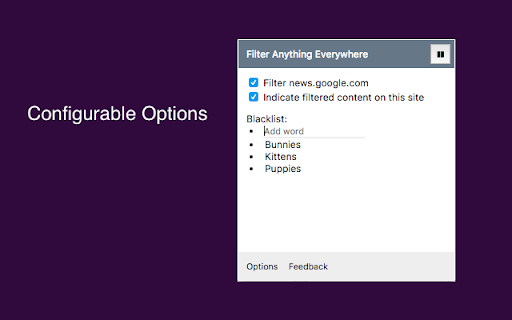
Filter feeds, lists and comment sections on all websites at the same time with this universal keyword blocker. Tired of information overload? Take control of your browsing experience with this powerful Chrome extension! It filters out unwanted content from Facebook, Google News, Reddit, Twitter, YouTube, and more, all in one place. Key features: - One-click access to filter settings. - Block unwanted topics, clickbait, and spam. - Customize settings for each website. To get started, simply install the extension and click the icon next to the address bar to access the control panel. Fine-tune your settings to enjoy a clutter-free, personalized online journey. Embrace a cleaner, more personalized browsing experience – try Filter Anything Everywhere today! Feel free to submit issues and pull requests: https://github.com/yeahpython/filter-anything-everywhere History: * 1.3.2 - Improved language support, e.g. Cyrillic characters, Chinese, Korean, Japanese - Better support for emojis and special characters - Migration to Manifest V3 - Start using TypeScript/Node/Rollup/Jest/Prettier * 1.3.1 - The code has been cleaned up a bit for upload to GitHub. The latest version of the extension includes the cleanup. * 1.3.0 - Fix for YouTube search results - Support for Chinese characters - Performance improvements * 1.2.4 - Fixes issue where entire YouTube page is hidden. * 1.2.3 - Wildcard matching is now supported. "*" matches any number of non-whitespace characters, and "?" matches exactly one non-whitespace character. Examples: - - "col*r" matches "color" and "colour". - - "gr?y" matches both "gray" and "grey", but not "gravy" since "?" can only match one character. - - "*?coin" matches "bitcoin" and "dogecoin" but not "coin", since "?" requires at least one character.

Hide That!
This extension can hide or remove selected elements on a page. Useful for removing invasive adverts, banners and overlays. The primary feature of this extension allows users to hide any element on the page with a simple right-click menu action. Advanced features on the Options page also allows the user to automatically close invasive popup windows, as well as automatically hide selected elements when the page is loading. Several other customizable settings are also available on the Options page. NOTE: - The primary right-click functionality of this extension does not permanently hide the element. Any page refresh will bring back the full page as intended. To automatically hide elements when loading a page please try the ‘Automatic Hiding’ feature on the Options page. - Once the extension is added to Chrome, any pages you already have open will need to be refreshed for the extension to start working. - The icon menu for chrome extensions should display to the right of the address bar (a puzzle piece). 3.7.0 (13th April 2024): - Added ability to close “about:blank” popups when opened from a specified website. - Displays “unsaved changes” warning message on the Options page. 3.6.0 (14th April 2023): - Migrated to new Chrome extension manifest version 3. 3.5.0 (18th November 2022): - Added "Show Auto Hidden" button in the icon menu to redisplay automatically hidden elements. - Added "Rerun Auto Hide" button in the icon menu to rerun automatic hiding. 3.4.0 (8th September 2022): - Added a user-friend option for the Automatic Hiding feature in the icon menu (“Set Auto Hide”) which will automatically generate the necessary element selectors for all your hidden elements on the current page. - Set newly added items as green, to indicate they are unsaved. 3.3 (21st March 2021): - Switched to using Chrome's local storage for storing the settings data (instead of syncing the data to your Google account). This allows for a higher data storage limit. 3.1 (22nd December 2020): - General improvements and bug fixes - Added option to show/hide help text on the Options page. 3.0 (29th November 2020): - Added new ‘Automatic Hiding’ feature on the Options page. - Split the ‘Advanced Features’ section on the Options page into the ‘Automatic Closing’ section and the new ‘Automatic Hiding’ section. - Improved help text and advanced feature explanations. - I apologise if any of your Option settings for this extension were reset upon upgrading to version 3.0. 2.2 (6th September 2020): - Added new 'Export Settings' section to the Options page. This will allow a user to import/export their settings. 2.1 (9th January 2020): - Enhanced the 'Advanced Features' option that closes listed popup sites. There is now a dropdown list that displays the address of recent new tabs or popups. This means the user doesn't have to manually capture the initial address of the popup site. 2.0 (December 2019): - Added new 'Advanced Features' section to the Options page. - Added 'Advanced Features' option that can immediately close listed popup sites.

TAG Image Filter
The TAG Image Filter blocks out skin color when it senses any skin colors in an image. This way you can surf safely without accidentally seeing any adult images and not modest pictures. *Comments and Feedback* • We regularly monitor this google form, for your comments and feedback https://forms.gle/XeepEpexzu8tWTr26 Always on (Default) - • By default the filter is on for every website. Use the options to enable/disable different filter features. Note that filters currently do not wok on IFrame contents (embedded content from third parties, such as ads). You can select to hide all IFrames in the options, but this may cause issues with some normal website functionality (e.g. captcha). *Warnings* • This is not a replacement for an internet filter and should not be relied upon. It is only to provide you with an extra level of protection or for situations where you don’t have the option of installing a filter, such as your office computer. • Flash will not be blocked by the filter; you will also have to set Flash not to run automatically. To back Flash, type chrome://settings/content in the address bar, scroll down to the 'Plug-ins' section, and select 'Click to play'. • Videos will not be blocked by the filter. *Our mission* • Our mission is to help people surf safely, especially where a regular internet filter is not an option. • The extension will update itself automatically as we improve it and will always be 100% free. • This filter is donated for the hatzlacha of Moshe ben Ruth, and family. • This filter is donated for the Refuah Shelemah of Moshe Ben Chana by the Setton Family. • This filter is donated in memory of Elan Ganeles by the Simhon Family.

YTBlock - Block any content from YouTube™
Block videos, comments, channels and much more! With this extension you can block any type of content in Youtube™. ✨ Features: • Blacklist words and phrases (regex supported). • Block channels, videos, comments, posts, and playlists. • Block videos by title, categories*, tags*, description*, duration, link, ID, views*, date* and published time*. • Block members only videos. • Block already watched videos. • Block video by language*. • Block shorts, live, premiere, and age-restricted videos. • Block channels and whitelist channels. • Block comments and posts by their content or by channel. • Block playlists by channel, title, and even mix playlists. • Toggleable block overlays. • Password protection. • Many more! ⚠️* Note: A Google API key is necessary to get information that are not visible in the YouTube™ page about videos and channels, such as tags, categories and descriptions. Within the extension there's instructions on how to get one.

Advanced Profanity Filter
Advanced Profanity Filter helps to clean up bad language on the websites you and your family visit. Advanced Profanity Filter helps to clean up bad language on the websites you and your family visit. Whether you choose to censor, substitute, or hide offensive words, APF is here to improve your browsing experience. Individuals around the world can now be protected from profanity in their homes, organizations, and schools. APF has a variety of options to meet your personal needs. APF is not limited to filtering text alone! With the use of captions and subtitles it can also mute audio while you sit back and relax to watch your favorite movies and shows from a collection of supported sites. Have a suggestion for a new supported site? Contact us! For a detailed overview of the features and settings, please see the Getting Started page here: Thank you for supporting the ongoing development of this project.
