
jlmlldiahhaejpjnonbddoniicdemakl
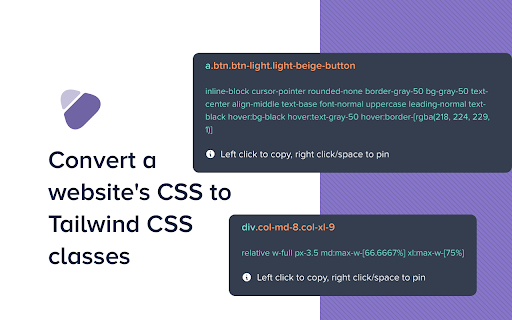


Easy as: 1. Click the extension icon 2. Hover on the element you want to convert 3. Right click to copy the class names to clipboard Features: 1. Hover an element to view its converted TailwindCSS Classes 2. Shows you which styles are missing from TailwindCSS 3. Copy just the class names or grab the entire element CSS styles Short-comings: 1. Uses Document.styleSheets behind the scenes and stylesheets on different domains will not be taken into account

Gimli Tailwind
A DevTools extension enabling smart tools for Tailwind CSS. The professional Devtools extension for Tailwind CSS developers. It lets you view and intuitively edit utility classes. Please note: Gimli Tailwind requires a $49 one-time lifetime license. No subscriptions. You can purchase your license via the extension (includes a 14-day money-back guarantee). ✔️ Autocomplete: Intelligent suggestions for class names. It also supports searching for CSS property names. ✔️ Quickly toggle utility values with Cmd/Ctrl + Click. ✔️ Intuitive UI We don't want to overwhelm developers with options and inputs. Here’s a list of features that enable developers to find relevant utilities quickly: ➤ Variant override: Displays what variant is active. ➤ Inputs are grouped the same way as in the official docs. ➤ Some sections like Grid and Flex will only be visible when relevant. ➤ Active inputs are always shown. ➤ Customizable UI.

Inspect Flow
The complete developer tool for Tailwind CSS! Increase your productivity and build Tailwind CSS websites faster with Inspect Flow! - Inspecting Tailwind CSS websites has never been easier! Quickly hover over elements to see the styles applied. - Quickly view components in CodePen and copy the HTML in a single click. - Edit elements in real-time and get instant feedback before finalizing changes in your code base. - Can't remember the name of a utility class? Every class name is at your fingertips when adding new utility classes with our auto-complete integration.

CSS Used
Get all css rules used by the selected DOM and its descendants. One click to get all the css applied to the selected web element and its descendants. -- Recent Update -- 1. Migrated to Manifest V3. 2. Resources are read from local caches, making it much faster and solves the cross-origin issue. 3. Optimized style parsing in a more efficient way. 4. Dropped support for some outdated CSS, mostly -o- and -ms- prefixed properties. 5. Implemented a new UI powered by Svelte, with some visual tweaks. -- Known Limit -- 1. For CSS rules like ".wrap p{...}", if only " " is selected, the result ".wrap p{...}" will not apply to " ". Either change the rule to "p{...}" or add a ".wrap" parent in the final HTML. 2. CSS custom properties (variables) and all the style inherit related features are not supported currently.

Supertweak
Visual editor for Tailwind CSS Supertweak is visual editor for Tailwind CSS to quickly tweak your website live, preview instantly and copy classes or html to use in your project. You can try it free for 7 days. Continued use requires activation key. You can purchase your copy of the extension at https://supertweak.dev 🎨 Tailwind editor Quickly modify property values for Tailwind classes, add or edit variants, manually add, edit or remove classes etc. right inside your browser. You can then copy the classes or html code from the elements with one click. Supports adding arbitrary values and variants and custom Tailwind config as well. 📱 Responsive Switcher You can quickly resize the window to responsive device widths. Since this resizes window, you will be able to use the editor in small screen widths too unlike the Devtools responsive mode. 📷 Quick Capture Supertweak lets you quickly take screenshot of visible screen or a selected area, which you can later download or copy to clipboard. This makes it easier to share the changes you made with your team and get feedback. 🪟 Children Editor You can easily re-arrange, remove or duplicate elements. Adding elements and text nodes are also supported. ⌨️ Edit Mode In Edit mode, you can edit the text in the page quickly without other distractions.
