
jkoihbmmdnnciboklipeogheldkngigc


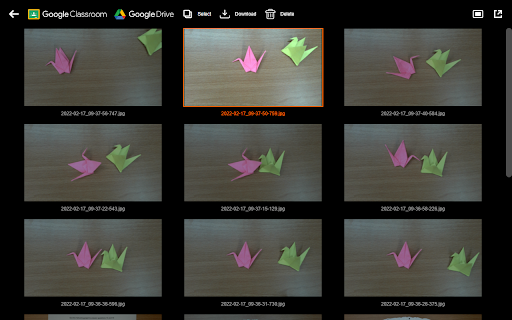
Designed for Ideao document camera, IdeaoCam let you take snapshots and create amazing video with ease! Connect with your Goolgle account, and access your file anywhere, anytime. IdeaoCam allows you to upload pictures directly onto your Google Drive, or use with Google Classroom to create assignments. • Control Ideao Camera Perform up to 6x zoom to get a close-up shot. Rotate in 0°/90°/180°/270° to get the right displaying angle. Flip and mirror the video when turning the document camera into the front-facing webcam mode. Freeze the image to avoid any interference. The intuitive menu bar let you control the Ideao document camera at your fingertips. • Snapshot and Record Take snapshots and record videos in the selected resolution. IdeaoCam offers the easiest way to digitize your content in picture and video format, no matter you are using IdeaoCam for live demo or pre-recorded sessions. • Stop Motion Video Create eye-catching stop motion video becomes easier than ever before! Featuring Onion Skinning to let you see through the frames and compare the keyframes to make perfect stop motion. All you need to do is taking pictures, adjust the frame per second, and export the stop motion video. It is that simple. • Connect with Google Drive and Google Classroom Sign in and access your Google Drive or Google Classroom. Every snapshot and video you make, you can save directly onto the cloud drive without hassle; or assign as quiz, assignment, or announcement. Enjoy the seamless integration with Google to help your lesson preparation more effective.

Stop Motion Animator
Make Stop Motion videos using your webcam This is a simple tool for creating stop motion animation sequences using your web camera. If you want to make stop motion animation videos, you should install our software. Animation sequences are saved to a video file in the webm format. Stop motion is an animated filmmaking technique in which objects are physically manipulated in small increments between individually photographed frames so that they will appear to exhibit independent motion or change when the series of frames is played back. If you are STUCK, please READ the help page inside the extension! We made a demo video on the help page which explains exactly HOW to use the software extension. Fixed a bug where you could not load a previously saved video. To begin using this software, here is what you need to do. Read the help page inside the extension if you are stuck with using this software. Fixed a bug where the save function was corrupted. Users can now save the file in mp4 format. Fixed a bug where the output webm file was corrupt. Now you can open this webm file inside Google Chrome. The main reason for this bug is because when the Google Chrome browser was updated, it modified the way webm files were saved. Install our software extension Click on the icon and allow web camera Begin making your stop motion animation video Its possible to make entire stop motion movies using our software, the possibilities are endless. To begin making stop motion video, just install our software and get started today. Some of our users enjoy making lego stop motion videos, its possible to make short skits/short videos using stop motion.

CYSCE
CYS Chrome Extension 0.9.5.3 + Added support for Manifest V3 + The MyStuff "Saves" panel now supports deleting saves + The viewer "invert" themes should actually be usable now, instead of blindingly white + Changed the characters-per-line viewer option to solely use CSS variables - Removed webNavigation permissions; the issue they once fixed has been patched siteside 0.9.4 + Fixed tag color on the storygame page 0.9.3 + Fixed some incompatibilities with CYS version 20210011 0.9.2 + Fixed navbar theming + Added new category art and fixed some image errors from the previous version 0.9.0 + Implemented all new art from MadHattersDaughter + The themed site banner is now toggleable between two variants + Made uploaded images viewable in-browser rather than forced to download (new permissions are required for this change) 0.8.2 + Switched the old School-Based category out for the new Dark Fantasy one + Made forum posts on the home page also dynamic (auto tagging/linking) + Fixed the glitchy color transition when hovering over posts in some themes + Prevented floating elements (e.g. some images) from overflowing out of forum posts + Updated table header colors in the storygame viewer themes + Added support for asterisks in storygame titles (sneak peek linking) 0.8.1 + Added option to toggle between dropdowns and uncompressed sidebar on the unthemed site 0.8.0 + Storygames can be given temporary styles and suppression via the dev panel + Author-given storygame styles can now be globally suppressed when using any theme + Storygame search now also shows the page number at the bottom of the list + The sidebar for the unthemed site has been compressed back to normal, now using dropdown menus + Sneak peek links use a smarter script that works with more titles + Fixed the username suggestion menu being hidden behind the page when creating a new message + Removed the following features that are now implemented on the base site: + Page editor enhancements + Trophy info 0.7.1 + The main site uses the faster method of theme application (already used in storygames) + Secondary storygame theme options are actually (somewhat) explained + Text Visibility option is applied to articles + Preserve Line Breaks option is a bit more lenient and less likely to clash with Normalize HTML + New option: M Mode + The comment page in the storygame viewer is styled 0.7.0 + Dark and Light storygame themes + Choose between serif and sans-serif versions + Choose between fixed character-per-line (90 or 110) and unfixed + Choose whether to suppress author-defined fonts and/or CSS + Storygame Dev Mode overhaul; it now opens in a separate window and displays more info + Modify the value of normal variables and $ITEMUSED variables + View the number of times a link has been clicked, and the history of pages visited + Quicksaves: quickly save and restore *multiple* named storygame states - Saved locally, so unlike options they don't persist across devices + View/manage all quicksaves on the My/Saves page and export as / import from JSON + Contrast enforcement for user-generated content in storygames, storygame descriptions, forum posts, PMs, and user profiles + Certain elements are tested for contrast with their background and brightened/darkened appropriately to fit the set contrast ratio + Alternatively, force them to be stripped of the color change completely - Removed emoji (because they're gone from the site, they were causing weird issues) + Improved image filtering in the inverted storygames themes + Updated CSS for the chapter selector in the Advanced Editor + Link buttons labeled in the Advanced Page Editor + Orphaned links are named "[none]" so their destinations are editable + The textbox in the "Add Link to New Page" dialog is autofocused + The broken spacer.gif (in My/Points and My/Stuff) is hidden + Worth algorithm changed; rules to achieve a "100" are stricter 0.6.3: + Now supports the new advanced page editor, fixing the lack of CodeMirror and updated icons 0.6.2: + Mizal's and Killa_Robot's trophies have been added to the dark and light themes + Now utilizing `CMReady`; basically preventing cases where CodeMirror might be loaded before its options were ready + "Anchor" button renamed to "Permalink" + Removed a redundant check in the storygame search script + Fixed right-aligned post title in locked threads + Themes should no longer apply color to CKEditor (RTE) dialogs + There's now a check for CKEditor presence before attempting to use CodeMirror, since PMs have the RTE now + It also now ignores the "preserve line breaks" option, just as the storygame page editor does + Masthead image uses the newer, FF versions + Added icon image for the "resolve" button + Visually updated navigation panel in My Duels and About Us + Fixed broken warning icon 0.6.0: + Fixed broken collapse/expand buttons + and elements are ignored when applying forum post formatting + Autocomplete for tagging members (on the forums with the CodeMirror editor) + After three characters, it polls a larger list of members instead of just the ones online + Inverted storygame viewer theme; flips brightness and saturation, but retains hue; images are relatively untouched + Also included a total color invert + This is intended to be a temporary option until a true dark theme is implemented + Added storygame categories to navbar 0.4.9: + Preview HTML when replying, editing, or making a new post + Enabled only when both async enhancements are on and rich text is off + Preview is done live, so it's constrained to a sandboxed iframe + HTML Normalization for forum posts (works with either plain text editor; on by default) + Mainly, it prevents unclosed tags from affecting the rest of the thread, though leaving a tag unclosed is still liable to cause strange behavior internally + Additionally, characters outside of the ISO 8859-1 range (including emoji), which would normally be turned into "?", are converted into hexadecimal HTML entities + Also preserves whitespace and forces all attribute values to be double quoted + The "Logged in as [user]" footer now links to the user's profile page + Online/offline status in user's profile sidebar + Theme tweaks + Forum post title no longer shoved to the right when there are no buttons + Forum post title CSS updated in general + Avatarless users have borders instead of blank boxes in the forums + A few new replaced icons, including some of those on admin-only buttons + Navbar text shrinks to better accommodate items if there are more than six (i.e. for admins) + CodeMirror ligatures are context sensitive (disabled in strings and plain text) and can be turned off entirely (they're off by default) + Title font now uses lining numerals (numbers all stay above the baseline) + Switch Route 159 typeface from OpenType to WOFF (and weight 300 to 400) 0.4.8: - Div wrapper for replies - Smarter forum action buttons Things you wish were clicky links are now clicky + Any posted links, member tags, unpublished games, and much more. Complete graphic overhaul + New icons, symbols, and trophy graphics that are more modern in both looks and format Complete MyStuff overhaul + Arrange widgets for messages, storygames, your notepad, points, and anything else you can think of to create a great dashboard area where you can see everything you need to at once. + Toggleable Able to collapse and anchor thread posts + Anchoring allows one to copy the direct post link + Collapsing allows one to read long threads with greater organization ability; allows one to collapse a post and it's replies for better screenshots and archiving ability New profile settings + Storygame Developer Mode ~ Allows for in-preview variable editing ~ Shows link and page IDs for testing and development purposes + CYS theme integration ~ Makes the site beautiful; Dark Mode for easy browsing at night, light mode for an elegant new look with the same comfy feel, or just keep the default :) + Choose to recieve alerts or not ~ Customize whether you see alerts as a badge on the CYS extension icon without even having the site open! ~ Choose what alerts you want to be notified of Text editors have toggleable syntax highlighting + Very useful for coding CYS-script or post HTML + Colors the text of key elements and allows for ease of finding particular sections of code + Quite useful for debugging code and identifying mistakes Lots of nit-picky fixes + Some letters were a misaligned by a pixel...we fixed those and some other stuff you'd never notice.

Sphere Lite
- Using AVer’s document camera stream live video of artifacts, experiments and more directly to the AVer Sphere Lite. - Move, resize, annotate and record it all. - In new version, the widget tool of Sphere Lite provide the One-touch connect allows you to easily connect your AVer DocCam in any web page. - Insert the widget tool into Google Slides to show your DocCam streaming during the presentation. - In widget tool mode, you also can use record, capture and related camera settings.

CamTuner
CamTuner browser extension for webcam configuration CamTuner helps you fine-tune how your camera appears in the browser. Whether you're joining a meeting, recording a demo, or live streaming, you can adjust your framing in real time and keep your setup consistent. Features: - Zoom and crop your camera feed with smooth real-time controls - Switch between aspect ratios including 16:9, 4:3, 1:1, and 9:16 - Reposition your framing with 9-point alignment controls - Add letterbox framing with a customizable background color - Switch between connected cameras instantly - Save your settings so your preferred setup is ready when you need it - Preview your adjustments in real time before using them Why CamTuner? - Look more polished and intentional on calls - Keep your framing consistent across meetings and recordings - Make quick adjustments without leaving the browser - Use a lightweight tool focused on the controls that matter most How To Use: 1. Open CamTuner from your browser toolbar 2. Adjust zoom, aspect ratio, alignment, and letterbox color 3. Click Show Preview to see your camera with the current settings 4. Use your camera in your preferred browser-based meeting or streaming app 5. If your app does not refresh immediately, toggle the camera off and on once Take control of your framing with CamTuner and make every camera setup feel intentional.
