
jkalanhajncaabamcheonncknfabbiaf
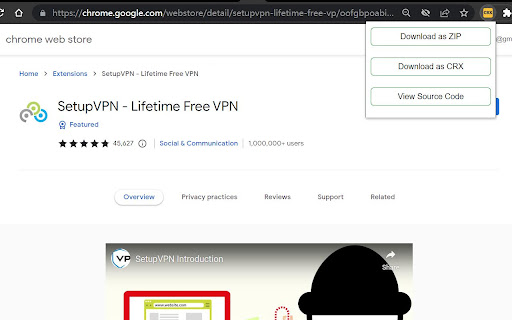
Download Chrome Extension Files directly as .crx or .zip file depending upon your choice (1)Download Chrome Extension files directly as .crx or .zip file depending upon your choice. (2)Extract and view the source code of Chrome Extension files online. This extension doesn't contain any tracking source code or ad code. you can also check by downloading the extension using this same extension to check whether any tracking or ad code is injected. You could either download the extension from google chrome extension web store as zip file or .crx file depending upon your needs. No need to depend or copy paste the Chrome extension url to another website to download as .crx or zip file.

Custom Cursor for Chrome™
Fun custom cursors for Chrome™. Use a large collection of free cursors or upload your own. Customize your Chrome browser experience with our free collection of mouse cursors at Custom Cursor. At Custom Cursor we have created a giant collection of hand-drawn cute cursors. We have over 10,000 different packs available on our website for you to enjoy. With your help, our collection has grown so big that we divided it into categories that should fit every taste, like: - Minecraft; - Cute Cursors; - Anime mouse packs; - Memes; - Spy x Family pointer packs with Anya Forger; - Among Us; - Two types of Minimal pointers for work and studies; - Games; - Roblox; - And many, many other funny elements for you to play with. Some of our mouse pointer packs are bundled with the Custom Cursor browser extension, but most of them await you on our website. Keep an eye out for new and trending additions. To simplify navigation, we've organised our collection into Editor's Picks collections, each with a unique theme. Examples include: - Green arrows for autumn; - Christmas themed arrows; - Holidays editor's picks; - Halloween; - Custom Cursor collaboration with Daieny Schuttz; - Pink pointers editor picks; - Summer mouse decorations; - Rainbow colors; and much, much more on our website. If you can't find what you're looking for, use the "UPLOAD CURSOR" button to add your own. Manage your personal arrow collection on the Upload page and adjust cursor size in the "Manage" section. Newly added collections will be uploaded to the Custom Cursor for Chrome extension and can be found at the bottom of the collection list. Your added packs will appear in “My Collection”. Create your own collection of mouse cursors from any images with Custom Cursor Creator tool on our website. It will allow you to create new packs from almost any arrow or pointer shaped image on the internet. ------------------- ! After installing the extension, refresh previously opened tabs to use it on those pages. Note that the extension may not work on Chrome Web Store pages or the home page. Open another website (e.g., google.com) to test the extension. If you like the extension you can also check our Custom Cursor for Windows app. Preview arrow appearance by clicking on it in the extension window and moving the mouse to the empty space within the window.

Extension Source Downloader
Download the source code for chrome extensions via toolbar popup in .zip or .crx formats. This extension allows you to download the source code for chrome extensions. Please open the toolbar popup and add a valid extension URL in the designated input field (top section). You can also navigate to the chrome web store, find an extension, and then open the toolbar popup. The URL for the active tab will be automatically inserted into the input field. Once the URL is added, the related extension ID will be extracted and written in the - Current extension ID - area. Now, please click on the - Download as CRX - or - Download as ZIP - buttons to start downloading the extension as ".zip" or ".crx" formats. Please note that the progress bar in the toolbar popup shows you the current progress for downloading the extension. Once downloading is done, the final file will be available in the default download location on your machine. Note: The extension interface supports dark mode. To switch the interface theme to dark, please press the moon icon in the bottom-right toolbar. If you have a feature request or found a bug to report, please fill out the bug report form on the addon's homepage (https://mybrowseraddon.com/extension-source-downloader.html).

Get CRX
Get source .crx extension file of any Chrome extension *Now working on both old and new Chrome Web Stores* Instantly get .crx source file of any free Chrome extension via right click context menu.

WebCRX
Easily and safely install local CRX files in Chrome Webcrx is an awesome utility that allows you to install and test local CRX files in Chrome with permissions management. Privacy Policy The extension does not track or transfer any of your data. Any usage of extension is not tracked. The extension does not track any websites you visit or search. No data is transferred to any third party. All data is stored within your browser and stays within your browser.
