
dlbdalfhhfecaekoakmanjflmdhmgpea
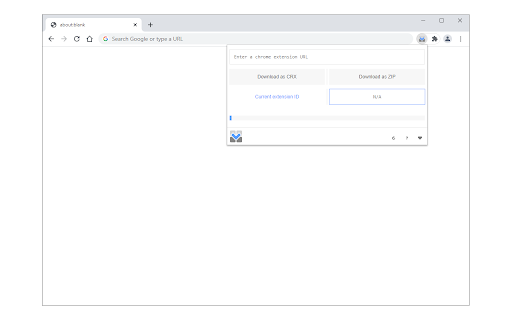
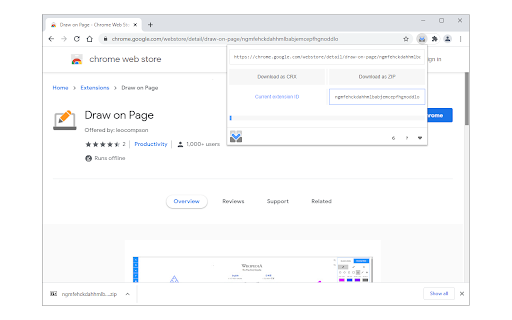
Download the source code for chrome extensions via toolbar popup in .zip or .crx formats. This extension allows you to download the source code for chrome extensions. Please open the toolbar popup and add a valid extension URL in the designated input field (top section). You can also navigate to the chrome web store, find an extension, and then open the toolbar popup. The URL for the active tab will be automatically inserted into the input field. Once the URL is added, the related extension ID will be extracted and written in the - Current extension ID - area. Now, please click on the - Download as CRX - or - Download as ZIP - buttons to start downloading the extension as ".zip" or ".crx" formats. Please note that the progress bar in the toolbar popup shows you the current progress for downloading the extension. Once downloading is done, the final file will be available in the default download location on your machine. Note: The extension interface supports dark mode. To switch the interface theme to dark, please press the moon icon in the bottom-right toolbar. If you have a feature request or found a bug to report, please fill out the bug report form on the addon's homepage (https://mybrowseraddon.com/extension-source-downloader.html).

Media Tools - Convert, Split & Extract
Manipulate media files (video & audio) via FFmpeg interpreter right in your browser! Media Tools, is a simple add-on that allows you to easily manipulate media (video, audio, etc.) files right in your browser. It uses an open-source software called FFmpeg. FFmpeg is an engine containing a suite of libraries for handling video, audio, and other media files and streams. In order to get more info about FFmpeg, please read this (https://en.wikipedia.org/wiki/FFmpeg) Wikipedia page. To download and install FFmpeg on your machine, please visit this (https://www.ffmpeg.org/) page. This add-on uses nativeMessaging (https://developer.chrome.com/apps/nativeMessaging) technology to communicate with FFmpeg software on your machine. Before using this add-on, you need to install FFmpeg on your machine. You also need the native client patch in order to build the communication between FFmpeg and your browser. Please visit this (https://github.com/alexmarcoo-nt/open-in-native-client/releases) GitHub repo and download the related patch for your machine. Follow the instruction in the above GitHub page in order to install the patch in your system. After installing, the "Media Tools" add-on in your browser can communicate with FFmpeg client on your machine (Window, Linux, or Mac). If you have a feature request or found a bug to report, please fill the bug report form in the add-on's homepage (https://mybrowseraddon.com/media-tools.html).

Source Code File Downloader
Used for downloading all source code files on the webpage for further analyzation. The files will be packaged an downloaded in .zip format.

DevTools - Sources downloader
This extension adds a button in the developer tools section to download the sources of the inspected page.

Website Source Downloader
Website Source Downloader - A browser extension to download webpage source from any webpage. SourceDownloader is a powerful browser extension that allows users to easily download and archive entire web pages, including all associated resources such as stylesheets, scripts, images, and more. It's designed to provide a comprehensive solution for web content preservation and offline access. 1. Complete Page Capture: Downloads the full HTML content of the current page, along with all linked resources. 2. Resource Extraction: Automatically identifies and downloads: - External stylesheets - External scripts - Inline styles and scripts - Images 3. Customizable File Structure: - Option to use original file paths or a custom directory structure - Configurable paths for CSS, JavaScript, and image files 4. Inline Content Handling: - Ability to extract inline styles and scripts into separate files - Automatically updates HTML to reference these new external files 5. CSS Resource Processing: - Option to download resources referenced within CSS files (e.g., background images) - Updates CSS files to use the new local paths 6. Flexible Output: - Generates a ZIP file containing all downloaded content - Preserves the structure and functionality of the original page 7. User-Friendly Interface: - Simple one-click operation to fetch page content - Clear display of download progress and resource counts - Detailed modal views for inspecting identified resources - Web archiving and preservation - Offline access to web content - Web development and design reference - Content analysis and research - Backup of online resources SourceDownloader offers a comprehensive solution for capturing web content, making it an invaluable tool for developers, researchers, archivists, and anyone needing to save and access web pages offline.
