
hhfkbeloejjheeiihhjndfcogjhejoek

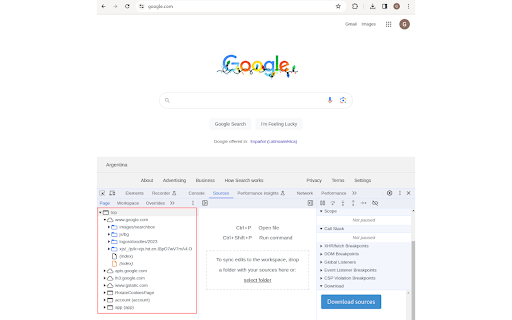
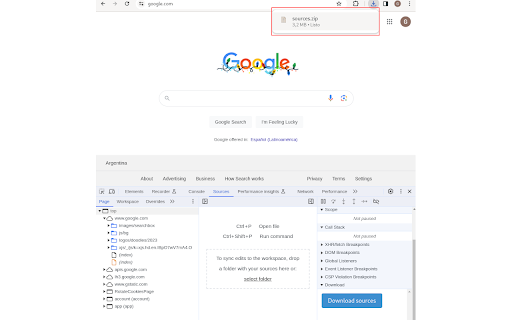
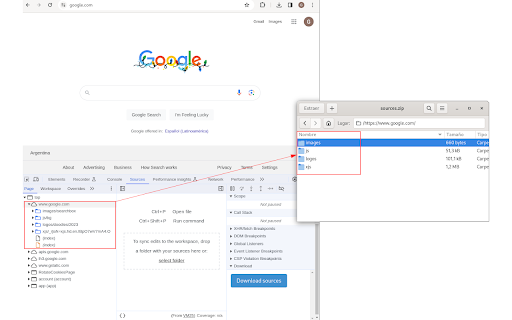
This extension adds a button in the developer tools section to download the sources of the inspected page.

FullDownload
Full download JS/CSS/HTML A simple tool to download IMG/JS/CSS/HTML. 一个可以下载页面引用的JS/CSS/HTML的小工具.

Source Detector
A powerful tool for developers to automatically detect, collect, and analyze source maps and CRX files from websites Source Detector is an open-source Chrome extension that helps developers and security researchers inspect client-side web assets directly in Chrome Key Functions • Detect: Automatically find source maps and CRX package files. • Explore: Browse collected source files and related assets. • Review: Use a structured workflow to examine versioned artifacts. • Export: Download individual files or full sets for offline analysis. Target Audience • Front-end Developers: Debug production assets efficiently. • Security Researchers: Validate exposed source artifacts. • Extension Developers: Inspect CRX package structures. • Technical Users: Analyze web application architecture. Core Benefits • Privacy First: Local storage in-browser; no account required. • Efficiency: Fast inspection with a repeatable review flow. • Transparency: Fully open-source. Highlights • Automatic source map detection. • Artifact inspection by site and version. • Export capabilities for deep analysis. • Local-first, account-free workflow. Changelog v1.4.1 • Added deeper GA4-ready instrumentation groundwork for the new navigation primitives and surfaces. • Follow-up UI/theme refinements landed after the 1.4.0 release cycle. • Cleaned local debug artifacts from the repo path and ignored env/debug residue to reduce pollution. Changelog v1.3.3 • Metadata Sync: Synced version metadata across UI and manifest. • Consistency: Improved release reporting for popup, Source Explorer, and analytics. • Stability: Maintained validated build and scanner workflows.

Save All Resources
Save all resources files with retaining folder structure. Chrome Extension for one click downloading all resources files and keeping folder structures. *** ResourceSaver tab wont be available in devtool panel while your current tab is on url https://chrome.google.com/* *** *** Please note, this ext is a resources collector, not a website downloader, so it won't do the job that you can run the website locally *** 2.0.2: Bug fixes for content blob promise 0.1.8: fixed zip file uncompressing with missing path issue in Windows 0.1.2: File extension detector bug fixes. 0.1.1: Added beautify code option (js-beautify) for JS,HTML,CSS fetching. 0.0.9: Add a compressing option that fetch all resources from browser-cache, compress(zip.js) & download at once. Thanks to @shanligang for contribution. 0.0.4: Including download for assests by XHR requests. 0.0.2: Extension now re-fetchs resource contents from browser-cache in order to improve speed & stability.

Asset Downloader
Lets you view and download all images, fonts, stylesheets, and scripts from a web page as a ZIP file. This extension will add a new panel to your Chrome Developers Tools named "Asset Downloader" which lets you view and download all assets from a web page as a ZIP file. It will also find and download images and fonts that are unused on the current page but are present in the stylesheets. To use this extension: 1. Open your Developer Tools by pressing F12 or right clicking on a page and selecting "Inspect". 2. In the top tabs of Developp Tools, click on "Asset Downloader" (you might need to click on the ">>" more button to find the tab). 3. You will now see a list of all Stylesheets, Scripts, Images, and Fonts on the page. You can download all of the page assets by clicking the red button "Download Everything as ZIP" at the top of the panel. 4. The first time that you download assets, you will be prompted to grant the "Host" permission to this plugin. You can optionally choose to deny the permission, however some files might fail to download if you do not grant the permission. 5. The ZIP file will be saved as "CURRENT_PAGE_TITLE.zip". You can also choose to download single files by clicking the "Download" button next to the file, or you can download a ZIP file with just certain assets such as stylesheets, images, scripts, or fonts.
