
jjmnbidkmmabkalampbilajnheeokpoj


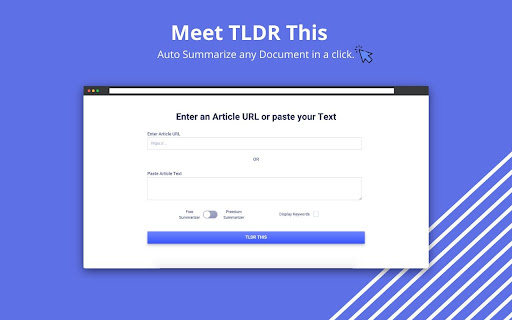

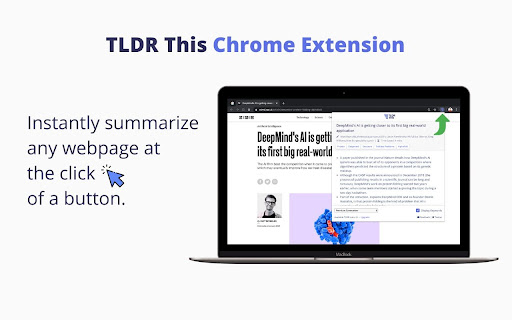
Automatically summarize any article, text, document, webpage or essay in a click. Hi 👋 TLDR This is a chrome extension (+ web app) that can take a painfully long piece of text and sum it up into five key bullet points using the power of NLP. There's so much content out there but too little time to read. So many times, it happens that there's a long article that we're interested in, but we don't really feel like scouring through it to extract relevant information from it. TLDR This is a simple tool that can come in handy at that time by helping you spend less time reading counterproductive stuff and more on doing valuable work. Steps to get cracking - Just click the "TL;DR" button in Chrome's toolbar on a webpage which you'd like summarized and within a few seconds you'll get the

Easy Scraper - One-click web scraper
A free web scraper for instant results. Scrape any website with one click. No coding required. Easy Scraper is the easiest web scraper you’ll ever use. With just a single click, extract data from any website and streamline your data analysis, research, and content aggregation tasks. - Scrape lists: Scrape any list, on any website, with a single click. - Scrape details pages: After extracting a list of URLs, scrape each URL and extract data from each page. - Easy to use: Navigate to your desired webpage, click the extension icon, and watch as data is magically organized and ready for use. - Instant export: Conveniently save your scraped data in CSV or JSON, facilitating easy integration with your projects or databases. - Dynamic content handling: Skillfully manages JavaScript-rendered content, ensuring you capture data from even the most complex sites. - Privacy focused: Operates locally on your browser, ensuring your data remains private and secure without being sent over the network. 1. Install the extension with a single click from the Chrome Web Store. 2. Navigate to any website from which you wish to scrape data. 3. Click the extension icon to activate the scraper. 4. Customize your scrape by changing the list and scraping speed if desired. 5. Export your data in the format of your choice and you're done! - Lead generation: Effortlessly collect contact information and leads for your sales and marketing initiatives. - Market research: Quickly gather product details, prices, and reviews. - Data analysis: Compile data sets from various sources for analysis. - Content creation: Aggregate content for research or inspiration.

Listly - Web Scraping
Convert any website to Excel in just a few clicks. Speed up your data collection and put your time and effort into what really matters to you. With 200,000+ installs and more than 80M URL downloads globally, Listly is the easiest tool to use and the preferred web scraping service among marketers and real estate agents who want to get their job done faster. • Look for suitable job candidates as a recruiter • Complete prospecting workflows as a sales representative • Collect product and pricing information from eCommerce websites as a marketer • Gather sports data to predict the outcome of sports games as a sports statistician • Generate new leads for companies and freelancers • Analyze social media posts, comments, likes, etc. • Track real estate prices and listing information • Identify potential competitors and monitor markets • Scrape movie reviews and ratings • Crawl various search engine results Listly Free Features • Export data to Excel (XLSX) files • Integrate with Google Sheets • Automatically detect and extract iFrame elements • Extract hyperlinks referring to other web pages • Tabs extraction – Extract data from multiple tabs instantly! • Export multiple pages into an Excel spreadsheet (group extraction at server) • Schedule daily extractions • Receive email notifications • Integrate with an API for developers (Beta) • Export data in CSV/JSON format • Upload .html files via Fileboard • Automate repetitive mouse or keyboard clicks to load more data • Auto-click to load more data • Auto-scroll to load more data • Auto-save while scrolling • Add a custom proxy server to change IP address and avoid getting blocked • Adjust the scraping speed to avoid getting blocked while scraping websites

Ultimate Web Scraper
Extract data instantly: Grab text, images, emails & links from any website with a single click. Fast, simple & powerful web scraper Your all-in-one tool for effortless web scraping, lead generation, and data extraction. No code, no setup — just instant results. + AI Assisted extraction for better results 😲 👇 One-Click Scraping Point the web scraper at any page with lists, tables, or directories and extract structured data instantly. Pagination and infinite scroll are handled automatically. 📄 Bulk Page Scraping Feed the data scraper a list of URLs and pull emails, business details, contact info, or custom fields from every page at once. 🖼️ Image Downloader Grab every image from a page in one click. 📬 Email Extractor Run the email scraper on one page or thousands — it finds and collects every address. 📊 Data Export Send your scraped data to CSV, Excel, or Google Sheets. 📧 Email Scraper — Pull email addresses for outreach and lead gen 📞 Phone Scraper — Collect phone numbers for sales follow-up 🏢 Business Scraper — Grab company names, addresses, and details 👤 People Scraper — Extract names, job titles, and work history 🌐 Social Scraper — Collect website URLs and social media profiles 💼 B2B Scraper — Get company size, industry, and revenue data 💬 Review Scraper — Scrape reviews and comments from any site 📄 Page Text Scraper - Scrape pages for clean text 📈 Sales & Marketing — Build lead lists with verified contact data 🎯 Recruiters — Scrape candidate info from job boards and LinkedIn 🛒 E-commerce — Monitor competitor pricing, products, and stock 🔬 Researchers & Data Scientists — Collect datasets for analysis and ML ✍️ Content & SEO — Gather data from blogs, news sites, and forums 📉 Brand & BI Teams — Track reviews, sentiment, and competitor moves ✅ AI‑powered extraction improves accuracy on messy, unstructured pages. ✅ No coding required, so anyone can start in seconds. ✅ Runs entirely in your browser, keeping your data private. ✅ Works on login‑protected pages and complex layouts. ✅ Handles pagination and infinite scroll for complete results. ✅ Fast exports to CSV, Excel, or Google Sheets. ☁️ Cloud Web Scraping — Run this web scraper in the cloud with cloud browsers for large‑scale data scraping. ⏱️ Scheduling — Automate web scraping and data extraction on a schedule. 🔗 Integrations — Connect your data scraper to n8n, Google Sheets, and Make.com. 1️⃣ Install the web scraper from the Chrome Web Store 2️⃣ Go to your target site 3️⃣ Click to scrape 4️⃣ Export your data

LightPDF Translator - Free AI Translator
Free AI-powered translator for any word, phrase, and sentence across multi-language as you browse the web. Say goodbye to language barriers with LightPDF Translator! This lightweight Chrome extension seamlessly integrates into your browser, offering a powerful AI translator for reading, working, and studying—all within Chrome. Simply customize your preferred language in the settings, and LightPDF Translator will automatically translate entire webpage instantly while preserving the original layout. Unlike translator extensions that only show translations, LightPDF Translator displays side-by-side comparisons of the original text and translated text - ideal for language learners to study grammar and expressions. Simply highlight any word or phrase for instant translation, ensuring seamless workflow and study sessions. 1. Instant AI Translation LightPDF Translator lets you quickly translate web content into your preferred languages quickly. No more navigation through complicated interface - just install the extension and enjoy real-time translation as you browse. 2. Full-Page Translation Translate entire webpages instantly. Whether it's a short paragraph or a lengthy article, LightPDF Translator automatically displays the original text alongside the translation for easy comparison. 3. Text-Selection Translation Highlight any text for quick translation. Simply select words or phrases, and LightPDF Translator will automatically detect and translate them into your target language - perfect for quick reference without interrupting your flow. 4. Diverse Language Support Supports 20 languages at the moment, including English, Spanish, French, German, Chinese, Japanese,and any 13 others - even minor languages are covered. More languages will be added soon! 5. AI-Powered Accurate Translation Leverage different LLM models, LightPDF Translator delivers precise, context-aware translations for a nature and seamless experience. 6. More Translation Service from LightPDF You can also translate PDFs, images, and videos with other tools from LightPDF. 7. Privacy and Data Security LightPDF takes users' privacy and data security as our top concern. We will not store your translated content on our server. All your sensitive information remains confidential to yourself. 8. Feedbacks and Complaints We value your feedback and complaints. If you have any suggestions, feedbacks and complaints when using our tool, please email us at support@lightpdf.com. We also appreciate your rating and review if you like us. How to Use LightPDF Translator Extension: 1. Once installed, open a webpage on your Chrome and launch this extension. 2. Configure the AI model and your target language. 3. Click Translate and let the AI translate the full-page content for you. 4. You can also highlight specific text for quick, on-the-spot translations. Perfect For: 1. Language Leaners: Study grammar, vocabulary, and expressions with the side-by-side translation. 2. Professionals: Communicate and collaborate across languages without barriers. 3. Students: Simplify research and study in multiple foreign languages. 4. Others: Navigate foreign websites and content effortlessly. Download now to experience the power of LightPDF Translator in your webpage browsing without foreign language barriers!
