
jjhppbooocacaccnhjninhmigbfmpnkh
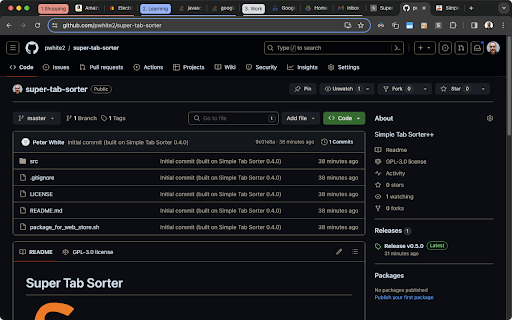
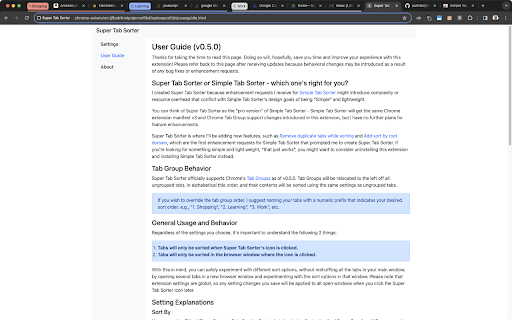


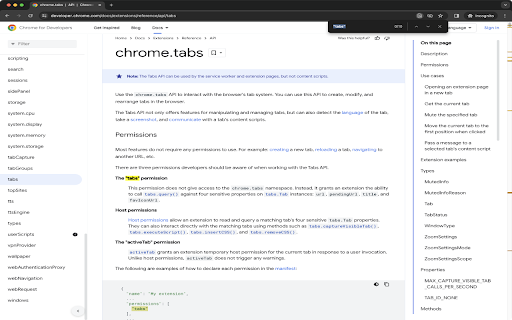
"Super Tab Sorter" is a free and open-source Google Chrome extension for people who want user-customizable tab sorting and grouping. This is a more feature-rich version of Simple Tab Sorter, designed to contain feature requests that might conflict with Simple Tab Sorter's design goals of remaining "Simple" and lightweight. 1. Respects Google Chrome's Tab Groups. 2. "Sort By URL" sorts by domain, sub-sorts by host name. 3. "Sort By Custom" is like "Sort By URL", with the ability to simply override the order of tabs manually - demonstrated in https://github.com/pwhite2/super-tab-sorter/blob/master/STS_Custom_Sort_Demo.mp4 4. Optional dedupe while sorting. 5. User configurable sort behavior for handling tabs suspended by extensions derived from The Great Suspender (please review the User Guide under Options for configuration instructions). If you encounter any issues, or have ideas for improvements, submissions at https://github.com/pwhite2/super-tab-sorter/issues and pull requests are greatly appreciated. PLEASE READ BEFORE INSTALLING AND SUBMITTING NEGATIVE REVIEWS: 1. Simple Tab Sorter v0.4.0 and later require Chrome version 88 or later. If you're using an older version of Chrome, you can manually install v0.3.3 by following the instructions at https://github.com/pwhite2/simple-tab-sorter#install-as-an-extension-from-source . 2. "Read your browsing history" permission warning during install in versions 0.4.0 and later... Chrome changed the permissions message for "tabs" permissions for manifest v3 extensions. The new release (0.4.0) isn't doing anything with the tabs API that it wasn't doing before - i.e., it doesn't have access to your browser history, just the currently open tab URLs which are required to sort by URL. You can see the requested permissions for this extension at https://github.com/pwhite2/simple-tab-sorter/blob/master/src/manifest.json. The developer documentation for the "tabs" API (https://developer.chrome.com/docs/extensions/reference/api/tabs) states: "The "tabs" permission This permission does not give access to the chrome.tabs namespace. Instead, it grants an extension the ability to call tabs.query() against four sensitive properties on tabs.Tab instances: url, pendingUrl, title, and favIconUrl." As you'll see, there is NO mention of "history" anywhere in the "chrome.tabs" developer documentation. To have access to your browsing history, an extension would have to specify "history" in the manifest.json permissions, which you can verify this doesn't, as documented at https://developer.chrome.com/docs/extensions/reference/api/history. ------------------------------------------------------------------------------------------------------------------ 2025-05-27: Version 0.5.3 released * Fix extension stuck in welcome/update message loop due to apparent browser implementation change. 2023-12-19: Version 0.5.1 released * Removed "Test" from Settings dialog and removed unused file. 2023-12-18: Version 0.5.0 released * This is the initial release, forked from my work on Simple Tab Sorter 0.4.0 (to be released shortly after this) * Added "Dedupe tabs (in current window)" option and disabled it by default * Sort By URL sorts by root domain name and sub-sorts by host name

Close Duplicate Tabs
Instantly close all duplicate tabs with one click. Hit the "Close Duplicate Tabs" button in your toolbar and watch your browser get organized!

Organize Windows and Tabs
Organize Windows and Tabs This extension adds these actions: * Merge windows and sort tabs: Merge all windows on target window, and sorts all tabs according to tab url alphabetically. * Merge windows: Merge all windows on target window. * Sort tabs: Sort tabs on target windows according to tab url alphabetically. * Close tabs from this domain: Closes all tabs with same domain. * Move tabs from this domain to this window Moves tabs from same domain with the selected tab's domain to current window. * Group tabs from this domain Groups tabs from same domain with the selected tab's domain. Default extension icon action is "Merge windows and sort tabs". This can be changed from options page. You can select "do nothing" option to disable default action. By default the extension ignores pinned tabs, popup and app windows for merge and sort actions. These can be changed from options page. This extension does not cause tab groups to be ungrouped.

Tab Manager - sort, group and more
Tab Manager - sort, group and more Introducing Tab Manager – Your Ultimate Chrome Tab Organizer! Are you overwhelmed by the chaos in your browser tabs? Say goodbye to clutter and welcome seamless organization with Tab Manager, the essential Chrome extension for a streamlined browsing experience. • Pin tab group • Create custom group • Auto collapse groups • Sort tab groups by the number of tabs, both increasing and decreasing. • Automatically group tabs by domain, supporting up to 5 levels of subdomains. 🔍 Smart Tab Sorting: Transform your workspace with ease by sorting your tab groups by title or tab count. With just a click, Tab Manager intelligently organizes your tabs, making it effortless to find exactly what you need. 🚀 Boosted Productivity: Enhance your productivity with a perfectly arranged workspace. Effortlessly switch between projects, tasks, or leisure browsing without sifting through a cluttered tab bar. 🌐 Automatic Grouping: Let Tab Manager do the heavy lifting by automatically grouping your tabs by domain, keeping related tabs together and your browsing neat. 💎 Streamlined Interface: Enjoy a smooth, user-friendly experience with a sleek interface designed for efficient tab management. No complex settings, just seamless integration into your Chrome browser. 🔒 Privacy and Security: Your privacy is our priority. Tab Manager operates locally on your browser, ensuring your sensitive data remains secure. Feedback: We value your input! Help us improve Tab Manager by sharing your thoughts and suggestions. Discover the difference with Tab Manager and transform the way you browse!

Simple Tab Sorter
"Simple Tab Sorter" is a free and open-source Google Chrome extension for people who want quick and easy user-customizable tab sorting and grouping. * Respects Google Chrome's Tab Groups. * User configurable sort behavior for handling tabs suspended by extensions forked from The Great Suspender (please review the User Guide under Options for configuration instructions). * Simple manual override of tab group sort order. Bug reports are welcome at https://github.com/pwhite2/simple-tab-sorter/issues. If you want additional functionality, please take a look at https://chromewebstore.google.com/detail/super-tab-sorter/jjhppbooocacaccnhjninhmigbfmpnkh instead. PLEASE READ BEFORE INSTALLING AND SUBMITTING NEGATIVE REVIEWS: 1. Simple Tab Sorter v0.4.0 and later require Chrome version 88 or later. If you're using an older version of Chrome, you can manually install v0.3.3 by following the instructions at https://github.com/pwhite2/simple-tab-sorter#install-as-an-extension-from-source . 2. "Read your browsing history" permission warning during install in versions 0.4.0 and later... Chrome changed the permissions message for "tabs" permissions for manifest v3 extensions. The new release (0.4.0) isn't doing anything with the tabs API that it wasn't doing before - i.e., it doesn't have access to your browser history, just the currently open tab URLs which are required to sort by URL. You can see the requested permissions for this extension at https://github.com/pwhite2/simple-tab-sorter/blob/master/src/manifest.json. The developer documentation for the "tabs" API (https://developer.chrome.com/docs/extensions/reference/api/tabs) states: "The "tabs" permission This permission does not give access to the chrome.tabs namespace. Instead, it grants an extension the ability to call tabs.query() against four sensitive properties on tabs.Tab instances: url, pendingUrl, title, and favIconUrl." As you'll see, there is NO mention of "history" anywhere in the "chrome.tabs" developer documentation. To have access to your browsing history, an extension would have to specify "history" in the manifest.json permissions, which you can verify this doesn't, as documented at https://developer.chrome.com/docs/extensions/reference/api/history. 2025-05-27: Version 0.4.2 released * Fix extension stuck in welcome/update message loop due to apparent browser implementation change. 2023-12-19: Version 0.4.0 released * Converted to Chrome manifest v3 * Added support for Chrome's Tab Groups 2023-04-25: Version 0.3.3 released * Fixed https://github.com/pwhite2/simple-tab-sorter/issues/21 - now compatible with Chrome's new suspended tabs. 2021-02-21: Version 0.3.1 released * Removed Google Analytics code * Added support for extensions derived from The Great Suspender now that it's been removed from the Chrome Web Store and derivative works have been submitted. Changes viewable at https://github.com/pwhite2/simple-tab-sorter/pull/12 2020-06-29: Version 0.3.0 released * Added "Sort pinned tabs" option and disabled it by default * Added short form to collect user feedback when extension is removed
